AI Powered Course
Certified AI SOC Analyst Training
Build L1 SOC Skills and Develop Foundations for L2 Investigations



Program Highlights
InfosecTrain’s Certified AI SOC Analyst Training is a beginner-to-job-ready program that teaches you how modern SOCs use AI to detect threats faster, reduce false positives, and automate investigation workflows. Across 48 hours of live instructor-led training, you’ll work with real tools including Splunk, Wazuh, and open-source AI models, analyzing logs, triaging alerts, hunting phishing and malware, and building AI-assisted incident response playbooks. The program culminates in a hands-on capstone project and dedicated SOC interview preparation, giving you everything you need to land and perform in an AI-enabled SOC analyst role.
 48-Hour LIVE Instructor-led Training by SOC Experts
  Detect and Triage Real Alerts Using Splunk and Wazuh
  Hunt Phishing, Malware, and Insider Threats in Practice
  Perform Memory Forensics
  Automate IOC Enrichment and Incident Response with AI
  Build a Capstone SOC Investigation End-to-End
  SOC Interview Prep with Mock Scenario-based Questions
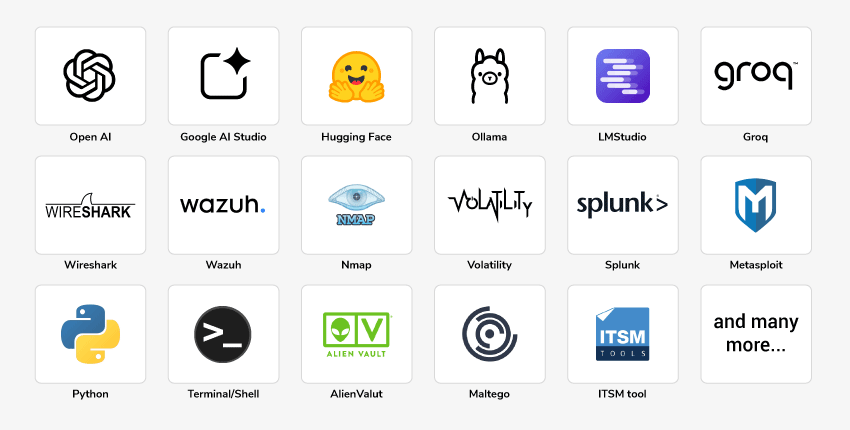
  20+ Real-world SOC Tools and AI Workflows
  Mentoring, Post-training Support, and Recorded Sessions
Training Schedule
- upcoming classes
- corporate training
- 1 on 1 training
| Start - End Date | Training Mode | Batch Type | Start - End Time | Batch Status | |
|---|---|---|---|---|---|
| 29 Nov - 23 Jan | Online | Weekend | 19:00 - 23:00 IST | BATCH OPEN | |
| 23 Jan - 07 Mar | Online | Weekend | 09:00 - 13:00 IST | BATCH OPEN | |
| 20 Mar - 02 May | Online | Weekend | 19:00 - 23:00 IST | BATCH OPEN |
Why Choose Our Corporate Training Solution
- Upskill your team on the latest tech
- Highly customized solutions
- Free Training Needs Analysis
- Skill-specific training delivery
- Secure your organizations inside-out
Why Choose 1-on-1 Training
- Get personalized attention
- Customized content
- Learn at your dedicated hour
- Instant clarification of doubt
- Guaranteed to run


About Course
The Certified AI SOC Analyst Training from InfosecTrain is built for cybersecurity beginners and early-career professionals who want to enter SOC roles equipped with AI-driven detection and investigation skills. Unlike traditional SOC courses that teach tools in isolation, this program integrates AI at every stage, from log summarization and alert triage to phishing detection, malware analysis, memory forensics, and incident response reporting. Every concept is reinforced through guided labs using real datasets, with AI models working alongside industry-standard tools like Splunk, Wazuh, and Wireshark. The program concludes with a capstone project that simulates a real SOC investigation and a dedicated interview-preparation module, ensuring participants are not just trained but genuinely job-ready.
Course Curriculum
- Module 1: Introduction to SOC & Lab Environment Setup
- What is a SOC?
- Role of the SOC in cybersecurity defence
- SOC structures:
- Centralized SOC
- Distributed SOC
- Virtual SOC
- SOC analyst roles
- SOC analyst roles and responsibilities
- Core L1 SOC analyst activities:
- Monitoring
- Triage
- Escalation
- Overview of L2 and L3 SOC analyst responsibilities
- Key SOC functions:
- Log monitoring
- Alert triage
- Threat detection
- Incident response
- SOC maturity model:
- Reactive
- Proactive
- Predictive
- Lab 1: Explore a Sample SOC Dashboard
- Explore a pre-built sample SOC dashboard using a demonstration environment or screenshots.
- Map the journey of an alert from:
- Raw log
- Log collection
- SIEM ingestion
- Alert generation
- Analyst triage
- Escalation or closure
Labs
- Document and save the lab network diagram containing:
- IP addresses
- System roles
- System details
- Network connections
- Log sources
- Security tools
- Networking basics for SOC analysts
- OSI model
- TCP/IP
- Ports and protocols
- Introduction to Cybersecurity & Information Security
- Elements of Information Security
- Understanding Hackers
- Types of Hackers
- Common attack types:
- DDoS
- Brute force
- Phishing
- Ransomware
- Brief case studies of well-known attacks
- Threat Intelligence
- Types of threat intelligence
- Indicators of Compromise
- Introduction to MITRE ATT&CK for SOC analysts
- MITRE ATT&CK navigation and lookup
- AI in threat intelligence:
- Summarizing threat feeds
- Correlating Indicators of Compromise
- Introducing Wireshark
Labs
- Simulate benign network traffic between the lab systems
- Simulate controlled brute-force activity
- Capture the traffic using Wireshark
- Manually identify the anomaly pattern
- Use AI to summarize a public threat-intelligence or CVE feed
- Collecting Threat Intelligence from multiple platforms/tools
- Convert the technical information into a plain-language brief
- Generate and save a labelled PCAP of the simulated brute-force attempt
- Introduction to Artificial Intelligence in Cybersecurity
- Role of AI in Modern Security Operations Centres
- Understanding the Core AI Technologies:
- Artificial Intelligence
- Machine Learning
- Deep Learning
- Natural Language Processing
- Large Language Models
- Relationship and Differences Between AI, ML, DL, NLP and LLMs
- Predictive AI and Its Role in Threat Detection
- Generative AI and Its Role in SOC Operations
- Learning Prompt Injections & its types
- Why AI is used in SOC operations:
- Reducing false positives
- Handling large log volumes
- Speeding up response
- AI use cases in SOC:
- Log summarization
- Phishing detection
- Anomaly detection
- Report generation
- AI limitations SOC analysts must understand:
- Hallucination
- Bias
- Explainability
- Data privacy
- Free and open AI tools:
- ChatGPT free tier
- Claude
- Ollama
- Hugging Face
- Windows Events Analysis
- How to investigate it manually
- How to correlate it with other evidence
Labs
- Run a local LLM using Ollama
- Use an appropriate model such as Phi-3 Mini or Mistral
- Provide endpoint security or authentication logs
- Use the model to summarize the events
- Use a cloud AI assistant such as ChatGPT or Claude to batch-classify ten sample alerts as:
- True positive
- False positive
- The AI assistant must also provide reasoning for each classification.
- Build a personal AI Prompt Library containing four reusable prompts:
- Log summarization
- Alert triage and classification
- IOC and CVE explanation
- Report drafting
- Save the prompts as a text file.
- Vulnerability basics and Pentesting Foundation
- CVE: Common Vulnerabilities and Exposures
- CVSS: Common Vulnerability Scoring System
- Exploitability
- Vulnerability-management lifecycle:
- Scan
- Assess
- Prioritize
- Remediate
- Report
- Tools:
- OpenVAS
- Nmap
- Nmap Scripting Engine
- AI for CVE explanation
- Converting technical CVEs into analyst-friendly notes
- AI for vulnerability prioritization
- Combining:
- Severity
- Exploitability
- Asset criticality
- AI-assisted vulnerability-report drafting
- Reports for management and non-technical audiences
Labs
- Run an OpenVAS or Nmap with NSE scan against the lab endpoint
- Export the raw scan results
- Select the top five findings
- Provide the findings to an AI assistant
- Generate a plain-English remediation summary
- Save:
- Raw scan output
- AI-generated vulnerability summary
- Module 5A: Splunk Free
- Splunk architecture basics:
- Forwarders
- Indexers
- Search Heads
- Splunk limitations and licensing awareness
- Daily ingestion limits
- SPL fundamentals:
- Search
- Stats
- Timechart
- Ingesting endpoint security and authentication logs
- AI-assisted SPL query generation
- AI-assisted alert summarization
- Splunk architecture basics:
Labs
- Install or access Splunk
- Configure Splunk and collect logs
- Ingest authentication and security logs from the lab endpoint
- Search for successful and failed login activity
- Use AI to generate an SPL query for detecting failed-login spikes
- Run the query
- Review the matching activity
- Use AI to summarize the resulting alert
- Wazuh architecture:
- Manager
- Agent
- Built-in capabilities:
- File Integrity Monitoring
- Vulnerability detection
- Compliance dashboards
- Deploying the Wazuh agent on the lab endpoint
- Working with default detection rules
- Writing custom rule
- Using AI to explain a noisy or false-positive-prone rule
- Using AI to tune a detection rule
Labs
- Deploy or access the Wazuh manager
- Deploy the Wazuh agent on the selected endpoint
- Confirm log and alert flow into the Wazuh dashboard
- Write a custom Wazuh rule
- Use AI to explain why a default rule may be over-firing
- Use AI to recommend how the rule can be tuned
- Phishing types:
- Email phishing
- Smishing
- Vishing
- Spear phishing
- Whaling
- Analyzing Email Headers
- SPF
- DKIM
- DMARC
- MFA abuse
- Brief real-world case studies
- Malware basics:
- Malware types
- Malware-family naming conventions
- Behavioural detection
- Signature-based detection
- Insider threats:
- Privilege misuse
- Data-exfiltration patterns
- AI in detection:
- Phishing-email classification
- Malware-family recognition using static information or metadata
Labs
- Analyse a batch of simulated phishing and legitimate emails
- Review email headers and content
- Using PEStudio to analyse malware
- Use AI to classify the emails
- Using malware samples
- Incident-response lifecycle:
- Preparation
- Detection
- Containment
- Eradication
- Recovery
- Lessons Learned
- AI-guided incident-response playbook templates
- Beginner-to-intermediate use of existing templates
- Automating IOC enrichment
- IP reputation lookups
- Domain reputation lookups
- AI-assisted Root Cause Analysis report writing
- Memory Analysis
- Understanding Process Hierarchy
- Introduction to Digital Forensics
- Role of Digital Forensics in incident investigation
- Difference between Incident Response and Digital Forensics
- Digital forensics investigation process:
- Identification
- Preservation
- Collection
- Examination
- Analysis
- Reporting
- Types of digital evidence:
- System logs
- Authentication logs
- Network captures
- Files and file metadata
- Browser artifacts
- Process information
- Registry and configuration artifacts
- Email evidence
- Volatile and non-volatile evidence
- Order of volatility
- Evidence preservation
- Chain of custody
- Evidence integrity and hash verification
- Creating an incident timeline from multiple evidence sources
- Introduction to forensic tools:
- Autopsy
- FTK Imager
- Volatility
- Wireshark
- AI-assisted digital-forensics activities:
- Summarizing forensic artifacts
- Correlating evidence from multiple sources
- Identifying suspicious patterns
- Limitations of AI in forensic investigations
Labs
- Lab 1: AI-Assisted Incident-Response Playbook
- Use AI to draft a complete incident-response playbook for the Incident scenario.
- The scenario covers:
- Brute-force activity
- Phishing activity
- Detection
- Response
- Lab 2: Volatility Framework: Memory Analysis
- Learning how to manually analyze memory for malicious activity
- How to extract memory
- RAM analysis
- Learning how to manually analyze memory for malicious activity
- Role-Based Interview Questions
- Scenario-Based Mock Interviews
Capstone Project
- A user account generates several failed login attempts within a short period.
- After the failed attempts, a successful login is recorded from the same source.
- Identify:
- Alert name
- Alert time
- Alert severity
- Affected user
- Affected endpoint
- Destination system
- Number of failed logins
- Related file or process information
- Check:
- Number of failed login attempts
- Time interval between attempts
- Source IP address
- Target username
- Whether a successful login occurred
- Whether the source is known or unknown
- Classify the alert as:
- True positive
- False positive
- Benign positive
- Needs further investigation
Target Audience
- Aspiring SOC Analysts (L1)
- Cybersecurity beginners entering SOC roles and aiming to use AI tools effectively
- Junior Security Analysts working with logs and alerts
- IT professionals transitioning into SOC operations
- Fresh graduates aiming for entry-level SOC positions
Pre-requisites
- Basic understanding of networking & cybersecurity fundamentals
- Familiarity with Windows/Linux basics
- Suitable for beginners with no SOC or AI background
Exam Details
| Certification Body | InfosecTrain |
| Exam Format | Multiple-choice Questions and Practicals |
| Number of Questions | 50 Questions |
| Exam Duration | 6 Hours |
| Exam Language | English |
| Passing Score | 80% |
| Testing Mode | Online |
Disclaimer: This is an InfosecTrain Certified Program, and all examinations and certifications are conducted and awarded solely by InfosecTrain.
Course Objectives
You will be able to:
- Operate Core SOC Functions Including Log Monitoring, Alert Triage, and Incident Escalation
- Analyze Network Traffic and Threat Intelligence Using Wireshark and AI-Assisted Correlation
- Perform AI-Powered Vulnerability Assessment, Prioritization, and Plain-English Report Writing
- Detect and Investigate Threats Across Splunk, Wazuh Using AI-Generated Queries
- Classify Phishing Emails, Analyze Malware Samples, and Detect Insider Threat Patterns
- Execute Incident Response Playbooks and Conduct AI-Assisted Root Cause Analysis
- Perform Memory Forensics and Digital Evidence Collection Using Volatility and Autopsy
- Automate IOC Enrichment, Alert Classification, and Investigation Reporting with AI Models
- Build and Present a Complete SOC Capstone Investigation from Detection to Closure
- Prepare for L1 SOC Analyst Interviews with Mock Technical and Scenario-based Questions


Vision

Goal

Skill-Building

Mentoring

Direction

Support

Success
Benefits of SOC Analyst Training

Learn AI-enhanced SOC workflows for modern detection needs

Gain hands-on experience with SIEM, AI models and real datasets

Improve threat detection accuracy with AI automation

Build confidence for SOC analyst (L1/L2) roles

Reduce alert fatigue through AI-driven triage and intelligent automation
Average Salary
Average Salary
Hiring Companies






"Source: Indeed, Glassdoor"
Confused about the right course for yourself?


This SOC Analyst training is outstanding. The instructor’s delivery is excellent, and as a beginner, I found it incredibly valuable for learning cybersecurity fundamentals.

The SOC Analyst Hands-on Training covered all the essential fundamentals and tools I was looking for. The practical, hands-on examples provided great insight into the functionality of core SOC tools. I also appreciated the recorded sessions and shared documents.

This course is a great starting point for freshers looking to build a career as a SOC Analyst. The content starts from the basics and gradually builds up, making it accessible and engaging. The expert’s guidance was invaluable in helping us grasp complex concepts effectively.

I have learned the most about cyber security (SOC Analyst) from this organization. Our trainer, in particular, has given me the greatest advice and knowledge. Best Regards to the entire InfosecTrain team.

Impressed with the trainer’s details in explanation and his knowledge. He kept the class engaging, and I never felt bored or at a slow pace. He also gave enough time to complete the tasks and check back on the doubts. Thanks for this training.

The trainer has great knowledge about the topic, and he knows what he is teaching us. Kudos to him. Thank you so much InfosecTrain.

Frequently Asked Questions
How is this Certified AI SOC Analyst Training different from a traditional SOC Analyst course?
Traditional SOC training usually focuses on manual log analysis, SIEM usage, and basic alert triage. This course goes further by combining core SOC skills with AI-assisted workflows for log summarization, alert classification, threat intelligence analysis, vulnerability prioritization, phishing detection, IOC enrichment, incident response, and report writing.
Will this course teach manual SOC investigation or only AI-assisted workflows?
The course teaches both. Learners first understand how to investigate logs, alerts, traffic, vulnerabilities, phishing emails, malware indicators, and forensic evidence manually. AI is then used to speed up analysis, summarize evidence, generate queries, and draft reports, while the final validation remains with the analyst.
Can beginners become job-ready for L1 SOC roles through this training?
Yes. The course is designed for beginners and early-career professionals who want to enter SOC roles. It covers SOC fundamentals, alert triage, SIEM and EDR tools, threat detection, incident response, and interview preparation through hands-on labs and a capstone investigation.
Will I learn how to validate AI-generated investigation results?
Yes. The course teaches learners to use AI as an investigation assistant, not as a replacement for analyst judgment. Participants learn how to verify AI-generated summaries, classifications, queries, and reports by checking logs, evidence, alerts, and investigation context manually.
What practical SOC outputs will I create during the course?
Learners create practical SOC outputs such as an investigation workspace, threat intelligence briefs, AI prompt libraries, vulnerability summaries, SIEM queries, Wazuh detection rules, phishing analysis notes, incident response playbooks, root cause analysis reports, and a final capstone investigation report.
Will I be able to explain my lab and capstone work during interviews?
Yes. The course includes a dedicated SOC interview preparation module where learners practice explaining their tools, investigation steps, findings, escalation decisions, and capstone project work. This helps them present their practical experience clearly during L1 SOC analyst interviews.
Does this course prepare me for real SOC shift responsibilities?
Yes. The course prepares learners for real SOC shift activities such as monitoring alerts, reviewing logs, classifying incidents, identifying false positives, escalating suspicious activity, documenting findings, creating reports, and communicating investigation outcomes.
What career roles can I pursue after completing this course?
AI-enabled SOC Analyst, Threat Detection Engineer, IR Analyst, AI Cybersecurity Analyst.
How do I enroll in the AI SOC Analyst certification training?
To enroll in the AI SOC Analyst certification training:
- Fill out the registration form on this page.
- You will receive a confirmation email with further instructions.
- Book your free demo with the Expert.
Will I learn how to decide whether to close, escalate, or investigate an alert further?
Yes. Learners practice alert triage and decision-making through SOC scenarios. They learn how to review evidence, assess severity, identify false positives, use AI-assisted analysis, and decide whether an alert should be closed, escalated, contained, or investigated further.
Do I need paid AI tools or subscriptions for the training?
No. The course introduces free and accessible AI tools, including free-tier AI assistants and local LLM options such as Ollama. Learners are also guided on how AI can be used safely and practically in SOC workflows without depending only on paid tools.
How does the capstone project help in SOC interview preparation?
The capstone project gives learners a complete investigation story to discuss in interviews. They can explain how they detected an alert, analyzed logs, used SIEM and EDR tools, applied AI-assisted workflows, made triage decisions, documented findings, and prepared an incident report.