Implementing Security Awareness Practices
In today’s cyber landscape, implementing robust security awareness practices is not just an option but essential. Stanford University researchers and a leading cybersecurity organization discovered that approximately 88% of data breaches involve human factors, often due to a lack of security awareness. The CompTIA Security+ course addresses essential cybersecurity topics, including the implementation of security awareness practices. These practices involve educating and training employees to recognize and respond to potential security threats. This proactive approach is critical for creating a robust security posture within any organization.
CompTIA Security+ Domain 5.5: Implement Security Awareness Practices
People are often the weakest link in cybersecurity. By implementing robust security awareness programs, organizations empower employees to become the first line of defense against threats. This fosters a culture where security is an integral part of daily work, not just a technical issue.
Phishing Campaigns: Recognition and Response
- Recognizing a Phishing Attempt: Phishing remains a significant threat due to its evolving sophistication. Employees must be educated to identify signs of phishing attempts.
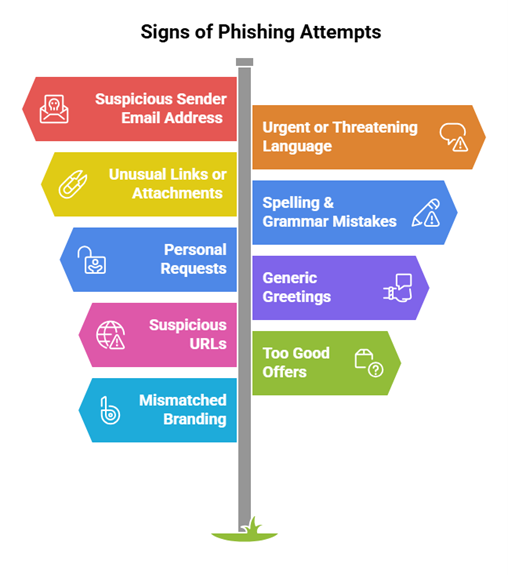
- Responding to Reported Suspicious Messages: It is crucial that employees know how to respond to potential phishing attempts:
- Not responding to or clicking on links within suspicious emails.
- Report the suspicious email to the IT or security team through established channels.
- Verify the sender by contacting them through official channels if necessary.
Anomalous Behavior Recognition
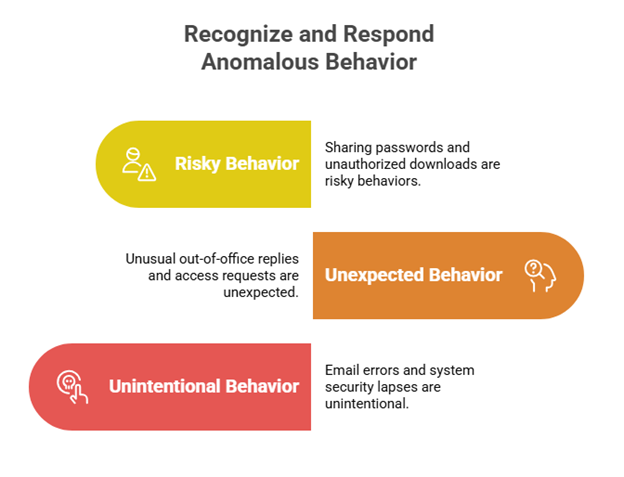
Employees should be trained to recognize anomalous behavior that could indicate security threats. These behaviors could include:
- Malicious Behavior: Malicious behaviors are intentional actions carried out by individuals with the intention of causing harm or unlawfully accessing sensitive information. These behaviors can be indicators of an insider threat or an external actor who has gained access to internal systems.
Examples: Data exfiltration, privilege escalation, or downloading unauthorized software.
- Unexpected Behavior: Unexpected behaviors are deviations from the norm that may suggest something unusual or suspicious. These can often be indicators of a compromised account or insider threats.
Examples: Unusual out-of-office messages or unexpected requests for access.
- Unintentional Behavior: Unintentional behaviors are accidental actions that can inadvertently lead to security breaches. These are often the result of negligence or lack of awareness.
- Examples: Misdirected emails or unattended systems.
Tips for Recognizing Anomalous Behavior
- Awareness Campaigns: Regularly update employees on security threats and protocols.
- Simulated Exercises: Conduct drills for recognizing and responding to phishing and other threats.
- Reporting Channels: Ensure employees can report suspicious behavior or incidents without fear.
- Regular Reviews: Periodically review security policies and adherence.
User Guidance and Training
Training should cover a broad spectrum of security practices and policies:
- Policy/Handbooks: Distribute and regularly update comprehensive policy handbooks that outline expected digital behavior, security protocols, and consequences for non-compliance.
- Situational Awareness: Train employees on the importance of situational awareness, such as recognizing social engineering attempts and understanding the security implications of everyday actions.
- Insider Threat: Educate employees on recognizing signs of insider threats, which could include unusual access patterns or copying of sensitive data.
- Password Management: Educate employees on creating strong, unique passwords and emphasize the importance of avoiding password reuse across different services.
- Removable Media and Cables: Warn against the threats of unauthorized removable media, which can introduce malware into the network. Provide guidelines on the secure use of such media.
- Social Engineering: Conduct regular training sessions on social engineering tactics, helping employees to recognize and respond to them effectively.
- Operational Security in Hybrid/Remote Work Environments: As more organizations adopt hybrid and remote work models, training should also focus on securing home networks, the use of VPNs, and the importance of physical security at home.
Reporting and Monitoring
- Initial and Recurring Incidents: Establish a straightforward process for reporting initial and subsequent suspicious activities. Recurring incident reports can indicate more significant systemic issues that need to be addressed.
- Monitoring: Ongoing monitoring of network and user activity helps identify and respond to threats promptly. Utilize automated monitoring tools to identify anomalies and ensure that the security team is notified in real-time. Regularly review and update incident response protocols to ensure they remain effective as threats evolve and adapt.
Development and Execution of Security Awareness Practices
Developing and executing effective security awareness practices is essential for any organization looking to enhance its cybersecurity posture. This involves creating comprehensive training sessions, regularly updating employees on emerging threats, and encouraging vigilance. These practices ensure that all employees are equipped to uncover and address emerging security risks or threats, significantly minimizing the likelihood of data breaches.
CompTIA Security+ Training with InfosecTrain
InfosecTrain‘s CompTIA Security+ training and certification course offers comprehensive coverage of security awareness practices. Through this course, individuals will gain an in-depth understanding of how to detect and respond to various security threats, enhancing their ability to protect sensitive information.

TRAINING CALENDAR of Upcoming Batches For Security+ Training
| Start Date | End Date | Start - End Time | Batch Type | Training Mode | Batch Status | |
|---|---|---|---|---|---|---|
| 10-Oct-2026 | 29-Nov-2026 | 09:00 - 13:00 IST | Weekend | Online | [ Close ] | |
| 28-Nov-2026 | 03-Jan-2027 | 19:00 - 23:00 IST | Weekend | Online | [ Open ] | |
| 09-Jan-2027 | 14-Feb-2027 | 09:00 - 13:00 IST | Weekend | Online | [ Open ] | |
| 13-Feb-2027 | 21-Mar-2027 | 19:00 - 23:00 IST | Weekend | Online | [ Open ] | |
| 13-Mar-2027 | 18-Apr-2027 | 09:00 - 13:00 IST | Weekend | Online | [ Open ] |