What are the 5 Pillars of Zero Trust Architecture?
Quick Insights:
Zero Trust security rests on five core pillars: Identity, Devices, Networks, Applications, and Data, each enforcing “never trust, always verify.” In practice, this means no implicit trust: every user, device, network request, and piece of data is continuously authenticated and authorized. Together, the five pillars form a holistic framework that shrinks attack surfaces and limits breach impact, aligning security tightly with business needs.
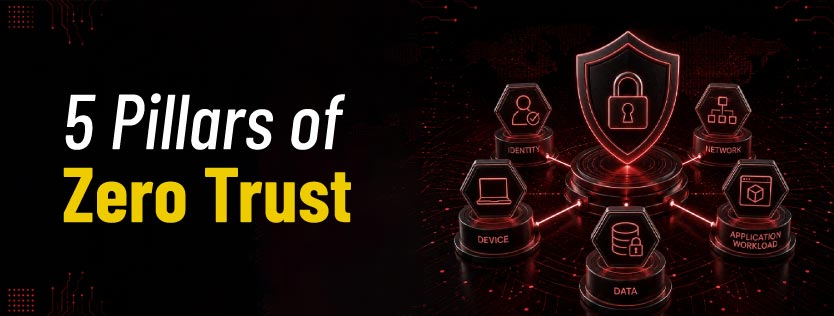
Zero Trust is a high-security model supported by five pillars: Identity, Devices, Networks, Applications, and Data. Gone is the old “castle-and-moat” model; every access request is treated as untrusted until proven safe. As cyber threats and remote work grow, the global Zero Trust market is surging (to over $33.9B by 2025). In fact, 22% of breaches now begin with stolen credentials, making identity verification more critical than ever. In this new paradigm, CISOs are asking not if but how fast to deploy Zero Trust. Let’s dive into the 5 pillars of Zero Trust and see how each one strengthens your security.
5 Pillars of the Zero Trust Architecture
Below are the 5 pillars of the Zero Trust architecture.
1. Pillar 1: Identity and Access Management (IAM)
The first pillar is Identity Verification. Every user and entity must prove their identity, typically via strong authentication such as Multi-Factor Authentication (MFA) and Single Sign-On (SSO). Zero Trust extends far beyond a simple username/password; it demands continuous identity checks and risk assessment. For example, after login, Zero Trust systems continually evaluate a user’s behavior and context (location, device health, etc.). Access is granted only if the identity and context meet policy requirements. IAM also enforces least-privilege access, meaning users get only the permissions they absolutely need. This limits damage if an account is compromised. In practice, tools like MFA, identity governance, and privileged-access management are key controls here. In short, the Identity pillar ensures “who is asking?” is legit before trusting any request.
2. Pillar 2: Device Trust (Endpoints)
The Device Trust pillar holds that every device must prove its security before connecting. Zero Trust does not just trust your company-issued computer; it continuously checks the device’s “health.” This includes verifying that patches are up to date, that the OS is not jailbroken/rooted, and that security software is running. Solutions like Mobile Device Management (MDM/UEM) and Endpoint Detection & Response (EDR) are common controls. For example, if a laptop attempts to access a database, Zero Trust will assess its posture (antivirus status, encryption enabled, etc.) and may quarantine it if it fails compliance checks. By enforcing device inventory and compliance checks, this pillar prevents compromised or rogue devices from being implicitly “trusted insiders”. Essentially, “Is this device known and healthy?” is the question this pillar answers.
3. Pillar 3: Network Segmentation
The Network/Environment pillar breaks traditional networks into tightly controlled segments. Instead of one big network where “trusted users” roam freely, Zero Trust uses microsegmentation and strict network controls. Each network segment is isolated; for example, HR systems are on a different microsegment than R&D systems. This way, even if an attacker breaches one zone, they can not easily move sideways. Zero Trust networks use software-defined perimeters and encryption to confine traffic flow. In practice, this means applying firewall rules, VLANs, or Zero Trust Network Access (ZTNA) gateways that vet every packet and connection. Security policies are applied per workflow, not just per subnet. This pillar also covers cloud infrastructure; in hybrid or multi-cloud setups, network controls ensure that communication between clouds and on-prem systems follows Zero Trust rules. In a phrase, the Network pillar asks, “Is this traffic supposed to be here, and is it protected?” By locking down the network surface, it dramatically reduces an attacker’s ability to pivot.
4. Pillar 4: Application and Workload Security
Under Applications and Workloads, Zero Trust treats every application and service like a potential risk. Access to applications (including cloud and on-prem software) is tightly controlled by identity and device posture checks. This pillar encompasses protecting software and services through secure development, runtime protections, and API security. For example, an API might only accept requests signed by known clients, and a database would only accept connections from verified services. Zero Trust also extends to cloud workloads and containers, isolating them so one compromised app can not infect others. Security policies ensure each user or device can only interact with authorized applications. In essence, this pillar ensures the question “Is this app safe and this session authorized?” is answered before any interaction. By embedding security into application deployment (e.g., using Kubernetes Zero Trust patterns), organizations shore up the weakest link in modern IT.
5. Pillar 5: Data Protection
The final pillar is Data Protection. Even with identity, device, and network controls, data itself must be guarded at its core. Zero Trust means encrypting and classifying data everywhere, in transit, at rest, and in use. Access to sensitive data is granted only on a strict need-to-know basis. For example, files may be automatically encrypted and only decrypted on a compliant device for a verified user. Organizations apply Data Loss Prevention (DLP), rights management, and granular access policies tied to data sensitivity. Comprehensive logging and analytics watch for unusual data access patterns. In effect, this pillar ensures “Is this data request allowed and is the data itself secured?” before any file moves. Encrypting data end-to-end (E2EE) is critical so that even if attackers intercept traffic or breach a server, the data they capture remains unreadable. This final pillar closes the loop: never trust the data, always verify its handling.
Conclusion
Zero Trust is no longer just a security framework; it is a practical way to build resilience in a world where users, devices, applications, networks, and data are constantly exposed to risk. By strengthening these five pillars, organizations can reduce blind trust, control access more intelligently, and limit the impact of breaches before they spread.
For professionals looking to understand and apply this model effectively, InfosecTrain’s Certificate of Competence in Zero Trust (CCZT) Training provides a structured path to learn Zero Trust principles, architecture, implementation strategies, and real-world security use cases. Whether you are a security professional, network engineer, cloud practitioner, or governance leader, this training can help you move from Zero Trust awareness to Zero Trust readiness. Ready to build stronger, verification-first security? Enroll in InfosecTrain’s CCZT Training and start your Zero Trust journey today.

Frequently Asked Questions
What is a Zero Trust security model?
Zero Trust is a cybersecurity model that eliminates implicit trust. Every access request (user, device, or application) must be strictly authenticated, authorized, and encrypted based on identity and context, with least-privilege access enforced.
Why is identity verification crucial in Zero Trust?
Identity is the foundation of Zero Trust. Because most attacks start with stolen credentials, verifying who is requesting access is paramount. By requiring strong authentication (like MFA) and dynamic risk assessments, organizations ensure only genuine users (or services) get in.
What is network segmentation in Zero Trust?
Network segmentation (or microsegmentation) breaks the IT environment into many isolated zones. Instead of trusting the entire network, Zero Trust only allows explicitly permitted communications. This limits lateral movement and confines threats, so a breach in one area (say, HR systems) will not open the door to your finance databases.
How does Zero Trust protect organizational data?
Zero Trust treats data as its own “pillar” of security. Sensitive data is encrypted and access-controlled at all times. For example, a medical file is encrypted in storage, decrypted only in memory on a verified device by an authenticated user. Policies based on data classification ensure that, even if an attacker slips past identity or network defenses, the data remains protected by encryption and right management.
How do I start implementing Zero Trust?
Start small and strategic. First, inventory your assets and sensitive data (the “protect surface”). Then pick one pillar, usually Identity, where you can make quick gains (e.g., enforce MFA everywhere). Gradually add controls in other pillars: ensure device hygiene with MDM/EDR, segment your network for critical systems, and encrypt your most sensitive data. Align efforts with business risks and use incremental pilots (for example, replacing a VPN with Zero Trust Network Access) to build momentum. With each pillar fortified, your security posture becomes exponentially stronger, and the traditional “trust fall” into your network simply will not work for attackers anymore.