What Is a Computer Virus? Complete Guide
Quick Insights:
A computer virus is a type of malware that attaches itself to files, programs, documents, or system areas and replicates when the infected host is executed. Viruses can spread through malicious attachments, untrusted downloads, removable devices, and infected files. Depending on their design, they may corrupt data, slow down systems, disable security tools, or install additional malware. Regular updates, trusted downloads, antivirus protection, backups, and user awareness can help reduce the risk of infection.
Malicious software, often referred to as malware, poses a major risk to computers and networks around the globe. Viruses are among the most common and notorious threats to our cyber world. While viruses might seem like a complex technical topic, it’s important for everyone to have a basic understanding of what they are and how they work. After all, being aware of the enemy is the first step in defending against it, right?
Understanding how viruses operate, spread, and avoid detection can help individuals and organizations identify infections and implement suitable security measures. These concepts are covered within Module 07: Malware Threats of the Certified Ethical Hacker (CEH) v13 program, along with Trojans, worms, ransomware, fileless malware, malware analysis, virus detection methods, and countermeasures.
Concept of Virus
A computer virus is a type of malicious program that replicates by inserting its code into another program, file, document, or system area. Once the infected host is executed, the virus can become active, replicate further, and perform the actions defined by its creator.
Unlike a computer worm, which can operate and spread independently, a virus generally requires a host program or file. It may also depend on user activity, such as opening an infected attachment, enabling a malicious macro, or running compromised software.
The term “virus” is derived from the biological analogy of a virus that infects living organisms. Just like their biological counterparts, computer viruses are parasitic in nature, relying on host files or programs to propagate and carry out their malicious activities. Viruses typically follow a specific life cycle:
- Design: This is where the virus is conceived and created by its author using programming languages or specialized virus construction toolkits. It’s like an evil scientist cooking up a nefarious plan in their secret lab.
- Replication: During this stage, the virus quietly makes copies of itself and spreads its code within the infected system, lying low and multiplying before making its presence known. Think of it as a silent invasion, with the virus replicating and fortifying its position.
- Launch: This is when the real trouble begins. The virus becomes active and starts executing its malicious payload, often triggered by an unsuspecting user running an infected program or file. It’s like the evil virus finally revealing itself and unleashing its sinister plan.
- Detection: At this point, security systems and antivirus programs raise the alarm, identifying the virus as a threat and marking it as harmful to the system. It’s like the good guys finally catching on to the virus’s tricks and sounding the alarm bells.
- Incorporation: Once the virus is detected, antivirus developers swing into action, analyzing the threat and integrating new defenses into their software to protect against it. This is like the security team developing a specialized antidote or countermeasure to neutralize the virus.
- Execution of the Damage Routine: In this final stage, users update their antivirus software with the latest definitions, allowing it to detect and remove the virus from their systems, effectively stopping its harmful effects in its tracks. It’s like the good guys deploying their antidote and squashing the evil virus once and for all (at least until the next one comes along).
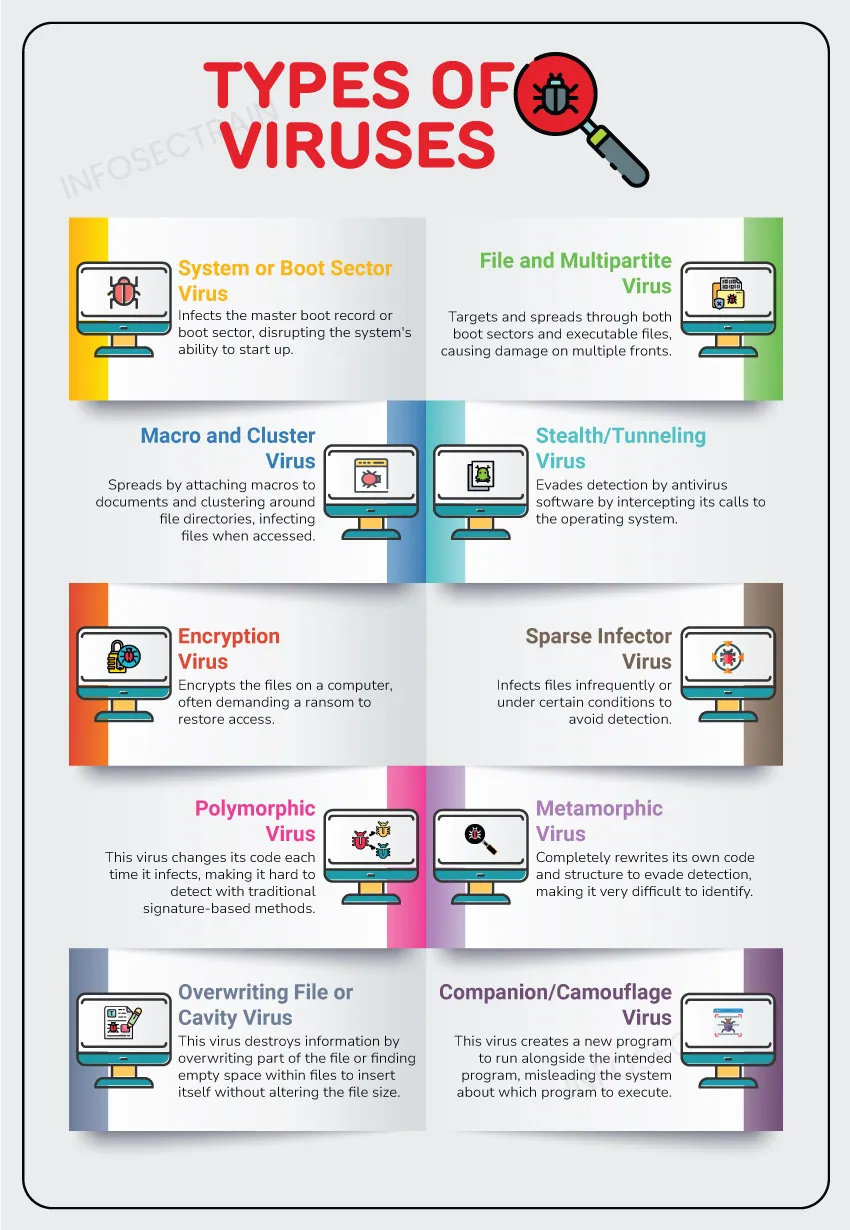
Types of Viruses
Get insights from this article: 12 Computer Virus Types, Their Behavior, and Risks
Working Process of Virus
Viruses have two phases to execute an attack: The infection phase and the attack phase. These phases describe how the virus behaves on a target system, while the six-stage lifecycle describes its broader journey from creation to elimination.
Infection Phase
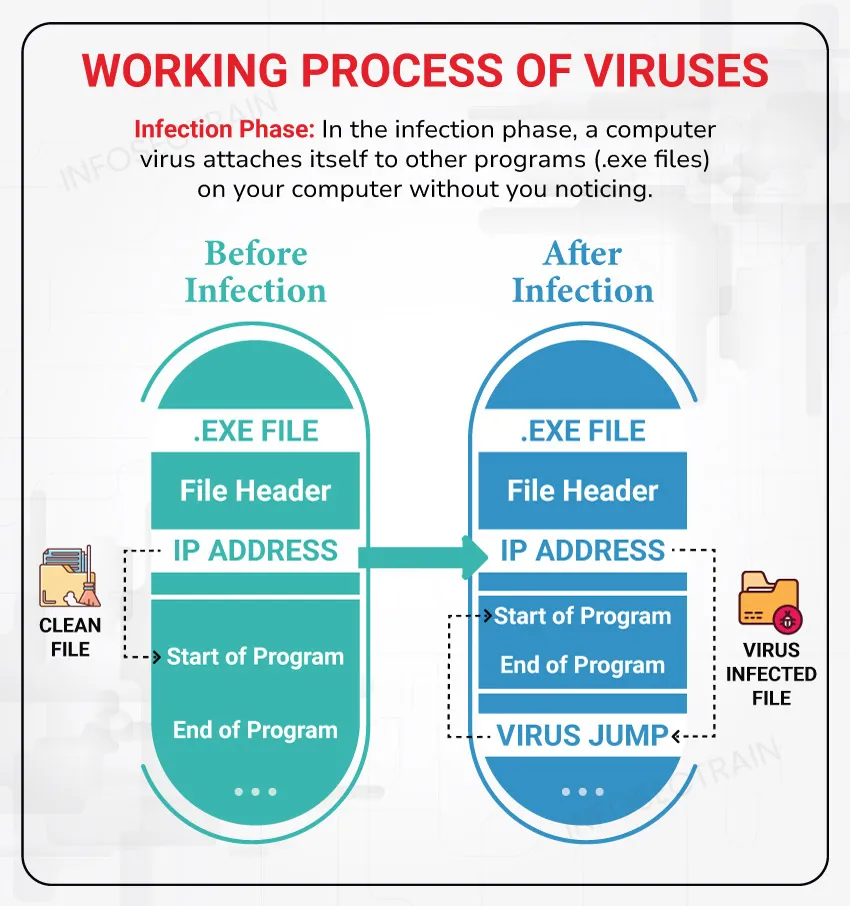
In the infection phase, a computer virus attaches itself to other programs on your computer without you noticing. It’s like a sneaky passenger hitching a ride. The most important factors in the infection phase are:
- Method of infection
- Method of spreading
Once a program is infected by a virus, it can infect other programs on the computer. This cycle continues until the user notices something is wrong with the system.
Sequence of Infection:
A typical file-infecting virus may follow this sequence:
1. The virus enters the system through an infected file, application, document, or storage device.
2. The infected host is opened or executed.
3. The virus code is loaded into memory or another system area.
4. The virus searches for suitable files, applications, or locations to infect.
5. It inserts or copies its code into those targets.
6. The newly infected files may spread the virus when they are shared or executed elsewhere.
Most Common Methods to Spread Virus
- Infected Files: A virus can hide in different types of files. When someone opens these files, their computer gets infected.
- File-Sharing Services: Viruses can spread through online file-sharing platforms. If someone downloads and opens an infected file from these services, their computer could get infected.
- Hard Drives and Storage Media: If you use an infected DVD, USB drive, or external hard disk on your computer, the virus from these devices can spread to your system.
- Malicious Attachments and Downloads: Viruses can be hidden in email attachments or in apps downloaded from untrustworthy sources. Opening these attachments or installing these apps can infect your computer.
- Compromised Websites: Some websites may host malicious downloads or exploit software vulnerabilities to deliver malware.
Attack Phase
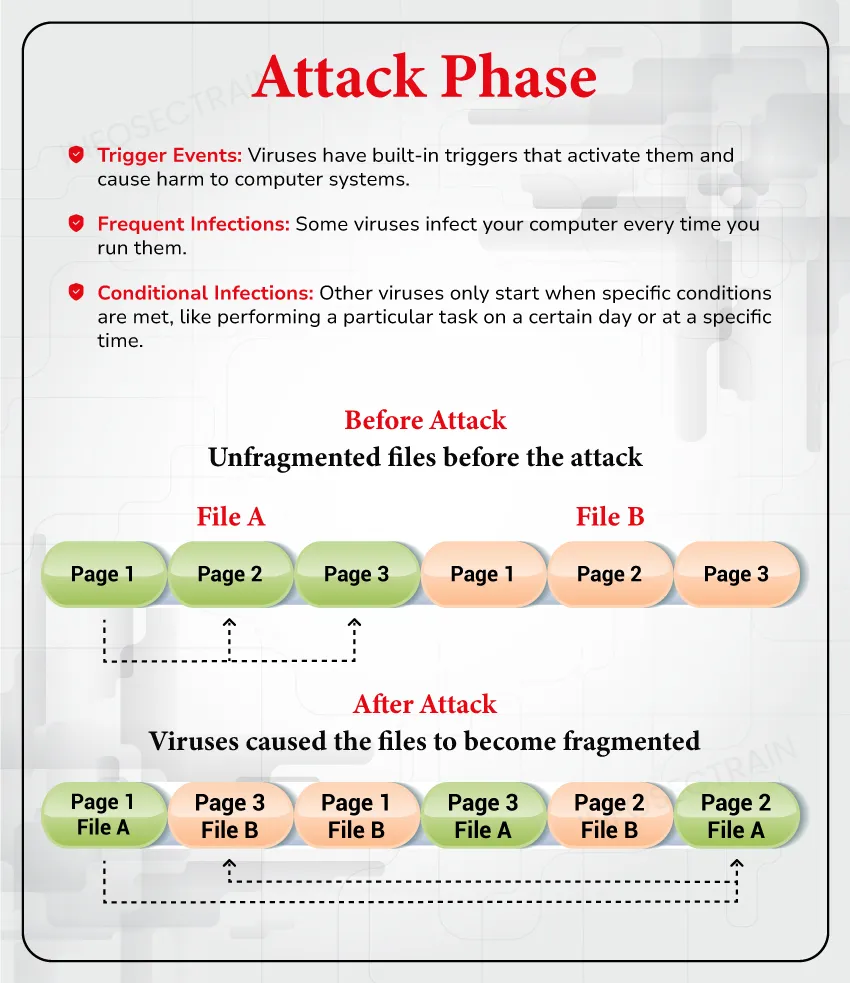
After spreading throughout a computer, viruses begin damaging files and programs. They only start causing harm after a specific trigger event occurs. Some viruses can even copy themselves and perform actions like deleting files or making the computer run slower. These viruses typically carry out the harmful activities they were designed for by their creators.
Common actions include:
- Deleting or overwriting files
- Modifying or corrupting data
- Disabling applications or security tools
- Consuming memory, storage, or processing resources
- Slowing down or crashing the system
- Displaying messages, sounds, images, or animations
- Collecting sensitive information
- Downloading additional malware
- Creating unauthorized access mechanisms
- Spreading to shared drives or connected devices
Not every virus performs destructive activity. Some may simply replicate, display a message, or remain inactive. However, even a virus without an intentionally destructive payload can consume resources, damage files, or create security risks.
Characteristics and Purpose of Viruses
Characteristics:
- Self-Replicating: Viruses are designed to replicate themselves by attaching their malicious code to other programs or files on a computer system. This allows them to spread rapidly.
- Host Dependency: Viruses cannot propagate on their own. They require a host file or program to latch onto to execute and replicate.
- Payload Delivery: Most viruses contain a particular payload or malicious code intended to cause harm, such as deleting files, corrupting data, or providing unauthorized access.
- Stealth Techniques: Advanced viruses employ stealth techniques to evade detection by antivirus software and conceal their activities from users.
- Polymorphic Nature: Some viruses use polymorphic code that mutates with each iteration, making it harder for antivirus programs to detect them based on signatures.
- Trigger-Based Activation: Some viruses activate only when a particular condition is met, such as a specific date, user action, or number of program executions.
Purposes:
- Causing Disruption: Many viruses are created with the sole purpose of causing chaos, deleting data, or disrupting normal system operations, often for malicious fun or revenge.
- Financial Gain: Some viruses are designed to steal sensitive information like passwords or financial data for monetary gain or corporate espionage.
- Demonstrating Skills: In some cases, virus creators develop viruses to demonstrate their programming skills or to challenge security measures.
- Political/Ideological Motives: Viruses can also be created to spread political or ideological messages or to target specific organizations or individuals.
- Building Botnets: Viruses are sometimes used to turn infected systems into bots, which can then be controlled remotely as part of a larger botnet for carrying out distributed attacks or other malicious activities.
How to Reduce the Risk of Virus Infections
Individuals and organizations can reduce virus-related risks by following basic security practices:
- Keep operating systems, browsers, and applications updated
- Use reputable antivirus or endpoint protection software
- Enable automatic security and malware-definition updates
- Download applications only from trusted sources
- Avoid pirated software and unofficial software cracks
- Do not open unexpected email attachments
- Verify links and attachments before interacting with them
- Disable unnecessary document macros
- Scan removable storage before opening files
- Use standard user accounts for everyday activities
- Restrict administrative privileges
- Maintain tested backups of important information
- Provide users with phishing and malware-awareness training
- Isolate potentially infected systems from the network
Conclusion
Computer viruses remain an important malware concept because they demonstrate how malicious code can use legitimate files and user actions to replicate and spread. Viruses can infect executable programs, documents, boot areas, and other system components. Depending on their design, they may damage data, disrupt operations, steal information, evade detection, or deliver additional malware.
Understanding the virus lifecycle, infection process, attack phase, common types, and security countermeasures helps learners distinguish viruses from other threats and prepares them to analyse malware-related incidents more effectively.
To be continued…
Computer Worms: Understanding Fundamental Concept
CEH v13 AI Certification Training with InfosecTrain
Ethical hacking is a complex and demanding field that requires a thorough understanding of cybersecurity. Enrolling in courses like the Certified Ethical Hacker v13 AI program at InfosecTrain enables learners to enhance their skills in assessing security and optimizing network systems. This training equips participants with the expertise and knowledge needed to help organizations effectively bolster their security measures. Join InfosecTrain’s CEH training to become a leading professional in protecting sensitive information.

TRAINING CALENDAR of Upcoming Batches For CEH v13 AI Training
| Start Date | End Date | Start - End Time | Batch Type | Training Mode | Batch Status | |
|---|---|---|---|---|---|---|
| 21-Nov-2026 | 20-Dec-2026 | 09:00 - 13:00 IST | Weekend | Online | [ Open ] | |
| 12-Dec-2026 | 24-Jan-2027 | 19:00 - 23:00 IST | Weekend | Online | [ Open ] | |
| 16-Jan-2027 | 21-Feb-2027 | 09:00 - 13:00 IST | Weekend | Online | [ Open ] | |
| 20-Feb-2027 | 28-Mar-2027 | 19:00 - 23:00 IST | Weekend | Online | [ Open ] | |
| 13-Mar-2027 | 18-Apr-2027 | 09:00 - 13:00 IST | Weekend | Online | [ Open ] |
Frequently Asked Questions
What is a computer virus?
A computer virus is malicious code that attaches itself to a host file or program and replicates when the infected host is executed.
How does a computer virus spread?
Viruses commonly spread through infected files, email attachments, untrusted downloads, file-sharing platforms, and removable storage devices.
What is the difference between a virus and a worm?
A virus usually requires a host file and user execution, while a worm is standalone malware that can spread automatically across networks.
What are the common signs of a virus infection?
Common signs include slow performance, frequent crashes, missing files, unusual pop-ups, disabled security tools, and unexpected system activity.
Can antivirus software detect every virus?
No. Antivirus software may miss new, modified, or highly evasive viruses. It should be supported by updates, secure configurations, backups, and safe browsing practices.
What is a polymorphic virus?
A polymorphic virus changes parts of its code while replicating, making signature-based detection more difficult.
How can virus infections be prevented?
Keep software updated, use trusted antivirus protection, avoid suspicious attachments, download files only from reliable sources, and maintain secure backups.