12 Computer Virus Types, Their Behavior, and Risks
Quick Insights:
A computer virus is a form of malicious software (malware) designed to attach itself to legitimate files or programs. Once executed, it can replicate, spread to other systems, and cause a range of harmful effects such as data corruption, system slowdown, unauthorized access, or disruption of normal operations. Viruses often rely on user interaction to activate and may use stealth techniques to avoid detection.
Computer viruses have been a cybersecurity concern for decades. Although people often use the word “virus” to describe any malicious program, a computer virus is a specific type of malware that attaches itself to a legitimate file, application, document, or system component.
Once the infected file is opened or executed, the virus can activate, copy itself, infect other files, and perform malicious actions. Depending on its purpose, a virus may corrupt data, slow down a system, disable security controls, steal information, or make a device unstable.
Understanding the different types of computer viruses can help users and organizations recognize how infections occur and implement suitable security measures.
What is a Virus?
Viruses are malicious software programs that attach themselves to a host file or program. It normally needs the infected host to be executed before they can activate or replicate. They can cause damage by altering, corrupting, or deleting files, disrupting system functionality, stealing sensitive information, or granting unauthorized access to a system.
Viruses often rely on human actions, such as opening malicious email attachments or downloading infected files, to propagate and infect new systems. They can also spread through removable media, network vulnerabilities, drive-by downloads, and social engineering.
Characteristics of Computer Viruses
Although computer viruses can behave differently, they commonly have the following characteristics:
- Self-replication: A virus can create copies of itself or insert its code into other files.
- Dependence on a host: Most viruses attach themselves to legitimate files, documents, applications, or boot components.
- Activation through execution: The virus usually becomes active when the infected host is opened or executed.
- Ability to spread: Viruses may spread through email attachments, shared files, removable media, downloads, or network locations.
- Malicious payload: A virus may corrupt files, steal information, disrupt operations, or modify system settings.
- Evasion capabilities: Some viruses encrypt, modify, or hide their code to avoid detection.
- Persistence: Certain viruses remain active in system memory or reinfect files after a device restarts.
How Does a Computer Virus Work?
A computer virus generally follows a simple infection process:
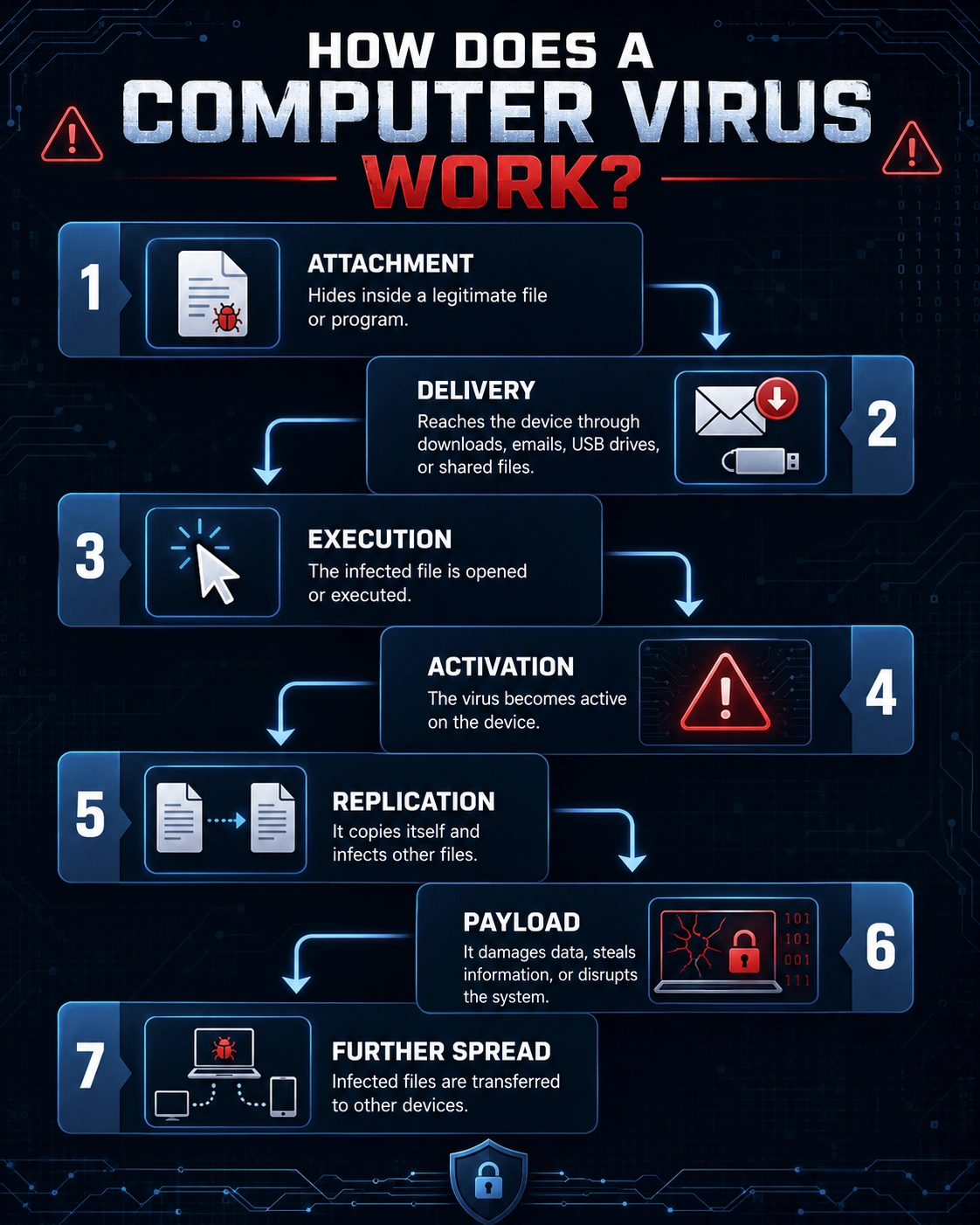
1. Attachment: The virus inserts its code into a legitimate file, document, program, or system area.
2. Delivery: The infected content reaches a device through an email attachment, download, removable drive, shared folder, or another delivery method.
3. Execution: A user or system process opens or executes the infected host.
4. Activation: The malicious code becomes active on the device.
5. Replication: The virus copies itself or infects additional files and system locations.
6. Payload execution: It performs its intended action, such as damaging files, changing settings, stealing information, or disrupting the system.
7. Further spread: Infected files may be shared with other users or transferred to additional devices.
Types of Viruses
Here is the list of different types of computer viruses:

1. Boot Sector Virus:
A boot sector virus infects the area of a storage device that contains instructions used during the startup process. When the infected computer or storage device is booted, the virus loads into memory before the operating system fully starts.
Historically, these viruses commonly spread through infected floppy disks. They may now spread through compromised removable drives, disk images, or other bootable media. Boot sector infections can interfere with system startup, damage storage information, or make the device inaccessible.
2. Direct Action Virus:
A direct action virus becomes active when an infected file is executed. It searches for other suitable files, infects them, performs its programmed actions, and then stops running.
Unlike a resident virus, it does not normally remain continuously active in the computer’s memory. The damage caused by a direct action virus depends on its payload. Some may only replicate, while others may corrupt or delete files.
3. Encrypted Virus:
An encrypted virus hides most of its malicious code using encryption. It includes a small decryption component that restores the hidden code when the virus is executed. Encryption helps conceal the virus from security tools that rely heavily on matching known code patterns.
An encrypted virus may also be classified as a file infector, resident virus, or another virus type. Encryption describes how it hides its code rather than what it infects.
4. File Infector Virus:
A file infector virus attaches its code to executable files, such as .exe, .com, .dll, or .scr files. When an infected program is executed, the virus becomes active and may infect additional executable files. It may modify the original file, increase its size, corrupt its contents, or change how it behaves.
5. Macro Virus:
A macro virus infects documents or templates that support automated commands called macros. These viruses are commonly associated with word-processing documents, spreadsheets, and other productivity files.
When a user opens an infected document or template and permits the macro to run, the virus can execute malicious commands. It may modify documents, infect templates, download additional malware, or send infected files to other users.
6. Multipartite Virus:
A multipartite virus infects more than one area of a computer. For example, it may infect both executable files and the boot sector of a storage device. Because it uses multiple infection methods, removing only one infected component may not eliminate the virus. A remaining infected area can reinfect the system after it restarts.
Multipartite viruses can therefore be more difficult to identify and remove than viruses that target only one file type or location.
7. Polymorphic Virus:
A polymorphic virus changes parts of its code or appearance whenever it creates a new copy. Its underlying malicious purpose remains the same, but its identifiable pattern or signature may change. This makes traditional signature-based detection more difficult because two copies of the same virus may not look identical.
8. Resident Virus:
A resident virus embeds itself into the computer’s memory and stays active even after the original infected program has stopped running. While present in memory, it can monitor system activities and infect files when they are opened, copied, renamed, or executed. Some resident viruses may also interfere with antivirus scanning or reinfect cleaned files.
9. Stealth Virus:
A stealth virus attempts to hide the changes it makes to a system. For example, it may intercept system requests and display clean-looking information instead of revealing an infected file’s actual size, contents, or modification date.
Some stealth viruses remain hidden while the operating system is running and become easier to detect only when the device is scanned from a trusted external environment.
10. Overwriting Virus:
An overwriting virus replaces the original contents of an infected file with malicious code. Once a file has been overwritten, its original information may be permanently damaged or lost. Removing the virus may therefore require deleting the infected file and restoring a clean copy from a backup.
11. Companion Virus:
A companion virus creates a malicious file with a name similar to that of a legitimate program. It attempts to make the operating system execute the malicious file before the genuine application.
The original program may remain unchanged, which can make the infection less obvious. Users may believe they are opening a trusted application while the companion virus runs first.
12. Metamorphic Virus:
A metamorphic virus rewrites its own code each time it spreads. Unlike a basic polymorphic virus, which often changes its encrypted appearance, a metamorphic virus can restructure its instructions while preserving the same functionality. It may change its code sequence, substitute instructions, or rearrange its internal structure.
Computer Virus vs. Other Types of Malware
A computer virus is only one category within the broader malware landscape.
| Threat | How It Works |
| Virus | Attaches itself to a host file or program and replicates when the host is executed. |
| Worm | Spreads independently across networks or systems without attaching to a host file. |
| Trojan | Disguises itself as legitimate or useful software but performs hidden malicious actions. |
| Ransomware | Encrypts files or blocks system access and demands payment. |
| Spyware | Secretly monitors activity or collects sensitive information. |
How Do Computer Viruses Spread?
Computer viruses may spread through several methods:
1. Malicious Email Attachments: Attackers may send documents, archives, scripts, or executable files that contain malicious code. The virus activates when the recipient opens the file or enables its content.
2. Infected Downloads: Viruses may be hidden inside pirated software, fake applications, unofficial installers, game modifications, or files downloaded from untrusted websites.
3. Removable Storage Devices: USB drives and other removable devices can transfer infected files between computers. Some threats may also attempt to execute automatically when the device is connected.
4. Macro-Enabled Documents: Documents containing malicious macros may activate when a user enables editing, enables content, or permits macros to run.
5. Shared Files and Network Drives: An infected file stored in a shared folder may spread when other users copy or execute it.
6. Compromised Websites: A compromised website may redirect visitors to malicious downloads or attempt to exploit vulnerabilities in browsers and plugins.
7. Unpatched Software: Attackers may exploit vulnerabilities in outdated operating systems, applications, or browser components to deliver malware.
8. Social Engineering: Cybercriminals often create urgent, convincing, or deceptive messages to persuade users to open infected files or disable security protections.
How to Prevent Computer Virus Infections
Reduce the risk of virus infections through layered security controls.
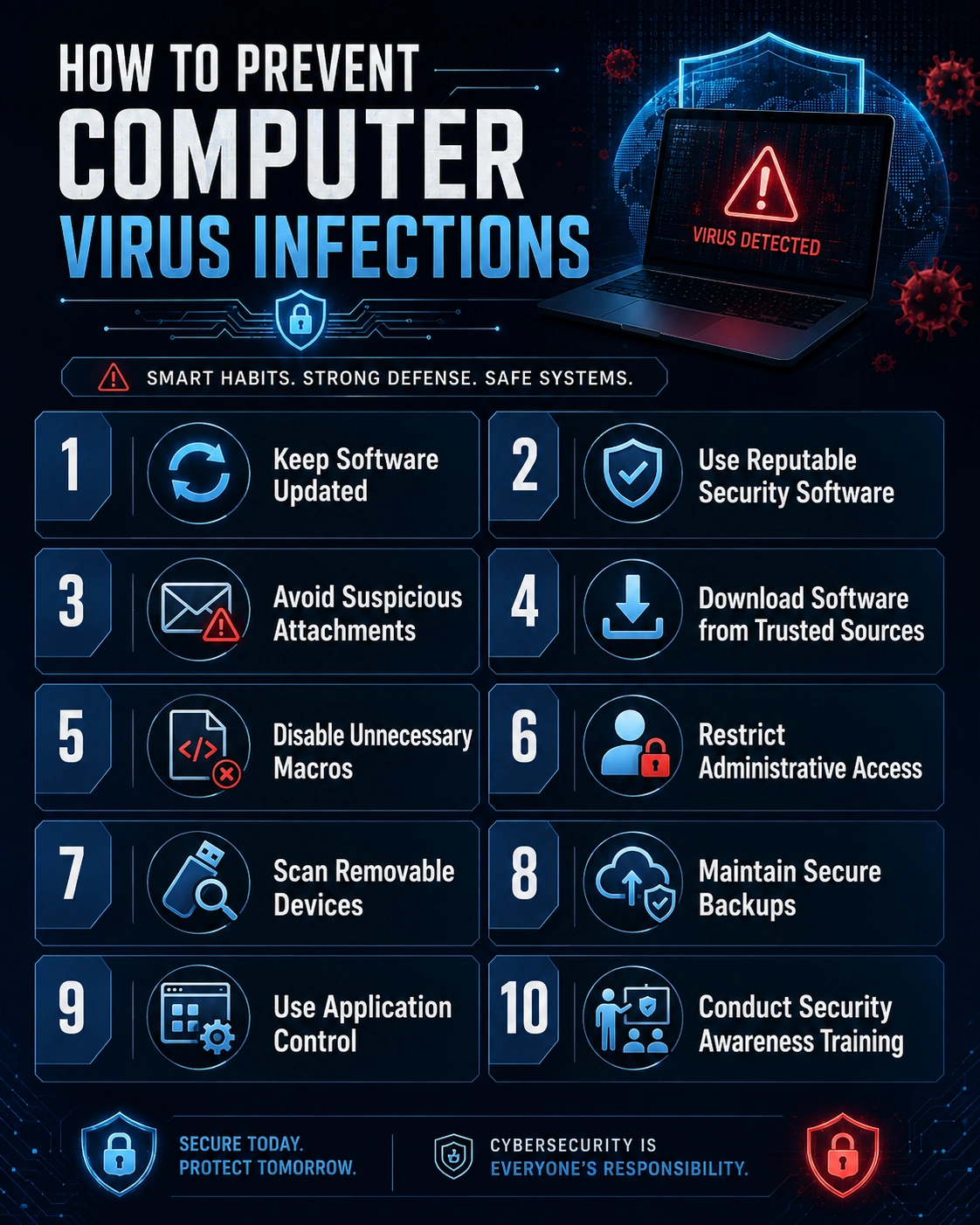
1. Keep Software Updated: Install operating system, browser, application, and security updates promptly. Updates often correct vulnerabilities that attackers could exploit.
2. Use Reputable Security Software: Use trusted antivirus or endpoint protection software and keep its detection engines updated. Regularly scan the system and connected storage devices.
3. Avoid Suspicious Attachments: Do not open unexpected email attachments, even when they appear to come from a known person or organization. Verify unusual messages through a separate communication channel.
4. Download Software from Trusted Sources: Use official websites, authorized application stores, and verified repositories. Avoid pirated software, unofficial installers, and cracked applications.
5. Disable Unnecessary Macros: Do not enable macros in documents received from unknown or untrusted sources. Organizations should restrict macro execution through security policies.
6. Restrict Administrative Access: Users should perform everyday activities through standard accounts rather than accounts with administrative privileges.
7. Scan Removable Devices: Scan USB drives and other removable media before opening their contents. Disable unnecessary automatic execution features.
8. Maintain Secure Backups: Keep regular backups of important files in a protected location. At least one backup should remain offline or otherwise isolated from the primary system.
9. Use Application Control: Organizations can allow only approved applications, scripts, and executable files to run. This reduces the likelihood of unauthorized code execution.
10. Conduct Security Awareness Training: Users should learn how to recognize phishing emails, unsafe downloads, suspicious links, unexpected attachments, and social engineering techniques.
Conclusion
Computer viruses infect legitimate files, applications, or system components and use different methods to spread, execute, and evade detection. Understanding these types helps distinguish viruses from other malware and highlights the importance of updates, security software, backups, access controls, and user awareness.
How can InfosecTrain help?
Enroll in InfosecTrain’s Certified Ethical Hacker (CEH) Training course to gain a solid understanding of viruses and other aspects of ethical hacking. We provide a well-structured curriculum, hands-on labs and exercises, expert-led instruction, and support to enhance your learning experience and boost your likelihood of success in the certification exam. We also provide resources like study guides, reference materials, and online platforms to supplement your learning journey.

TRAINING CALENDAR of Upcoming Batches For CEH v13 AI Training
| Start Date | End Date | Start - End Time | Batch Type | Training Mode | Batch Status | |
|---|---|---|---|---|---|---|
| 21-Nov-2026 | 20-Dec-2026 | 09:00 - 13:00 IST | Weekend | Online | [ Open ] | |
| 12-Dec-2026 | 24-Jan-2027 | 19:00 - 23:00 IST | Weekend | Online | [ Open ] | |
| 16-Jan-2027 | 21-Feb-2027 | 09:00 - 13:00 IST | Weekend | Online | [ Open ] | |
| 20-Feb-2027 | 28-Mar-2027 | 19:00 - 23:00 IST | Weekend | Online | [ Open ] | |
| 13-Mar-2027 | 18-Apr-2027 | 09:00 - 13:00 IST | Weekend | Online | [ Open ] |
Frequently Asked Questions
Can a computer virus infect a smartphone?
Yes. Mobile devices can be infected by malicious applications, files, or links, although mobile threats are more commonly classified as malware rather than traditional viruses.
Can a computer virus damage hardware?
A virus usually damages software, files, or system settings rather than physical hardware. However, it may disrupt hardware operations by changing firmware or system controls.
Can a virus remain inactive on a computer?
Yes. Some viruses remain dormant until a specific date, user action, system event, or condition triggers their malicious code.
Can a computer virus infect files stored in the cloud?
An infected file can be uploaded to cloud storage and synchronized across connected devices. The virus becomes active only when the infected file is downloaded and executed.
Can formatting a computer remove a virus?
Formatting and reinstalling the operating system can remove most infections. However, threats embedded in firmware, boot components, or infected backups may survive or return.
Why are polymorphic viruses difficult to detect?
Polymorphic viruses modify their code or signature whenever they replicate, making it harder for traditional signature-based antivirus tools to recognize them.
Can a computer virus infect backup files?
Yes. Backups may contain infected files if they were created after the infection occurred. Backups should be scanned and verified before restoration.