How to Collect and Verify Emails at Scale Using Snov.io?
Email is the workhorse of digital communication, with over 4.48 billion people using email in 2024, a number set to climb another 500 million by 2027. For cybersecurity pros and OSINT enthusiasts, email lists are both a goldmine and a challenge. On one hand, targeted email lists can aid phishing simulations, social engineering tests, and intelligence gathering. On the other hand, unchecked lists lead to bounced messages, wasted effort, and even legal risk. The key is collecting high-quality email contacts and verifying them before use. Tools like Snov.io streamline this process, combining domain and LinkedIn search with built-in verification to clean lists at scale.
Why is Email Collection and Verification Important?
Email remains one of the most effective outreach channels. In 2024, email marketing was ranked the third-best way to attract and convert high-quality leads. Companies still send over 361 billion emails per day worldwide. Yet in cybersecurity, these numbers translate into opportunity and risk. Phishing is the most common cyberattack vector, so Ethical Hackers and SOC teams must know how to harvest and vet email lists. Collecting publicly available emails via OSINT helps build phishing simulations or map an organization’s attack surface.
However, inbox providers and users are wary of unsolicited mail. Indeed, 86% of consumers believe companies hoard more data than needed. Sending emails to bad addresses or the wrong contacts can hurt deliverability and trust. A careless campaign wastes your time and can trigger spam filters or tarnish reputations.
That is why verification is critical. Before launching a phishing exercise or outreach, you want to know which addresses are real, which are risky, and which do not exist. Snov.io’s Email Verifier performs multi-stage checks (syntax, MX records, SMTP checks) to classify addresses as valid, risky (unverifiable), or invalid. Cleaning your list this way “reduces bounces and avoids sending to risky or inactive emails”. For cybersecurity testing, a verified list means more realistic simulations and fewer dead-end messages.
Getting Started with Snov.io
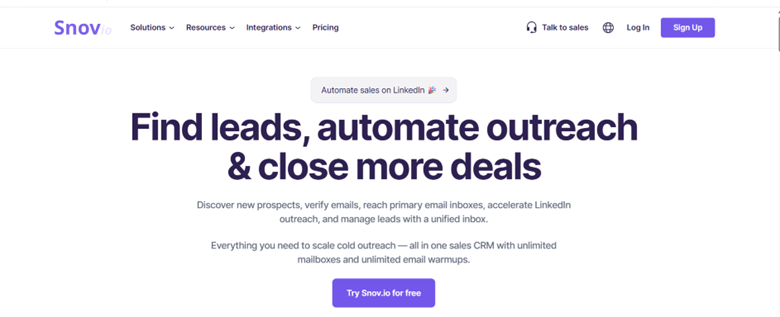
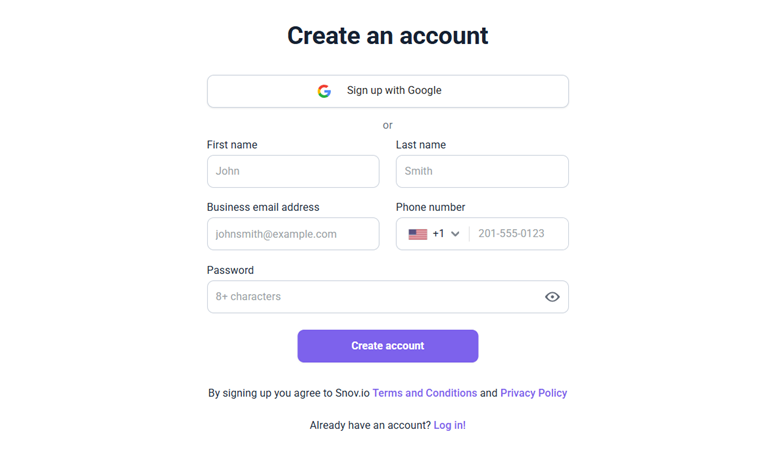
- Create a io account: A free trial is available to test core features.
- Explore the Dashboard.
- After logging in, you’ll see the main navigation with three key sections:
- Prospects: Your contact database. Organize and manage leads into custom lists.
- Campaigns: Build and automate email sequences for outreach.
- Tools: Access essential features like:
- Domain Search
- Email Finder
- Bulk Email Finder
- Email Verifier
- Start Collecting Emails
Go to the Tools section to begin collecting addresses using: - Domain Search for emails from a specific company.
- Email Finder for person-specific lookups (name + domain).
- Bulk Email Finder for uploading large lists of names/domains.
Collecting Emails with Snov.io
Snov.io offers several ways to collect emails. You can search by domain, upload lists of domains (bulk search), scrape LinkedIn, or even input individual names and companies. The common thread is automation: Snov.io scours databases and pages to uncover contacts. Below are key methods:
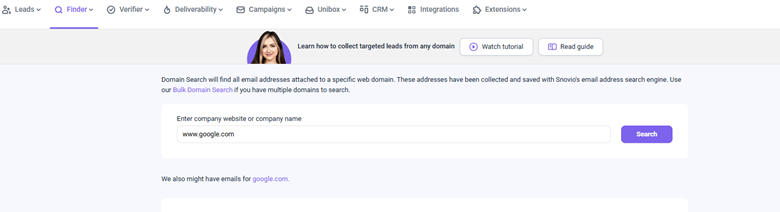
1. Domain Search (Single Company): Enter a company’s domain or website (www.google.com) into Snov.io’s Domain Search tool. It will retrieve a company profile along with lists of people (prospects) and emails associated with that domain.
- View the company profile, along with employee names, roles, and emails.
- Filter contacts by job role (e.g., “Marketing,” “IT”) to stay focused.
- Save individual or all contacts to your Prospect list (1 credit per verified email).
- Check the “All Domain Emails” tab to grab extra emails scraped from public web sources (manual verification needed).
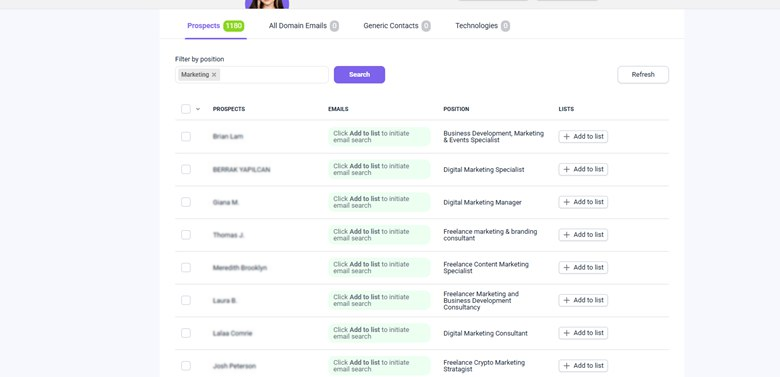
2. Bulk Domain Search (Multiple Companies): For scale, use Bulk Domain Search. Upload a CSV/TXT list of company domains (or names); up to 20,000 domains per file. Snov will process all domains in one go. You can choose Prospects mode (grabbing key contacts per company) or Emails-only mode (collecting any email addresses).
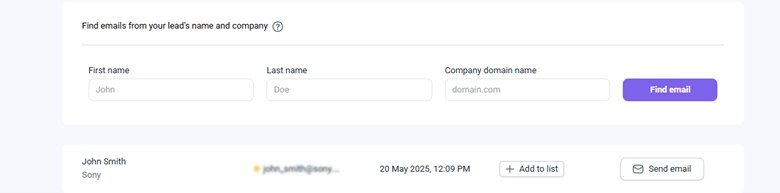
3. Email Finder (By Name or LinkedIn URL): The Email Finder tool can also search by a person’s name and company. Input a first name, last name, and company domain, and Snov.io will attempt to construct the work email (or find it in public sources). This is useful when you have a name (from conference lists or LinkedIn) but no email. The results show emails with an indicator (green/red/yellow) and sometimes role information.
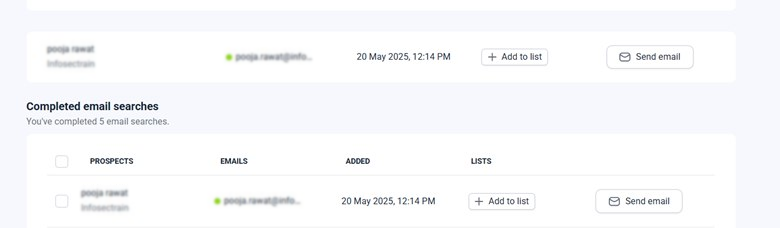
4. Chrome Extensions- Website and LinkedIn Scraping: Snov.io provides Chrome extensions for on-the-fly collection. The Email Finder Extension lets you click the Snov icon while visiting any website or search results page. The extension scans the current page for email contacts and shows them in a panel. You can save found addresses to a prospect list or skip unwanted ones.
For example, on a company’s “Contact Us” page, click the extension and capture emails of sales or press contacts. According to Snov.io, the extension can help you “save thousands of leads in seconds” by automating manual scraping.
LinkedIn Prospect Finder:
- While browsing LinkedIn search results or profiles, click the extension.
- It will extract name, job title, company, and verified emails (if available).
- It supports bulk scraping, sets how many pages to scan, and lets it run.
- Built-in smart delays (7–14 sec per profile) mimic human behavior to avoid blocks.
- Suggested daily limits: ~100 prospects (Free LinkedIn), ~500 (Premium), ~1000 (Sales Navigator).
5. Bulk Email Upload (for Verification): If you already have a list of emails (from scraping or a previous tool), upload it directly into Snov.io’s Bulk Verifier.
- Accepted formats: CSV and XLS (one column of emails).
- io processes up to 100,000 emails per upload and tags each as Valid, Risky, or Invalid.
- Perfect for cleaning up old or scraped email lists fast and at scale.
Verifying Emails with Snov.io
Finding emails is only half the battle; you must verify them before using them. Snov.io’s Email Verifier checks each address through multiple steps (syntax check, MX DNS check, SMTP handshake, etc.) to determine deliverability. After verification, each address is marked as:
- Valid (Green): active and safe to use.
- Unverifiable/Risky (Yellow): The address may exist, but server settings prevent full confirmation (a common problem with catch-all domains).
- Invalid (Red) – does not exist or is inactive.
Cleaning your list lets you “avoid sending campaigns to risky or inactive emails” and reduce bounce rate. Here is how you can verify emails:
- Single Email Verification: In the Snov.io dashboard, go to Email Verifier > Single Email Verification. Paste one address and click Verify. Within seconds, Snov will show the status (green/red/yellow). You can safely send a test or add it to a campaign if it is valid.
- Bulk Email Verification: Under Email Verifier > Bulk Verification, you can upload an email file. Once uploaded, Snov will process the list (up to 100k emails per batch). After completion, you’ll see counts of valid, invalid, and risky addresses.
- In-List Verification: If you have collected emails via Snov.io (in a Prospect list), you can verify right there. Go to any list, click Verify list at the top, and Snov will run through the contacts (up to 1,000 emails per domain per day). This is handy when building a list via LinkedIn or domain search: one click cleans the whole list.
Tips for Using Snov.io
1. Use Filters and Set Limits: Narrow down by role, location, or industry to reduce noise. Follow Snov.io’s lead scraping limits:
- Free LinkedIn: ~100/day
- Premium: ~500/day
- Sales Nav: ~1,000/day
Enable “Search Timeout” (7–14s) in the extension to mimic natural browsing.
2. Go Bulk, Save Time: Use Bulk Domain Search and Bulk Verifier for large lists (CSV uploads).
- Skip manual work—process 1,000s of entries in one go.
- Group results by target segment (e.g., industry, size).
3. Manage Credits Smartly: each email find or verify = 1 credit.
- Prioritize high-value contacts (C-suite, IT leads).
- Track usage and top up as needed to avoid running out mid-task.
4. Integrate with Tools and APIs: Connect Snov.io with CRMs (e.g., HubSpot, Salesforce). For sending verified lists at scale, SendGrid is a common choice, though reviewing top SendGrid competitors can help you find better deliverability and pricing for outreach campaigns. Use Snov.io’s REST API for scripted automation (Python/cURL supported). Automate email verification like a pro.
CEH and SOC Analyst Hands-on Training with InfosecTrain
Mastering email reconnaissance tools like Snov.io significantly amplifies a cybersecurity professional’s toolkit. Automating lead generation and list cleaning saves time and improves accuracy. As marketing trends show, email outreach remains crucial for engagement, but we use those same techniques for defense and testing in infosec. Learning to collect and verify emails at scale helps you conduct realistic phishing drills, enrich intelligence, and uncover vulnerabilities, all while preserving quality.
Ready to elevate your skills even further? InfosecTrain’s CEH (Certified Ethical Hacker) and Advanced AI SOC Analyst Certification Training dive deep into practical hacking and defense techniques, including OSINT and email-based tactics. Take the next step, hone your security expertise with InfosecTrain’s expert-led courses and become a more effective cybersecurity pro.

TRAINING CALENDAR of Upcoming Batches For SOC Analyst Training
| Start Date | End Date | Start - End Time | Batch Type | Training Mode | Batch Status | |
|---|---|---|---|---|---|---|
| 26-Sep-2026 | 15-Nov-2026 | 09:00 - 13:00 IST | Weekend | Online | [ Open ] | |
| 29-Nov-2026 | 23-Jan-2027 | 19:00 - 23:00 IST | Weekend | Online | [ Open ] | |
| 23-Jan-2027 | 07-Mar-2027 | 09:00 - 13:00 IST | Weekend | Online | [ Open ] | |
| 20-Mar-2027 | 02-May-2027 | 19:00 - 23:00 IST | Weekend | Online | [ Open ] |

TRAINING CALENDAR of Upcoming Batches For CEH v13 AI Training
| Start Date | End Date | Start - End Time | Batch Type | Training Mode | Batch Status | |
|---|---|---|---|---|---|---|
| 10-Oct-2026 | 29-Nov-2026 | 19:00 - 23:00 IST | Weekend | Online | [ Open ] | |
| 21-Nov-2026 | 20-Dec-2026 | 09:00 - 13:00 IST | Weekend | Online | [ Open ] | |
| 12-Dec-2026 | 24-Jan-2027 | 19:00 - 23:00 IST | Weekend | Online | [ Open ] | |
| 16-Jan-2027 | 21-Feb-2027 | 09:00 - 13:00 IST | Weekend | Online | [ Open ] | |
| 20-Feb-2027 | 28-Mar-2027 | 19:00 - 23:00 IST | Weekend | Online | [ Open ] | |
| 13-Mar-2027 | 18-Apr-2027 | 09:00 - 13:00 IST | Weekend | Online | [ Open ] |