John the Ripper Explained: A Practical Guide to Password Cracking
Quick Insights:
John the Ripper (JtR) is a free, open-source, command-line tool for offlinepassword auditing. It supports dozens of hash formats (MD5, SHA-1/256, NTLM, bcrypt, scrypt, etc.) and a wide range of protected file types (ZIP/RAR archives, Office/PDF documents, SSH/GPG keys, disk images, password managers, and more). JtR includes “prep” utilities (e.g. zip2john, ssh2john) to extract hash data from files. Crack modes range from wordlist (dictionary) attacks to rule-based mutations to full brute-force (incremental) attempts. After a run, John stores any recovered passwords, which you can view with john --show. In practice, security teams use John on authorized test data to identify weak passwords. Defenders then harden password policies (length, complexity, modern hashing, MFA, etc.) to prevent an attacker from having it easy.
In today’s threat landscape, organizations often invest in firewalls, intrusion detection, and AI defenses, yet weak passwords remain a leading attack vector. A recent Picus Security report found that password-cracking attempts succeeded in 46% of tested networks in 2025. Similarly, Verizon’s DBIR notes stolen or compromised credentials appear in about 31% of breaches. These numbers highlight that simple passwords (“123456”, “Password”, etc.) are still all too common. John the Ripper is a popular open-source password-cracking tool that security professionals use to simulate attackers and find weak credentials before adversaries do. By using John in a controlled lab or audit, you can proactively discover which passwords would “crack” easily and then improve your defenses.
What is John the Ripper?
John the Ripper (often just “John” or JtR) is an open-source password cracking tool used for security auditing and recovery. Originally built for Unix/Linux password hashes, today it runs on Linux, macOS, Windows and even mobile platforms. Its goal is simple: take a list of password hashes and find the original plaintext passwords by hashing guesses and comparing them to the target.
John comes in two main flavors: the core and the community “jumbo” edition. The jumbo build expands the list of supported formats, including many encrypted file types, archives (ZIP, RAR, 7z), document files (PDF, Office), disk images (BitLocker, DMG), crypto wallets, and more. In short, JtR is like a “Swiss army knife” for cracking: one tool that handles hundreds of hash and encryption schemes.
John is a must-have in the Ethical Hacker’s toolkit. It is completely free to download, and often pre-installed on pentest Linux distros (Kali, Parrot, etc.).
Safety first: Always get written permission before using John on any system or data. It’s intended for authorized security audits and forensic work. Running John on a network you don’t own (or without explicit consent) is illegal in most countries.
How Does Password Cracking Work?
Before diving into John, it helps to recall how systems store passwords. Rather than saving your password in plaintext, most systems keep a hash (a one-way cryptographic fingerprint) of your password. For example, the MD5 hash of the word “password” is 5f4dcc3b5aa765d61d8327deb882cf99. Without the original “password”, you can not trivially reverse the hash, at least in theory.
John’s job is to play a guessing game with those hashes. It takes a target hash (or list of hashes) and repeatedly guesses a password, hashes that candidate with the same algorithm, and compares it to the target. When there’s a match, the original password is found.
Because John works offline on copied hashes, it can try millions of guesses without triggering lockouts or alerts. Offline cracking offers big advantages: no logs on the target system, no account lockout, and no rate limits. The only limitation is hardware speed and time. This is why fast hashing algorithms are dangerous for passwords. OWASP warns that MD5/SHA-1/SHA-256 are too quick to compute and should NOT be used for password storage. Instead, use a slow, adaptive algorithm (bcrypt, scrypt, Argon2, PBKDF2) with salts to dramatically slow down tools like John.
Cracking Modes
John the Ripper supports several attack strategies. Different modes serve different purposes:
- Dictionary (Wordlist) Mode: John loads a text file containing common passwords and phrases, and tries them one by one. This is usually the fastest way to crack “easy” passwords that appear in lists of breached or common passwords. Its success depends on a good wordlist, which you can customize with company names, tech terms, or leaked credentials.
- Single-Crack Mode: John analyzes each account’s information (username, full name, etc.) and generates candidates based on that (adding numbers, capitalizing, etc.). For example, user “alice.smith” might yield “Alice”, “Alice2026”, “Smith!”, etc. Many people base passwords on their own names, so Single mode can quickly crack a chunk of accounts.
- Incremental (Brute-Force) Mode: John systematically tries all combinations of characters up to a defined length. It is the most thorough method (eventually guaranteed to crack any password within the given keyspace), but also the slowest. The search space grows exponentially with length: e.g., 26 letters (A-Z) and 10 digits for an 8-character password yields 36^8 ≈ 2.8×10^12 combinations, which can take impractically long to exhaust without specialized hardware.
Note: Modern password policies often mandate longer passphrases or complex rules to defeat modes like these. For example, using a unique salt and bcrypt work factor means a single guess might take tens or hundreds of milliseconds, which slows John from billions of tries per second to maybe thousands.
John also supports rule-based mutations: after loading a wordlist, it can modify each word (e.g., capitalizing, adding symbols, and substituting “@” for “a”) according to a ruleset. This significantly expands a small wordlist. And advanced “external” modes let users code custom generation routines.
Getting Started: Installing John the Ripper
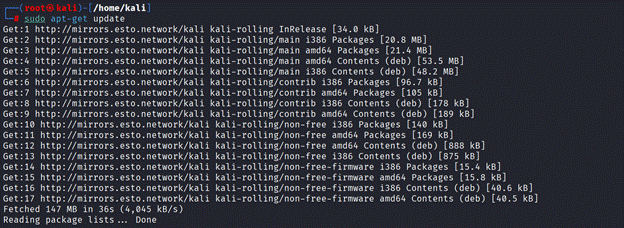
Most security-focused Linux distros come with John out of the box. For example, Kali Linux and Parrot include the jumbo version by default. On Debian/Ubuntu you can install it manually:
sudo apt-get update
sudo apt-get install john john-data -y
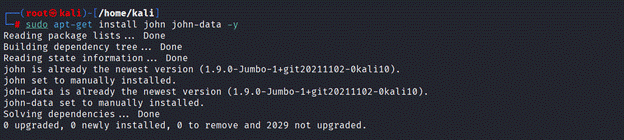
This pulls in the John core and data (wordlists, etc.) packages. On macOS, use Homebrew: brew install john-jumbo. Windows users can download precompiled binaries from the Openwall site or build from source. After installation, running john –help or simply john will display available options.
John’s “jumbo” build adds many extra formats and helper scripts. If your distro’s package is core-only, you might need to get the jumbo source (from GitHub) and compile it to handle certain hashes (e.g., Office, PDF, or newer ciphers).
Running John: Examples and Commands
Once installed, use John on a hash file. You typically feed John a text file containing one hash per line (with optional username fields). Let’s go through a few examples:
- Cracking a single hash: Say you have a simple MD5 hash in txt.

You can run:
john –format=Raw-MD5 hash.txt
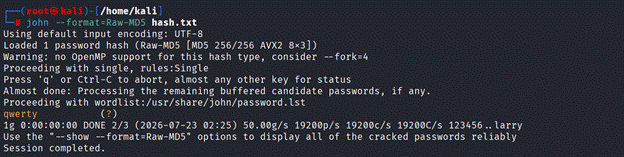
John will auto-detect some formats, but you can specify with –format= if needed. In seconds, it may find the password. (For instance, running John against the MD5 of “123456” will quickly output “123456” as the cracked password.) After cracking, john –format=Raw-MD5 hash.txt –show

will display the recovered password next to the username/hash.
- Using a wordlist: Create or download a list of candidate passwords (one per line). Then run:
john –format=Raw-MD5 –wordlist=/usr/share/wordlists/rockyou.txt hashes.txt
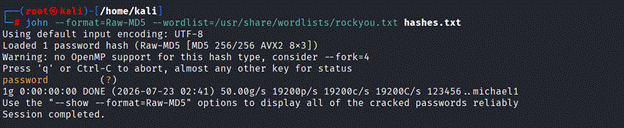
John will try each word from rockyou.txt against the hashes in hashes.txt. This is often faster than brute-forcing from scratch, because it leverages human-chosen words first.
- Resuming a session: John saves its progress. If you interrupt a run (Ctrl+C), you can resume later with:
john –restore=SESSION_NAME
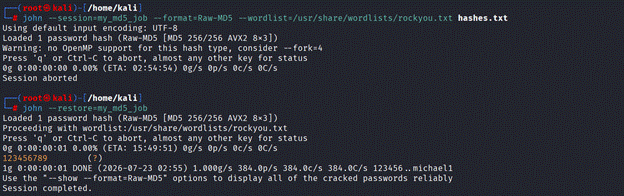
(Use –session=name when starting if you want to label it, otherwise use –restore to continue the last job.)
Cracking Different File Types
Real-world targets aren’t always in /etc/shadow. John provides many helper tools named *2john to extract hashes:
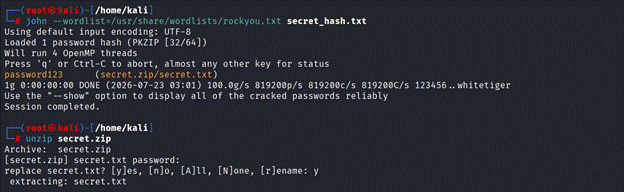
- ZIP/RAR archives:
zip2john secret.zip > secret_hash.txt

john –wordlist=/usr/share/wordlists/rockyou.txt secret_hash.txt
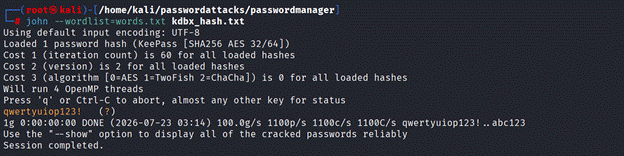
- KeePass database (.kdbx):
keepass2john Database.kdbx > kdbx_hash.txt

john –wordlist=words.txt kdbx_hash.txt
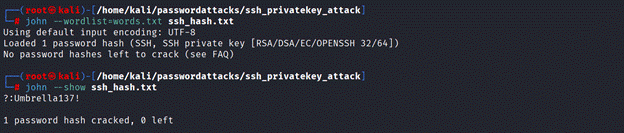
- SSH private key:
ssh2john id_rsa > ssh_hash.txt
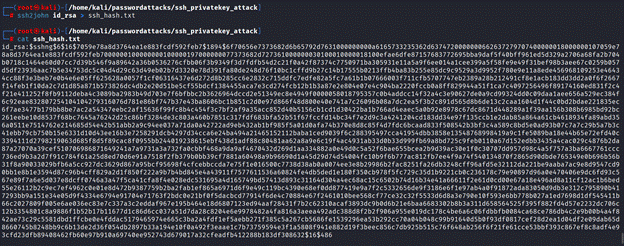
john –wordlist=words.txt ssh_hash.txt
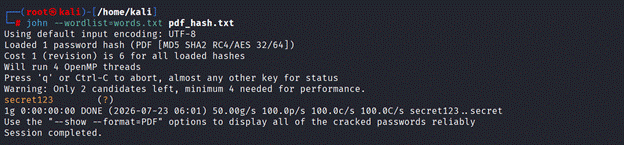
- PDF document (with password):
pdf2john protected.pdf > pdf_hash.txt

john –wordlist=words.txt pdf_hash.txt
This table shows some common *2john tools and how to run them:
|
File Type |
Extract Tool | Commands (example) |
|
ZIP archive |
zip2john | zip2john secret.zip > ziphash.txt<br>john –format=zip ziphash.txt |
|
KeePass .kdbx |
keepass2john |
keepass2john mydb.kdbx > kdbxhash.txt<br>john kdbxhash.txt |
|
SSH key (id_rsa) |
ssh2john |
ssh2john id_rsa > keyhash.txt<br>john keyhash.txt |
|
BitLocker volume |
bitlocker2john |
bitlocker2john drive.raw > bchash.txt<br>john bchash.txt |
|
RAR archive |
rar2john | rar2john secret.rar > rarhash.txt<br>john rarhash.txt |
| 7z archive | 7z2john |
7z2john secret.7z > 7zhash.txt<br>john 7zhash.txt |
Cracking Unix System Passwords
A classic use of John is auditing Linux system accounts. On a Unix box, passwords are stored (salted and hashed) in /etc/shadow. To combine the username and hash information, use the unshadow tool:
umask 077
unshadow /etc/passwd /etc/shadow > all_hashes.txt

john –format=crypt –wordlist=words.txt all_hashes.txt
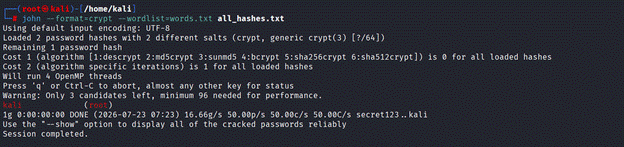
This merges the account info and then runs John on every hash in all_hashes.txt. (If stopped, john –restore can resume.) Cracked passwords will appear in the output or via john –show all_hashes.txt. Remember to delete any extracted hashes after your audit to keep them secure.
Interpreting John’s Output
John keeps a “pot” file (usually john.pot) containing all cracked passwords. The command john –show hashes.txt displays each hash and its plaintext password. Review and handle these with care (they’re sensitive!). If a password appears weak or matches a pattern, flag that for remediation.
Defending Against John the Ripper
The point of using John is to strengthen your password security, not just to crack them. After an audit, focus on these best practices:
- Strong Hashing: Move away from fast hashes (MD5, SHA1) for password storage. Use slow, salted algorithms like bcrypt, scrypt or Argon2. These require more work per guess, slowing down John by orders of magnitude. For example, bcrypt with cost=12 might make one hash evaluation take 100–200ms, meaning John can try only a few dozen per second, not billions.
- Unique Salts: Ensure each password uses a unique random salt. Salts prevent attackers from using precomputed “rainbow tables” and force John to crack each account individually, increasing effort.
- Length and Complexity: Encourage passphrases or long passwords. Longer passwords expand John’s search space massively. According to eSecurityPlanet, weak policies often encourage 8-character limits, lifting that to 16+ characters hugely reduces success rates. Even better, allow user-chosen passphrases (words and spaces), which are easier to remember but very long.
- Multi-Factor Authentication (MFA): Require MFA on all sensitive logins. Even if John recovers a password offline, a second factor (token, biometrics) prevents account takeover.
- Password Managers and Breach Checks: Encourage employees to use password managers to generate unique secrets. Integrate breached-password checks (e.g., using Have I Been Pwned API) to block known-compromised passwords.
- Regular Audits: Run John or similar tools on password databases periodically (with permission) to verify policies. Just because a password meets minimum criteria does not mean it can not be weak (e.g., “Company2026!” might fit rules but still crack easily if the company name is known).
- Policy Updates: Finally, tighten any policies that John routinely wins. If many users fail on the same pattern (e.g., “Summer2026!” style), consider disallowing those patterns.
Conclusion
John the Ripper helps security professionals understand how quickly weak passwords and outdated hashes can be compromised. Used responsibly, it reveals gaps in password policies and supports stronger defenses through longer passwords, modern hashing, uniqueness, and MFA.
To build practical skills with password-cracking tools and learn how ethical hackers identify and address real-world vulnerabilities, explore InfosecTrain’s CEH Certification Training. Gain hands-on experience with industry-standard tools, attack techniques, and defensive strategies under expert guidance.
Start your CEH journey with InfosecTrain and turn ethical hacking knowledge into practical cybersecurity expertise.

TRAINING CALENDAR of Upcoming Batches For CEH v13 AI Training
| Start Date | End Date | Start - End Time | Batch Type | Training Mode | Batch Status | |
|---|---|---|---|---|---|---|
| 21-Nov-2026 | 20-Dec-2026 | 09:00 - 13:00 IST | Weekend | Online | [ Open ] | |
| 12-Dec-2026 | 24-Jan-2027 | 19:00 - 23:00 IST | Weekend | Online | [ Open ] | |
| 16-Jan-2027 | 21-Feb-2027 | 09:00 - 13:00 IST | Weekend | Online | [ Open ] | |
| 20-Feb-2027 | 28-Mar-2027 | 19:00 - 23:00 IST | Weekend | Online | [ Open ] | |
| 13-Mar-2027 | 18-Apr-2027 | 09:00 - 13:00 IST | Weekend | Online | [ Open ] |
Frequently Asked Questions
What is John the Ripper?
John the Ripper is a free, open-source password-cracking tool. It tests password strength by trying to recover plaintext passwords from their cryptographic hashes and encrypted files. In practical terms, it is a fast offline brute-force/dictionary tool favored by penetration testers and red teams to audit credentials.
How does John the Ripper crack passwords?
John takes password hashes (from systems, files, etc.) and repeatedly guesses passwords. It compares each guess’s hash to the target. It supports dictionary attacks (using wordlists of common passwords), rule-based mutations of those words, and pure brute-force (incremental) tries. Essentially, John generates candidate passwords and checks if their hash matches the stolen hash.
What formats and files can John the Ripper crack?
JtR handles many formats. Besides Unix/Linux password hashes (from /etc/shadow), it can crack Windows hashes (NTLM), macOS keychains, encrypted ZIP/RAR/7z archives, PDF/Office documents, SSH/GPG private keys, BitLocker or TrueCrypt volumes, KeePass files, and more. You usually extract a hash using a helper like zip2john or pdf2john, then feed that to John.
Is John the Ripper legal and ethical?
The tool itself is legal; it is just code. What matters is usage. John must only be run against data you own or explicitly have permission to test. For example, a security team auditing its own passwords, or a penetration test targeting customer systems under contract, is fine. Running it against unauthorized targets is illegal and unethical.
John Ripper vs. Hashcat, which is better?
They serve similar purposes but have different strengths. John the Ripper is highly versatile, supporting a broad array of formats out of the box, and includes clever modes like single-crack. It is also quite efficient on CPU and mixed workloads. Hashcat, on the other hand, is optimized for GPU-based cracking and extremely fast raw performance on supported hashes. Many teams use both: start with John’s built-in utilities and rules, then switch to Hashcat for heavy GPU brute-forcing when needed.