Active Directory Enumeration: BloodHound
Quick Insights:
BloodHound is an open-source tool that turns your Active Directory (AD) into a visual map of attack paths. It uses data collectors (SharpHound or BloodHound.py) to retrieve AD information via LDAP, SMB, and RPC, and then plots relationships among users, groups, computers, and permissions. This lets security teams (and attackers) spot hidden privilege escalations, for example, the shortest path from a regular user to a Domain Admin, or which accounts are susceptible to Kerberoasting.

What is BloodHound?
BloodHound Community Edition (CE) is a powerful, free, open-source tool for AD enumeration. BloodHound collects a large amount of AD data and displays it as an interactive graph. In this graph, nodes represent objects (users, computers, groups, OUs) and edges represent relationships or permissions (membership, local admin rights, delegated permissions, etc.). By visualizing this data, BloodHound makes hidden attack paths obvious. For example, it might show that UserA is a member of GroupX, which has write permissions on ServerZ, where Domain Admin has a session, thus giving UserA a path to the Domain Admin account.
BloodHound was developed by SpecterOps and is widely used by Red Teams, Penetration Testers, and, unfortunately, by sophisticated adversaries alike. Its core idea is that many attack paths in AD are just multi-step “unintended” permission chains, and graph theory can reveal them. BloodHound’s popularity is also a warning sign: it has been documented in many breach reports and even used in high-profile ransomware attacks.
BloodHound Components
BloodHound has two main parts:
- Data Collector (SharpHound/AzureHound/BloodHound.py): This is what gathers AD data. SharpHound is a C# PowerShell ingestor (fileless or EXE) that you run on a Windows machine in the domain. There’s also BloodHound.py (a Python LDAP collector) that can run from an attacker’s machine. These collectors speak LDAP, SMB, RPC, etc., to pull AD information. For example, SharpHound can query AD for group memberships, local admin lists, session details, ACLs, and more. Likewise, BloodHound.py can remotely connect to a domain controller over LDAP and fetch “all” AD attributes and configurations. The output from any collector is a set of JSON files (usually zipped) containing the raw data.
- BloodHound GUI (Neo4j-backed): Once the data is collected, you launch the BloodHound application. It runs a Neo4j graph database (often via Docker or a bundled package) and provides a web interface. You import the JSON/ZIP data, and BloodHound processes it into graph nodes and edges. In the UI, you can then use built-in Ciypher queries (like “Shortest path to Domain Admin”) or manual search to explore the graph. The result is a web app showing colored nodes and arrows, green for users, yellow for groups, red for computers, etc. This makes it very quick to spot, say, which users have unconstrained delegation or DCSync rights.
Setting Up BloodHound
Installing and running BloodHound is straightforward on Kali Linux or other pentest distributions. (Note: If you encounter antivirus/EDR alerts, it is best to run SharpHound in a controlled lab or VM.) A typical install flow is:
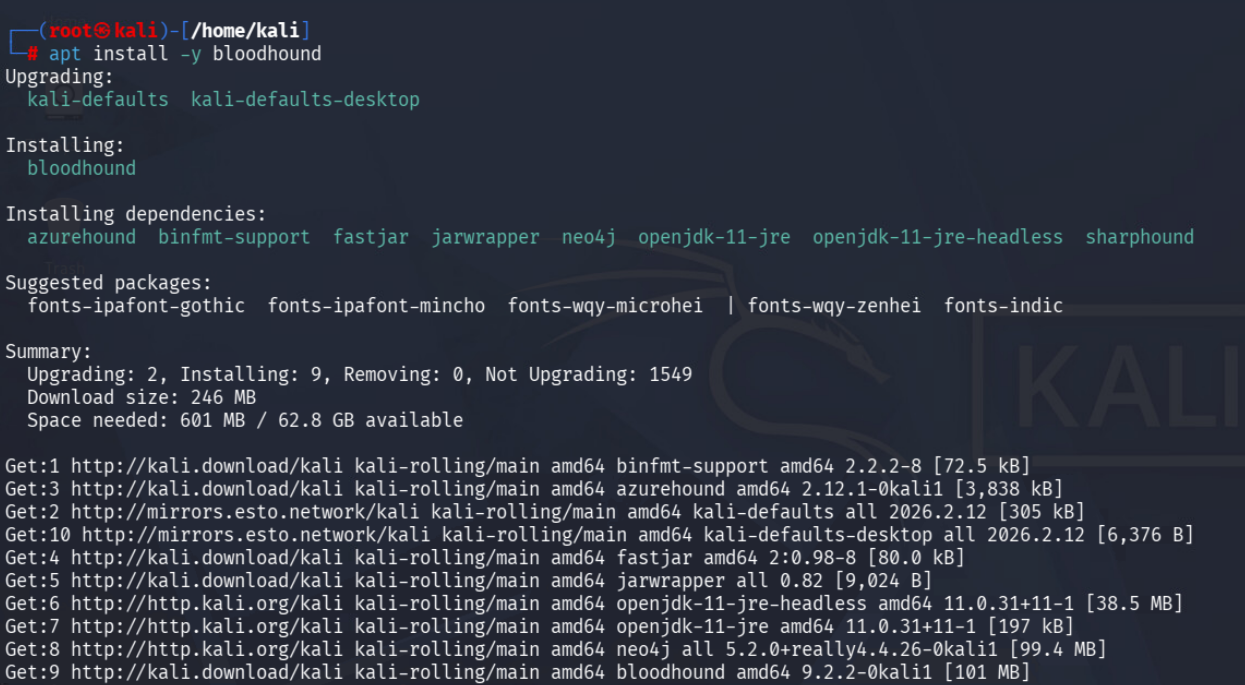
1. Install BloodHound CE. On Kali, you can simply run apt install -y bloodhound. This pulls in all dependencies, including Neo4j and supporting libraries.
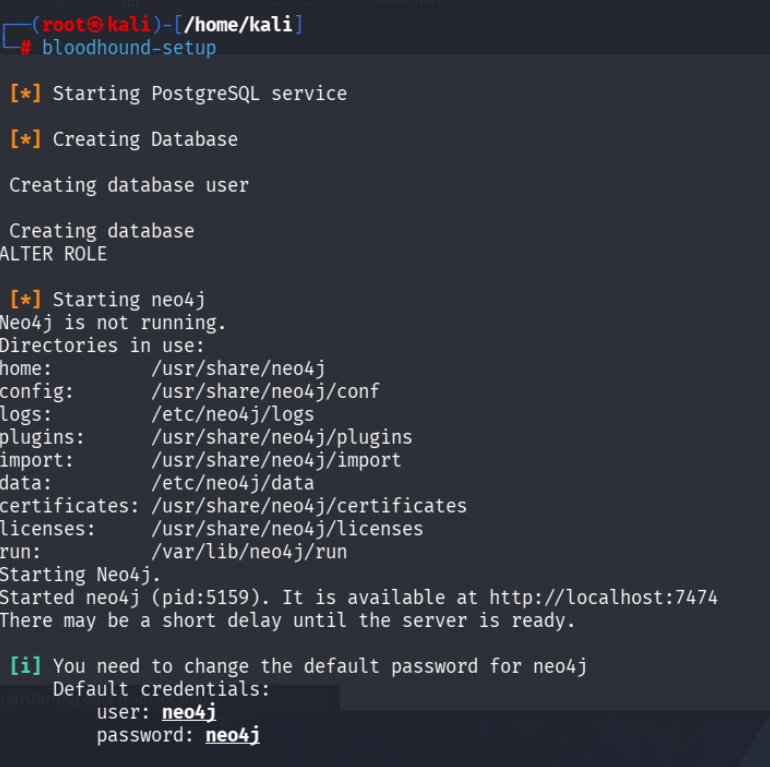
2. Initialize the databases. After installation, run bloodhound-setup. This command sets up the PostgreSQL (if needed) and starts Neo4j. It will display default credentials (neo4j / neo4j) and remind you to change the password.
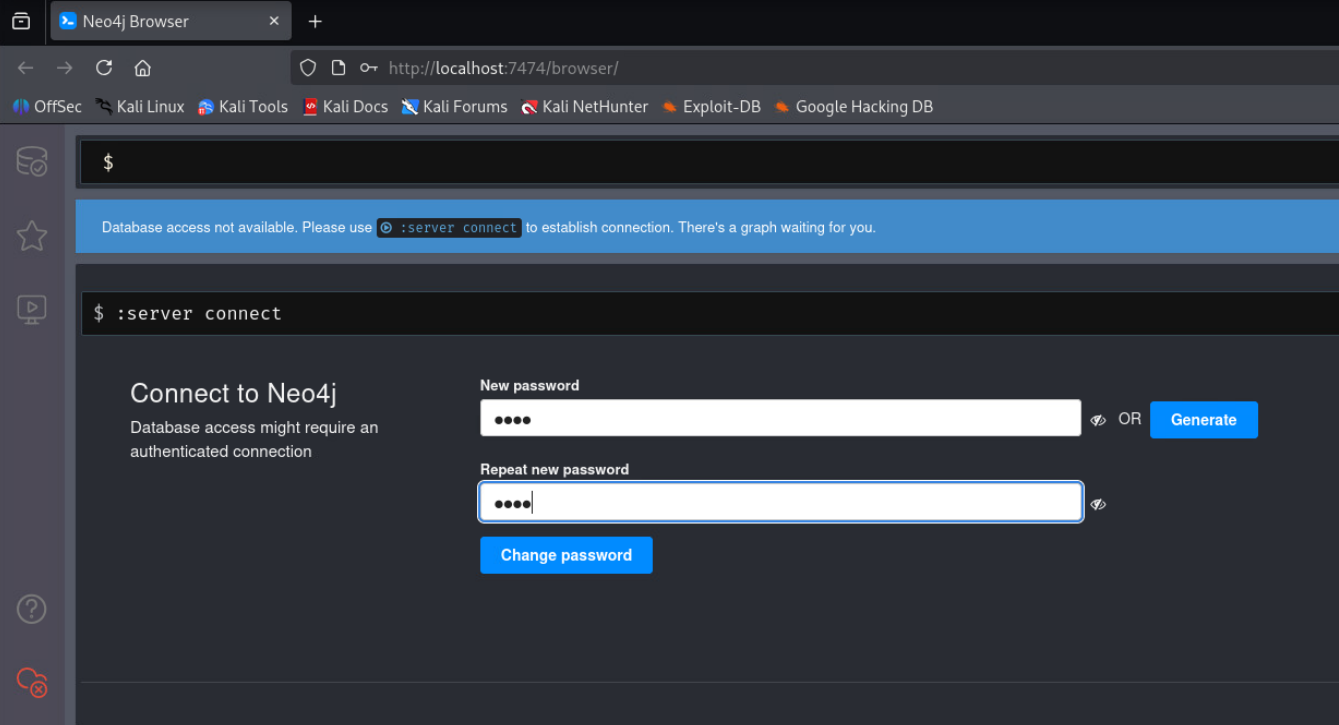
3. Change Neo4j Password. Open http://localhost:7474 in your browser, log in with neo4j/neo4j, and set a new password.
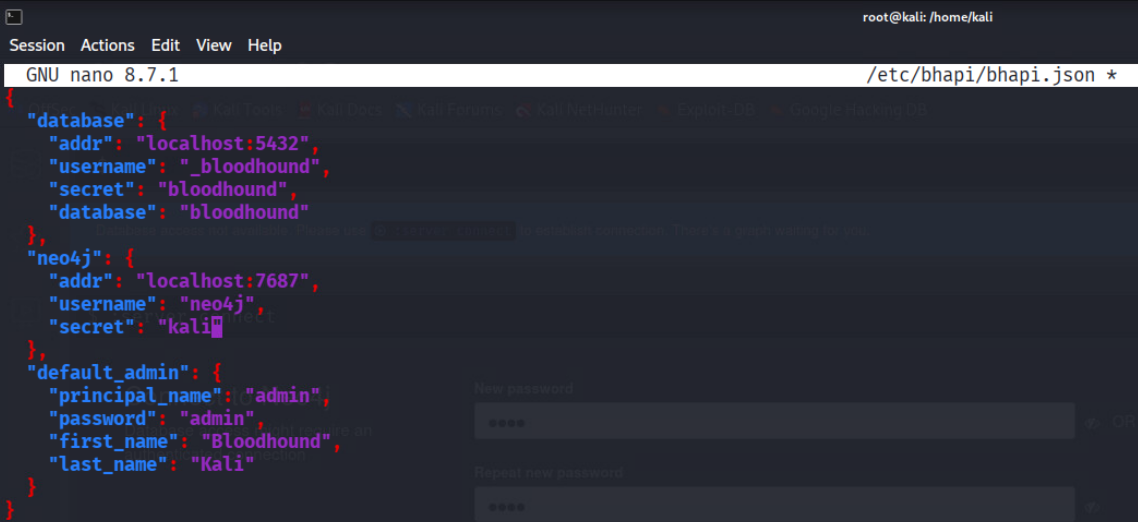
4. Configure BloodHound API (bhapi.json). Update the /etc/bhapi/bhapi.json file so that the Neo4j credentials match what you just set. This typically involves editing the JSON and replacing the “secret” with the new password.
5. Start the BloodHound server. Now run ==bloodhound-start== (the command). This will launch the BloodHound API and GUI. It should open ==http://127.0.0.1:8080== or similar in your browser.
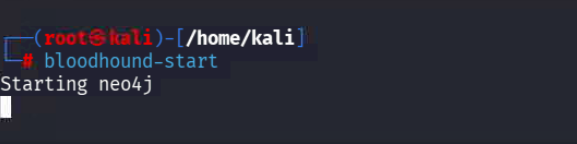
6. Log in to the GUI. Use the default admin creds from bhapi.json (often admin/admin). You should see an empty BloodHound interface with an “Upload” prompt.
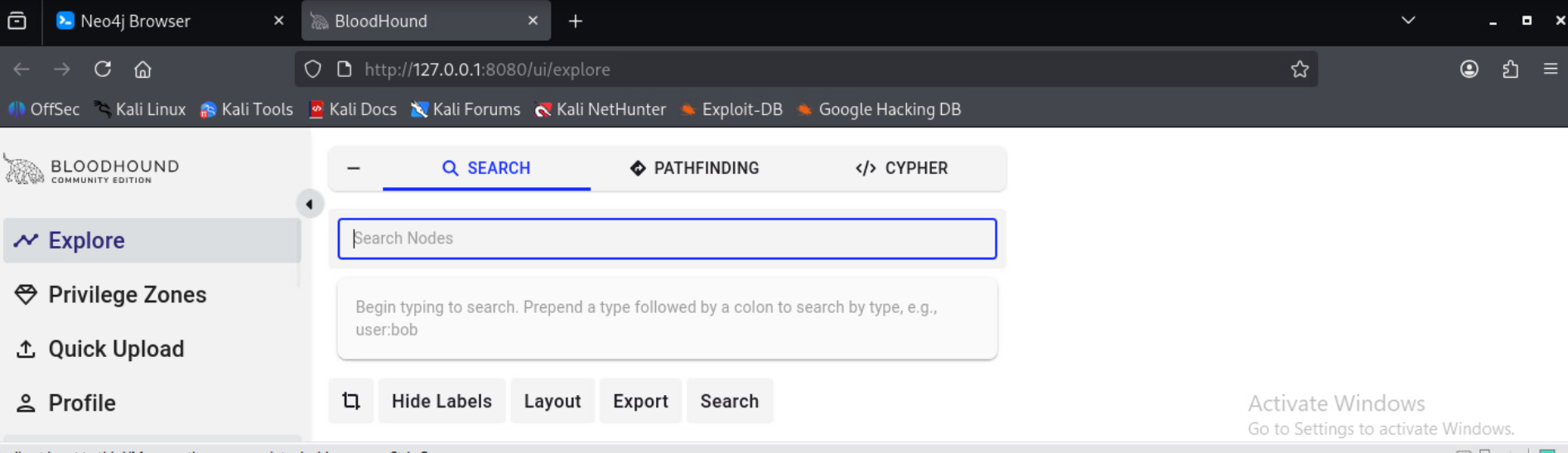
At this point, BloodHound is ready to receive data. If you don’t have real AD data, there’s usually a sample dataset link, or you can drag-and-drop example JSONs into the UI.
Running BloodHound: Data Collection Methods
The key step is gathering data from the Active Directory domain. BloodHound offers multiple methods depending on your foothold and privileges:
- SharpHound (C# ingestor): This is the classic method. If you already have a domain-joined Windows machine (or an Active Directory admin console) where you can run code, you execute SharpHound on that host. It can be launched via PowerShell (fileless, in-memory) or as an EXE. SharpHound will walk the AD, collecting things like user accounts, group memberships, ACLs, session info, local admins, trusts, SPNs, and more. After it finishes, it outputs a BloodHound zip with JSON data. (Defenders: be aware that SharpHound’s PowerShell is often detected by modern EDRs, so attackers may try to obfuscate it.)
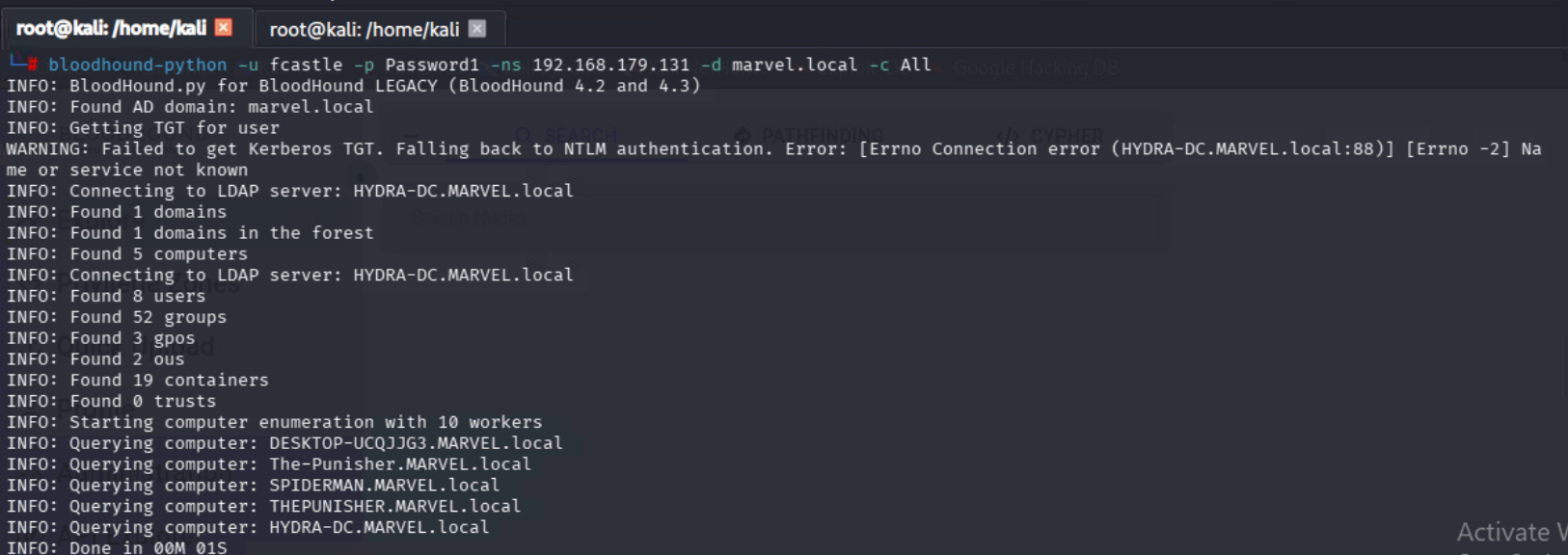
- BloodHound.py (LDAP remote): If you have valid domain credentials but no direct shell, you can run BloodHound.py from a Pentest box (like Kali). It uses pure LDAP to query the domain controller. For example:
==bloodhound-python -u fcastle -p Password1 -ns 192.168.179.131 -d marvel.local -c All==
This command (example) tells BloodHound.py to log in as ==fcastle== to the DC at ==192.168.179.131== and collect all data. The result is again a ZIP you upload. This method is stealthier (no code on the target) but requires the DC to allow your credentials to run LDAP queries.
- Metasploit Post-Module: Metasploit has a module post/windows/gather/bloodhound that invokes SharpHound on a compromised host. This is handy if you already have a Meterpreter session.
Exploring BloodHound Results
Once your data is in BloodHound, the fun begins. The GUI has a Search tab on the left where you can query objects by name, or you can use built-in queries (in the Queries menu) like:
- “Shortest Paths to Domain Admin”: Finds the shortest directed path from any non-admin to the Domain Admin user/group.
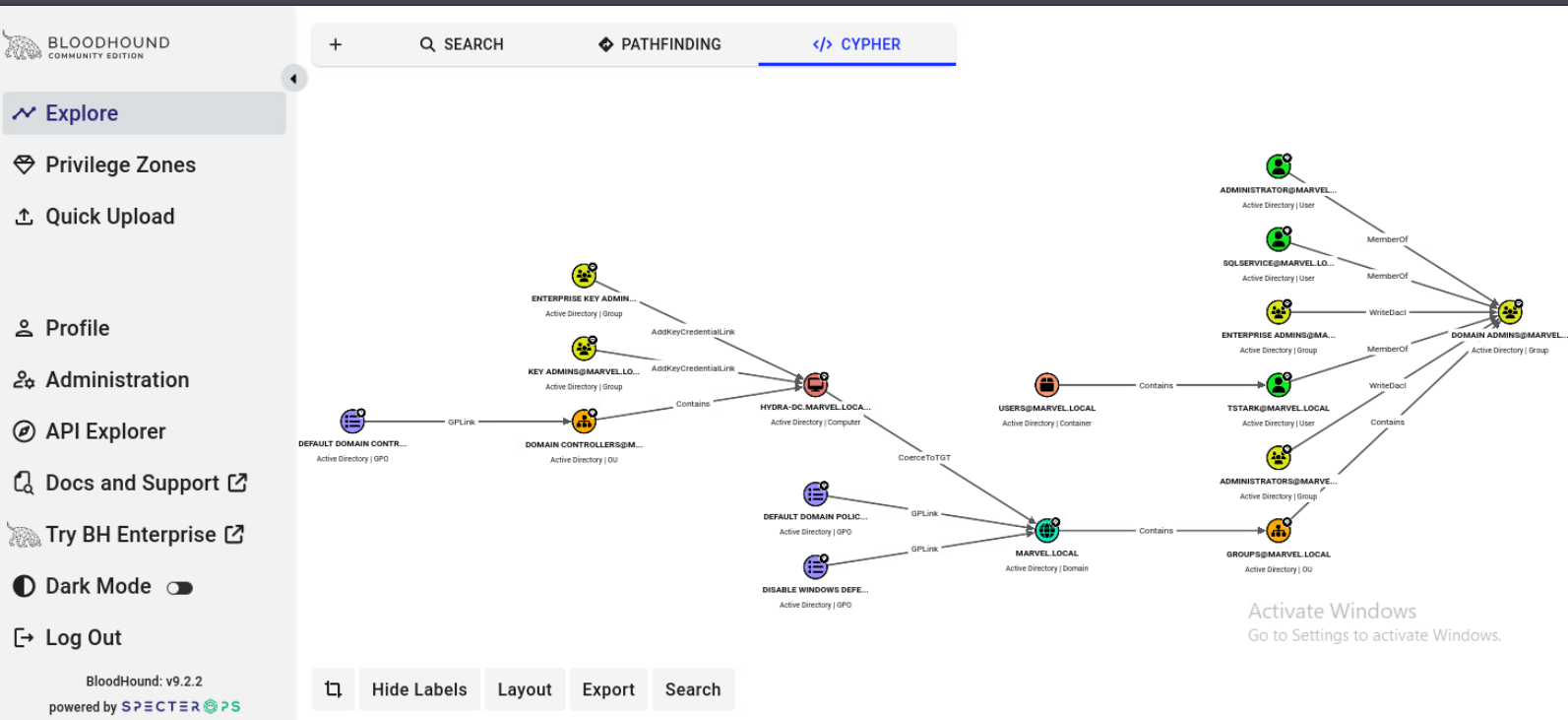
- “All Kerberoastable Accounts”: Lists accounts with SPNs (service principal names) that can be requested for Kerberoasting
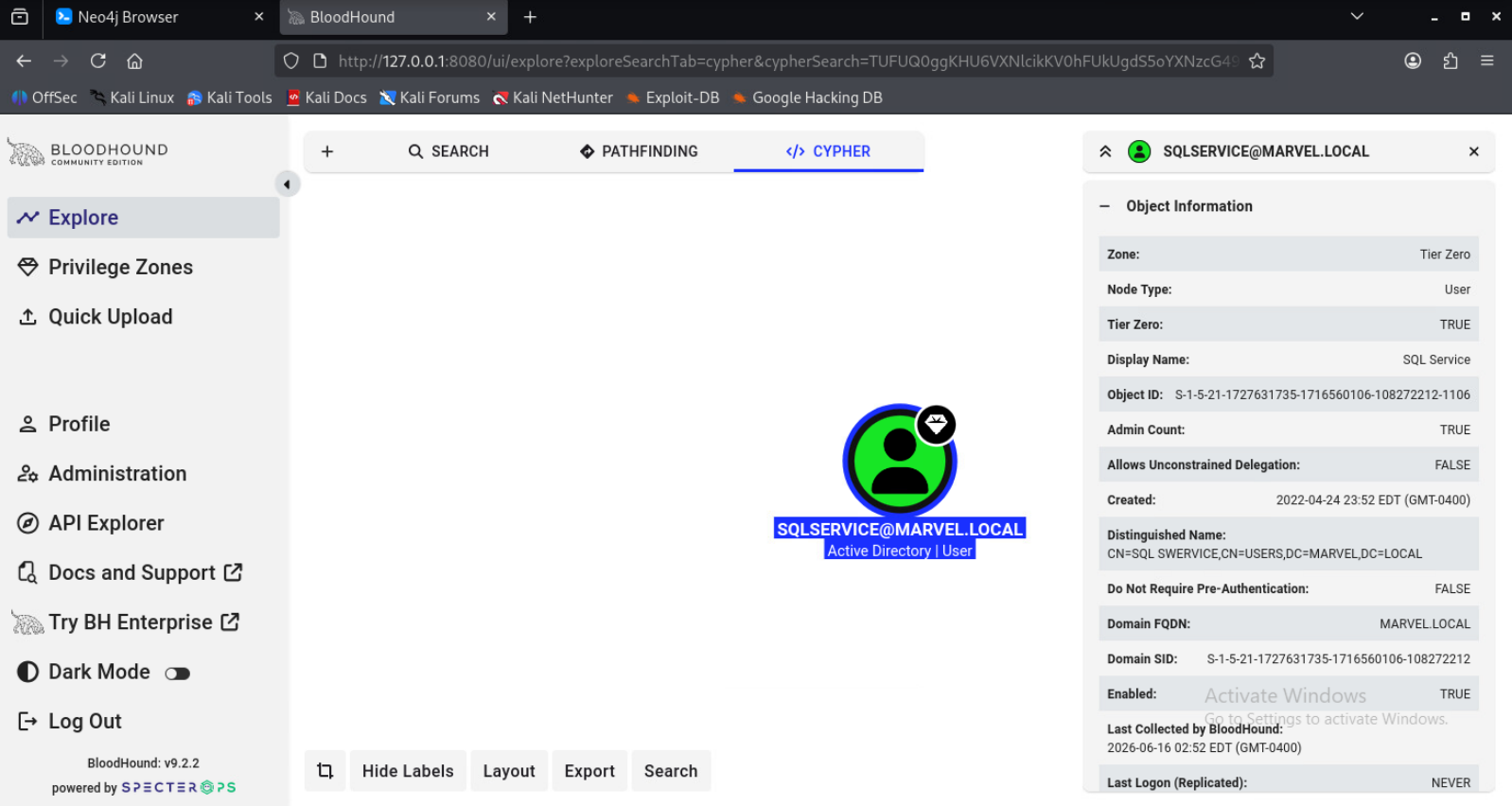
- “Users with DCSync Rights”: Shows accounts that could perform a DCSync (replicate directory changes) to steal hashes.
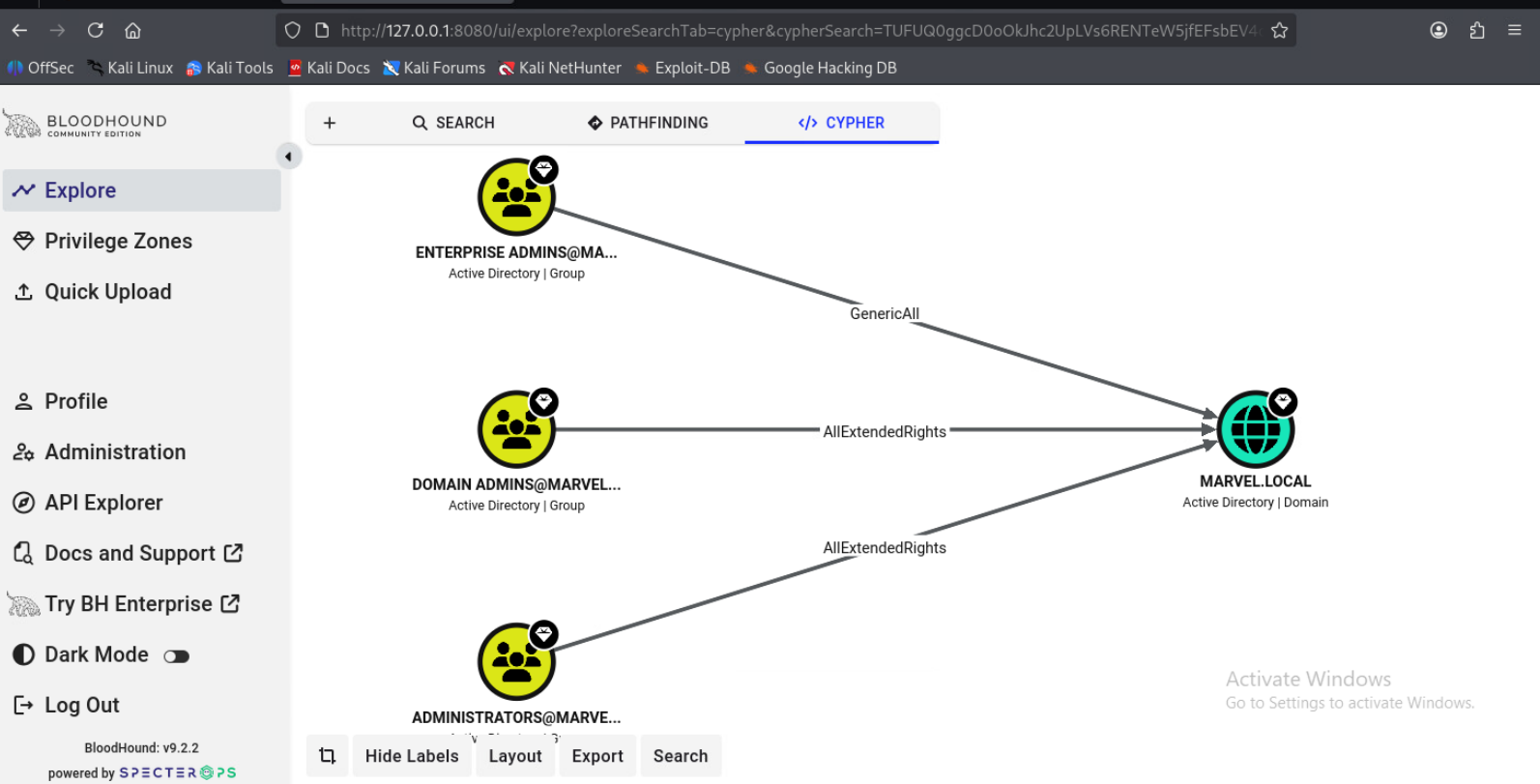
These queries use Cypher but you just click-and-run them. The results highlight nodes in the graph so you can visually see the chain of trust or rights.
You can also manually click on a node (e.g., a user) to expand its edges. For example, clicking a user will reveal which groups they belong to and what machines they have local admin sessions on. In one sample BloodHound graph, the UI identified a user “RAM@IGNITE.LOCAL” who was in Backup Operators and Remote Management Users, groups that can be abused (backup ops can read system hives, RM users can remote login). Another user, “Tom,” had a ForceChangePassword right over another user, a classic AD-DACL abuse where he can reset that user’s password without knowing it.
Common BloodHound Use Cases
In practice, BloodHound is used to uncover the most dangerous AD attack paths. Common findings include:
- Shortest Path to Domain Admin: Finds how any user could reach the Domain Admin group through group memberships and rights.
- Kerberoastable Accounts: Identifies which service accounts have Kerberos SPNs, a target for offline password-cracking.
- AS-REP Roasting: Lists accounts that don’t require pre-auth, allowing attackers to request their TGTs without pre-auth and then brute-force them.
- DCSync Rights: Flags users/groups that have “Replication Get Changes” rights on the domain, essentially, who can impersonate a DC to steal all user hashes.
- Unconstrained/Constrained Delegation Abuse: Shows where computer accounts have delegation rights, which attackers can exploit to get tickets for higher-privilege accounts.
- ACL (DACL) Abuse: Reveals where low-privilege accounts are accidentally granted powerful Active Directory permissions (like GenericAll) on higher-privilege objects.
Detection and Hardening
Because BloodHound is so effective, it is a favorite for malicious recon. BloodHound has been documented in many security breach reports and that attackers need network access to run it. Fortunately, organizations can fight back. Here are some strategies:
- Least Privilege: The simplest defense is not to give out more information than necessary. If regular users have minimal permissions in AD, there’s less to enumerate. Apply least-privilege principles to domain users to reduce what BloodHound can see. This means auditing group memberships, removing excessive privileges, and cleaning up stale/inactive accounts.
- Monitor LDAP Activity: BloodHound’s collectors rely on LDAP queries. A large burst of atypical LDAP queries is a red flag. For example, SharpHound might query every group, every user’s session, and every ACL, which looks very different from normal user activity. Monitor for “unusual LDAP activity” and investigate quickly if you spot bulk enumeration. Many SIEMs can spot spikes in AD queries or queries that enumerate all groups, all sessions, etc.
- EDR/AV Detection (SharpHound): The SharpHound PowerShell loader is fileless and stealthy, but Windows Defender/EDR can catch it. The Microsoft Defender research team has developed machine-learning AMSI models specifically to detect SharpHound’s behavior.
- Harden Exposure Points: Some mitigations are more structural: enforce MFA and strong password policies (since BloodHound by itself does not break passwords, but it leverages credentials it finds). Weak passwords and non-expiring credentials are still common; tightening those policies means that even if BloodHound finds a service account, the attacker still needs to break the password.
- Alert on Telltale Queries: Some specific indicators can be monitored. For example, if a user queries ldapEnrichedRoles or does repeated “get-ADuser, memberof” on a wide scale, it is suspicious. Or if you see RPC LDAP RPC calls on port 445 from unusual hosts. ExtraHop offers a “BloodHound Enumeration Activity” detection, which, in their NDR product, flags the DC being queried by an enumeration tool.
Quick BloodHound Tips
- Use the Latest Version: Always get the latest BloodHound CE from the official GitHub. New releases fix bugs and add queries.
- Try Sample Data: If you are new to BloodHound, import the sample dataset to learn the UI and queries without risk.
- Learn Cypher Queries: BloodHound allows custom queries via Cypher. Learning a bit of Cypher lets you write your own searches.
- Segment and Controls: If possible, network-segment AD such that domain controllers only accept LDAP from known hosts (helps reduce risk of unknown clients collecting data).
Conclusion
BloodHound is ultimately a proactive tool for defense as much as offense. By running BloodHound on your own test network or in a controlled audit (often called “Blue teaming with Red team tools”), you can find and fix insecure paths before bad guys do. For example, after discovering with BloodHound that a service account has Delegate Privilege to reset the Domain Admin’s password (a real case), a team can tighten the ACL and eliminate that attack vector.
At the same time, defenders must build processes around monitoring. The more you know about your AD’s normal state, the quicker you’ll notice when something like BloodHound lights up the logs. Use baseline logs, SIEM alerts for LDAP spikes, and keep endpoint protections current.
This is where structured training becomes important. InfosecTrain’s Certified Ethical Hacker Training helps learners understand tools like BloodHound from an ethical hacking and defensive security perspective, while InfosecTrain’s Red Team Operation Training course takes it further by teaching how attackers chain reconnaissance, AD enumeration, privilege escalation, lateral movement, and attack path analysis in real-world enterprise environments. Together, these programs help professionals move beyond theory and build the practical mindset needed to identify attack paths, validate risks, and strengthen defenses.
Ready to level up? Enroll in InfosecTrain’s CEH Training and Red Team Operations Training course today and build hands-on skills that matter in real-world cybersecurity.
- Top Tools Covered in Red Team Operation Training from InfosecTrain
- Ethical Hacking in the Age of AI
- How to Perform Kerberoasting and Pass-the-Ticket on Linux?

TRAINING CALENDAR of Upcoming Batches For Red Team Training
| Start Date | End Date | Start - End Time | Batch Type | Training Mode | Batch Status | |
|---|---|---|---|---|---|---|
| 05-Dec-2026 | 13-Feb-2027 | 19:00 - 23:00 IST | Weekend | Online | [ Open ] | |
| 06-Mar-2027 | 08-May-2027 | 19:00 - 23:00 IST | Weekend | Online | [ Open ] |

TRAINING CALENDAR of Upcoming Batches For CEH v13 AI Training
| Start Date | End Date | Start - End Time | Batch Type | Training Mode | Batch Status | |
|---|---|---|---|---|---|---|
| 10-Oct-2026 | 29-Nov-2026 | 19:00 - 23:00 IST | Weekend | Online | [ Open ] | |
| 21-Nov-2026 | 20-Dec-2026 | 09:00 - 13:00 IST | Weekend | Online | [ Open ] | |
| 12-Dec-2026 | 24-Jan-2027 | 19:00 - 23:00 IST | Weekend | Online | [ Open ] | |
| 16-Jan-2027 | 21-Feb-2027 | 09:00 - 13:00 IST | Weekend | Online | [ Open ] | |
| 20-Feb-2027 | 28-Mar-2027 | 19:00 - 23:00 IST | Weekend | Online | [ Open ] | |
| 13-Mar-2027 | 18-Apr-2027 | 09:00 - 13:00 IST | Weekend | Online | [ Open ] |
Frequently Asked Questions
What is BloodHound in Active Directory enumeration?
BloodHound is an open-source tool that maps relationships inside Active Directory using graph analysis. It helps visualize how users, groups, and permissions connect, revealing hidden paths attackers could exploit. Both security teams and attackers use it to understand privilege escalation risks quickly.
How does BloodHound gather information from Active Directory?
BloodHound collects data using tools like SharpHound or BloodHound.py, which query Active Directory via protocols like LDAP and SMB. It gathers details such as users, groups, sessions, and permissions, then converts them into visual graphs for analysis.
Why do attackers and defenders use BloodHound?
Attackers use BloodHound to quickly identify privilege escalation paths that are hard to detect manually. Defenders use the same insights to audit their environment, fix misconfigurations, and reduce security risks before they can be exploited.
How can organizations detect BloodHound activity in their network?
BloodHound activity can be detected by monitoring unusual spikes in LDAP queries or abnormal Active Directory enumeration behavior. Security tools like EDR and NDR solutions can also flag SharpHound execution or suspicious data collection patterns.
What are common queries or outputs in BloodHound analysis?
BloodHound includes built-in queries like “Shortest Path to Domain Admin” or “Kerberoastable Accounts.” These queries generate visual paths showing how users or groups can gain higher privileges, making it easier to identify and fix security gaps.