Device-Code Phishing Explained: The MFA Bypass Employees Must Know
Quick Insights:
Device-code phishing is a social engineering attack that abuses a legitimate OAuth device authorization flow. Instead of stealing a password through a fake login page, the attacker generates a real device code and tricks the victim into entering it on a legitimate sign-in page. Once the victim completes login and MFA, the attacker receives valid access tokens and can access the victim’s cloud account, email, files, and connected services.
For years, employees were told one simple rule: “Check the login page before entering your password.” That advice is still useful, but modern phishing has evolved beyond fake websites and suspicious-looking URLs.
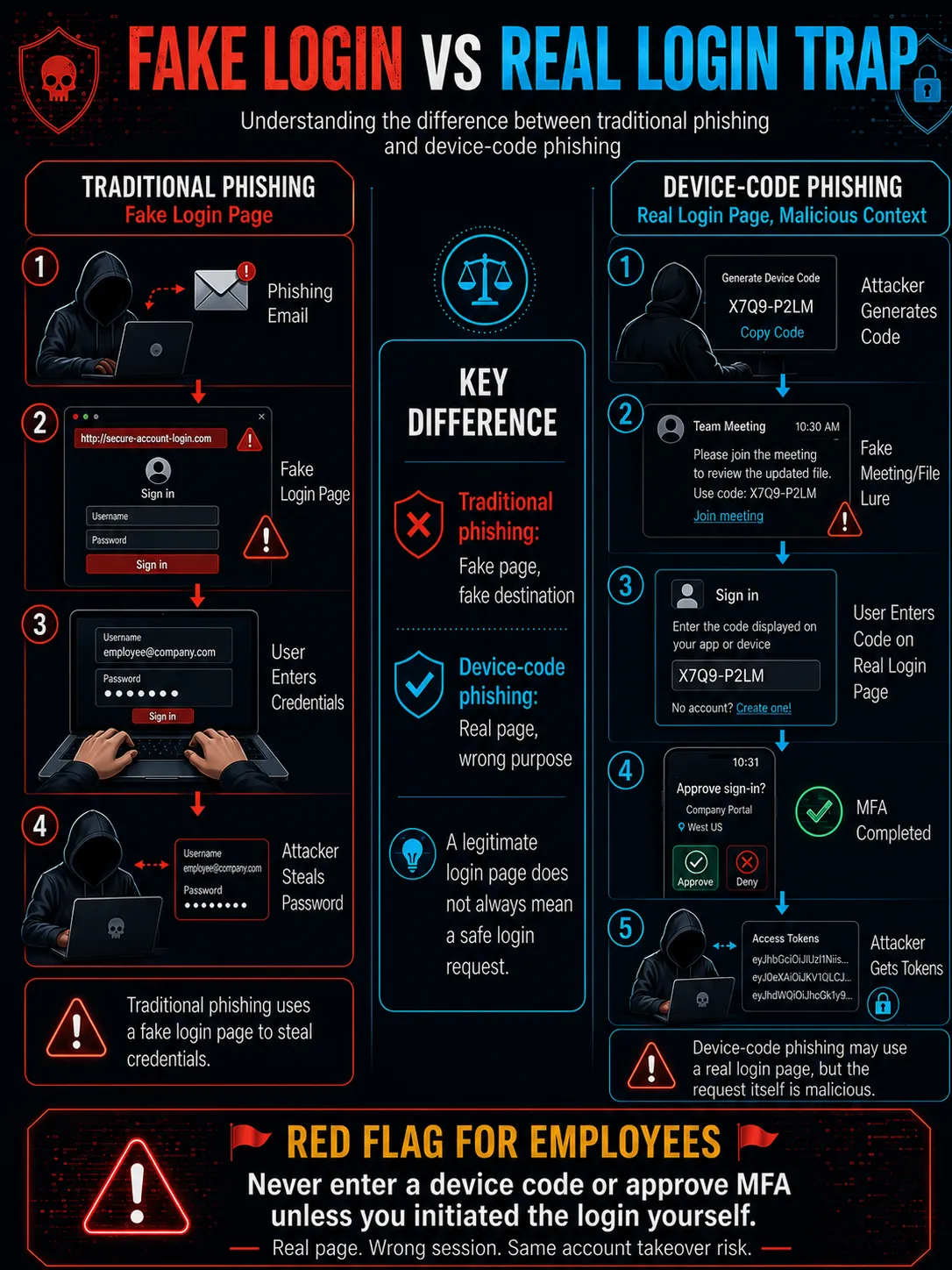
Device-code phishing is one of the most dangerous examples of this shift. In this attack, the login page may be real. The MFA prompt may also be genuine. The authentication process may look completely normal. Nothing may look obviously fake. Yet by entering an attacker-provided code, the employee can unknowingly authorize the attacker’s session.
This is why device-code phishing is often described as an MFA bypass. It does not always “break” MFA. Instead, it manipulates the employee into completing MFA for the attacker’s session.
What Is Device-Code Authentication?
Device-code authentication, also called the OAuth 2.0 device authorization grant, is a legitimate login method designed for devices that are hard to type on, such as smart TVs, printers, IoT devices, and command-line tools.
A normal device-code login works like this:
- A device displays a short code.
- The user visits a login page on another device, such as a laptop or mobilephone.
- The user enters the code.
- The user signs in and completes MFA.
- The original device receives access.
This flow is useful and legitimate when the user starts it intentionally.
The risk begins when an attacker generates the code and tricks the employee into entering it.
What Is Device-Code Phishing?
Device-code phishing is an attack in which a cybercriminal generates a valid device code and convinces an employee to enter it on a legitimate login page. They send it to a victim through email, chat, SMS, meeting invites, QR codes, or fake file-sharing messages. The attacker may pretend that the code is required to join a meeting, open a shared file, verify access, or complete a routine login. In reality, they are authorizing the attacker’s device or session.
Unlike traditional phishing, the attacker does not always need to steal the password directly. The goal is to steal tokens. Tokens are digital proof that a user has already authenticated. If attackers obtain valid access or refresh tokens, they may be able to access email, files, chats, and cloud services without logging in with the password again.
How Device-Code Phishing Bypasses MFA
Device-code phishing is often referred to as an MFA bypass because the attacker can gain access even when MFA is enabled. MFA is not always bypassed technically. It is misused.
Here is how the attack works:
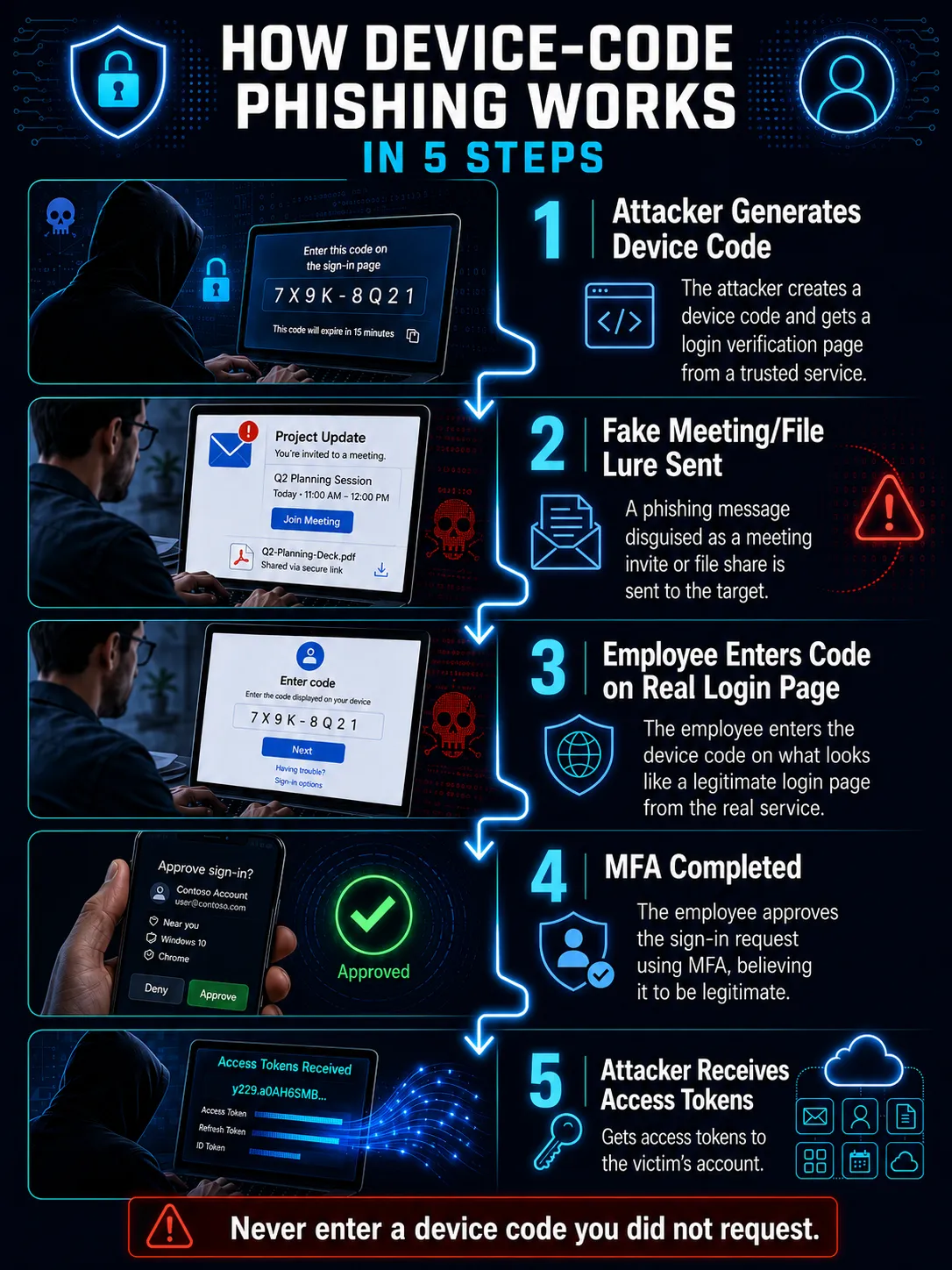
From the employee’s point of view, it may look like nothing happened or the meeting/document did not open. From the attacker’s perspective, the account may now be accessible.
Common Device-Code Phishing Lures
Attackers usually do not say, “Please authorize my device.” They wrap the request in a believable work scenario.
1. Fake Microsoft Teams Meeting Invite
The employee receives a message that looks like a Teams meeting invite. The message asks them to enter a code to join or verify access.
2. Shared Document or RFP Request
The attacker sends a file-sharing message related to invoices, proposals, contracts, RFPs, or internal documents.
3. Message from a Trusted Person
Attackers may impersonate a senior executive, vendor, recruiter, customer, or colleague. In some cases, they build rapport through messaging apps before sending the phishing request.
4. “Verification Required” Prompt
The employee may be told that their account needs verification before they can access a tool, meeting, or cloud file.
5. QR Code-Based Login
Some attacks may include QR codes that push employees toward a code-entry workflow, making the process feel quick and mobile-friendly.
Warning Signs of Device-Code Phishing
Employees should pause if they see any of these signs:
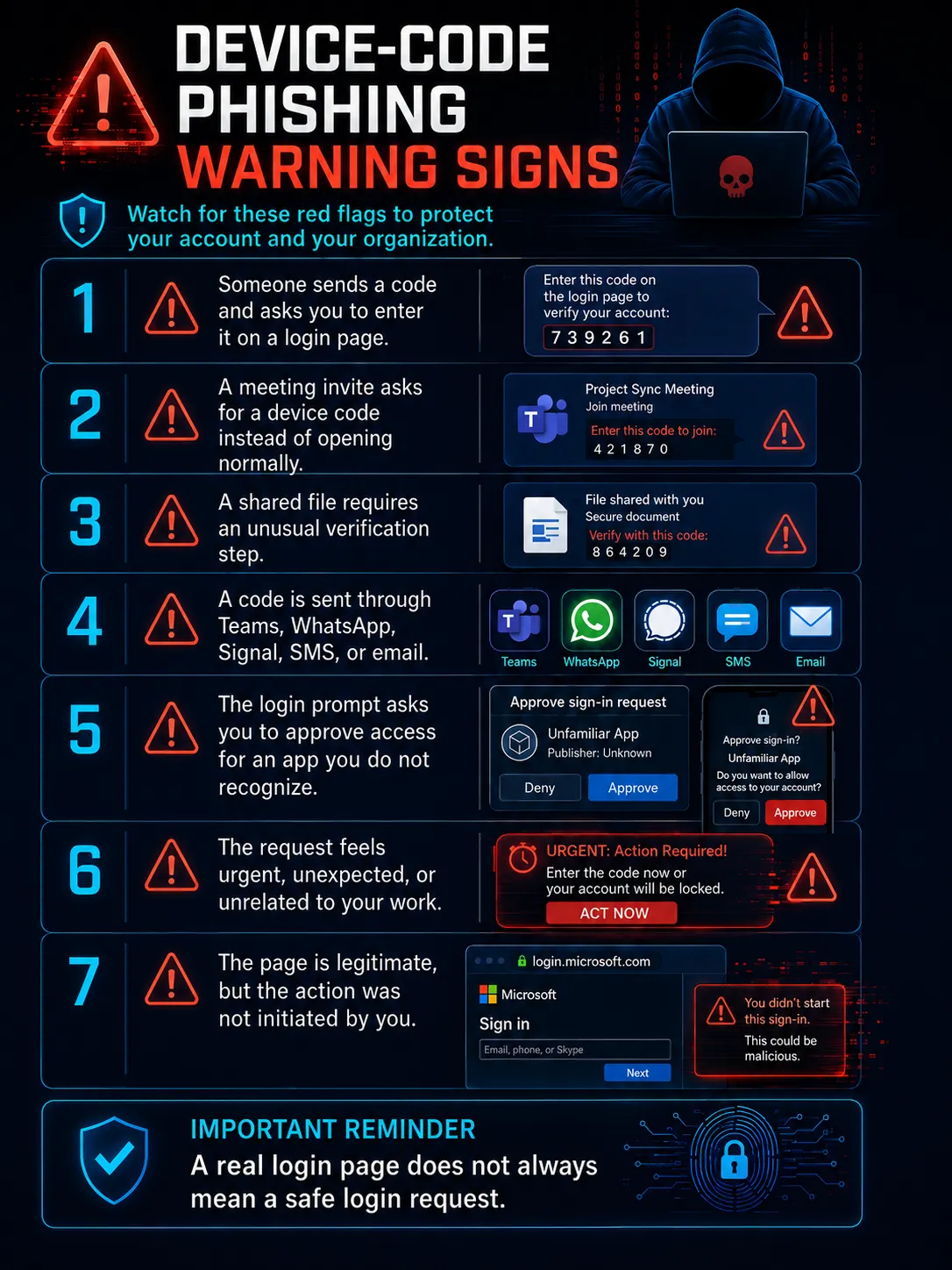
The golden rule: Never enter a device code that someone else sent you. Only enter a device code when you personally initiated the login on a device you own or manage.
How Organizations Can Prevent Device-Code Phishing
1. Block Device-Code Flow Where It Is Not Needed
Not every employee or application requires device code authentication. Organizations should review whether this flow is necessary and restrict it wherever possible.
2. Use Conditional Access
Security teams should restrict risky authentication flows, enforce trusted-device requirements, and apply location-, risk-, and app-based controls.
3. Move Toward Phishing-Resistant MFA
Traditional MFA remains important, but organizations should adopt phishing-resistant methods, such as FIDO2 security keys, passkeys, and certificate-based authentication, for high-risk users and critical systems.
4. Monitor for Suspicious Device-Code Authentication
Security teams should watch for suspicious device-code logins, unusual token activity, unfamiliar devices, impossible travel, rare locations, and abnormal access to cloud applications.
5. Revoke Tokens After Suspected Compromise
If device-code phishing is suspected, password reset alone may not be enough. Security teams should revoke active sessions, refresh tokens, and re-authenticate the user.
6. Train Employees on Code-Based Phishing
Employees should understand that phishing is not limited to fake websites. Attackers can abuse real login pages, real MFA prompts, QR codes, and legitimate authentication flows.
What Employees Should Do If They Entered a Suspicious Device Code
If an employee suspects they entered a code from an attacker, they should act immediately. They should:
- Report the incident to the IT or security team
- Avoid deleting the message or email
- Share screenshots, sender details, and the time of interaction
- Sign out from all sessions if instructed
- Change the password only if the security team advises it
- Allow IT to revoke tokens and investigate account activity
The faster the report is made, the better the chance of stopping token abuse, mailbox access, and lateral phishing.
In Conclusion
Device-code phishing is a powerful reminder that cybersecurity is not just about stronger tools. It is also about understanding how trusted systems can be misused. MFA remains important, but employees must know that not every MFA prompt is safe. A genuine login page can still be part of a phishing attack if the user is entering a code they did not initiate.
The best defense is layered: block unnecessary device-code flows, monitor suspicious token activity, use phishing-resistant MFA, and train employees to question unexpected code-entry requests. In today’s cloud-first workplace, identity is the new attack surface. Protecting it starts with awareness.
Strengthen Your Team Against Modern Phishing Attacks
Device-code phishing proves that attackers are no longer relying only on fake login pages. They are abusing trusted workflows, cloud identity systems, OAuth flows, and employee habits. InfosecTrain helps professionals and organizations build practical cybersecurity skills through expert-led training in phishing defense, SOC operations, cloud security, identity security, incident response, and security awareness.
Want your team to recognize and respond to modern phishing attacks before they become account takeovers? Explore InfosecTrain’s cybersecurity training programs and build a workforce that can identify, report, and stop identity-based threats.

TRAINING CALENDAR of Upcoming Batches For CC Training
| Start Date | End Date | Start - End Time | Batch Type | Training Mode | Batch Status | |
|---|---|---|---|---|---|---|
| 23-Nov-2026 | 03-Dec-2026 | 20:00 - 22:00 IST | Weekday | Online | [ Open ] | |
| 04-Jan-2027 | 14-Jan-2027 | 20:00 - 22:00 IST | Weekday | Online | [ Open ] | |
| 08-Feb-2027 | 18-Feb-2027 | 20:00 - 22:00 IST | Weekday | Online | [ Open ] | |
| 08-Mar-2027 | 18-Mar-2027 | 20:00 - 22:00 IST | Weekday | Online | [ Open ] |
Frequently Asked Questions
What is device-code phishing?
Device-code phishing tricks users into entering an attacker-generated code on a real login page. After the user completes MFA, the attacker may receive valid access tokens.
Is device-code phishing a Microsoft vulnerability?
No. It abuses an industry-standard authentication flow through social engineering, not a flaw in Microsoft’s code.
Can MFA stop device-code phishing?
MFA helps, but attackers can trick users into approving access for the attacker’s session. Stronger controls, such as Conditional Access and phishing-resistant MFA, are needed.
Why is device-code phishing hard to detect?
Because the login page is often legitimate. The real red flag is the unexpected code request, not the website itself.
What should employees do if they receive a device code?
Do not enter it. Verify through an official channel and report it to IT or the security team.
How can companies reduce device-code phishing risk?
Block unnecessary device-code flows, monitor suspicious OAuth activity, use phishing-resistant MFA, revoke risky tokens, and train employees regularly.