What is Cloud Architecture? Types, Components, & Benefits
Quick Insights:
Cloud architecture is the blueprint that defines how cloud resources, applications, data, networks, security, and services work together. It can take different forms, including public, private, hybrid, and multi-cloud architectures, depending on business and technical needs. Core components such as compute, storage, databases, networking, IAM, security, observability, and automation help create cloud environments that are scalable, reliable, secure, and cost-effective. Effective cloud architecture also relies on practices such as designing for failure, applying least-privilege access, automating repetitive tasks, monitoring workloads, controlling costs, and regularly reviewing the architecture as requirements evolve.
Cloud computing has completely changed how businesses build and manage their IT systems. A few years ago, the main concern was: “Where should we keep our servers?” Today, the challenge is much broader. Companies need to figure out how their applications, data, networks, security, and cloud services can work together efficiently, securely, and at scale.
That’s where cloud architecture comes in.
Think about building a house. Buying bricks, doors, electrical wiring, and plumbing doesn’t automatically give you a good home. Someone still needs to decide where everything goes and how the pieces connect. Cloud environments work in much the same way. Compute, storage, databases, APIs, networks, identity systems, and security services need a carefully planned structure.
A strong cloud architecture helps an organization build systems that can scale when demand rises, remain available when individual components fail, protect sensitive information, and avoid unnecessary cloud spending.
What is Cloud Architecture?
Cloud architecture is the way cloud technologies, services, and resources are designed and organized to support applications and workloads. Think of it as the blueprint for a cloud environment. It shows how computing power, storage, networks, databases, security, and other cloud services connect to support applications and day-to-day operations.
A well-designed cloud architecture helps businesses build systems that are secure, reliable, scalable, and flexible enough to adapt as their needs change.
Types of Cloud Architecture
There is no single cloud architecture that works for every business. The right approach depends on several factors, including where applications and data need to run, how much control the organization wants, and its security, performance, and compliance requirements.
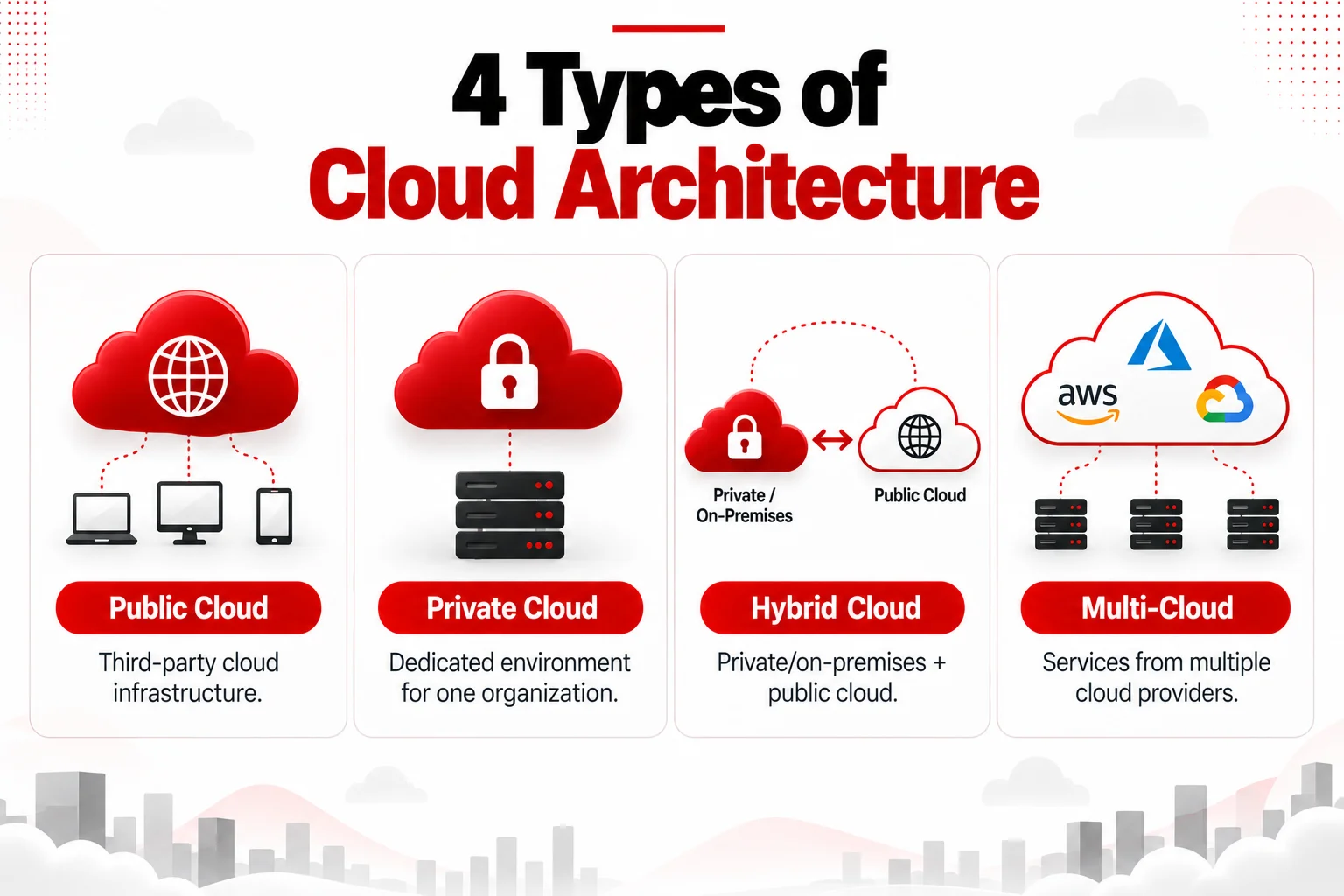
Here are the four main types of cloud architecture.
1. Public Cloud Architecture
In a public cloud architecture, businesses use computing resources and services provided over the internet by a third-party cloud provider. Instead of buying and maintaining their own physical infrastructure, they can access the resources they need when they need them. These services can include computing power, storage, databases, networking, analytics, AI, and many other tools.
Common use cases include:
Web applications, development and testing environments, data analytics, backup systems, SaaS applications, and workloads with changing resource requirements.
2. Private Cloud Architecture
A private cloud architecture is built for the exclusive use of one organization. It can run in the company’s own data center or be hosted and managed by a third-party provider.
Businesses may choose a private cloud when they want more control over their infrastructure or need an environment tailored to specific security, governance, or compliance requirements. That additional control comes with more responsibility. Organizations may need to handle infrastructure maintenance, capacity planning, upgrades, security, and costs themselves, depending on how the private cloud is managed.
3. Hybrid Cloud Architecture
A hybrid cloud architecture brings public cloud services together with private cloud or on-premises infrastructure. Rather than moving everything to the public cloud, a business can decide where each application or workload makes the most sense.
For example, a company might keep sensitive databases in its own environment while running its customer-facing applications in the public cloud.
Hybrid architecture can help during cloud migrations because companies don’t have to move every workload at once.
4. Multi-Cloud Architecture
A multi-cloud architecture involves using services from two or more cloud providers. For example, a company might use one provider to host its applications while relying on another for analytics, AI, backups, or other specialized services.
This approach gives businesses more choice and allows them to use services that best fit different needs. However, using multiple cloud providers doesn’t automatically make a system more reliable.
Key Components of Cloud Architecture
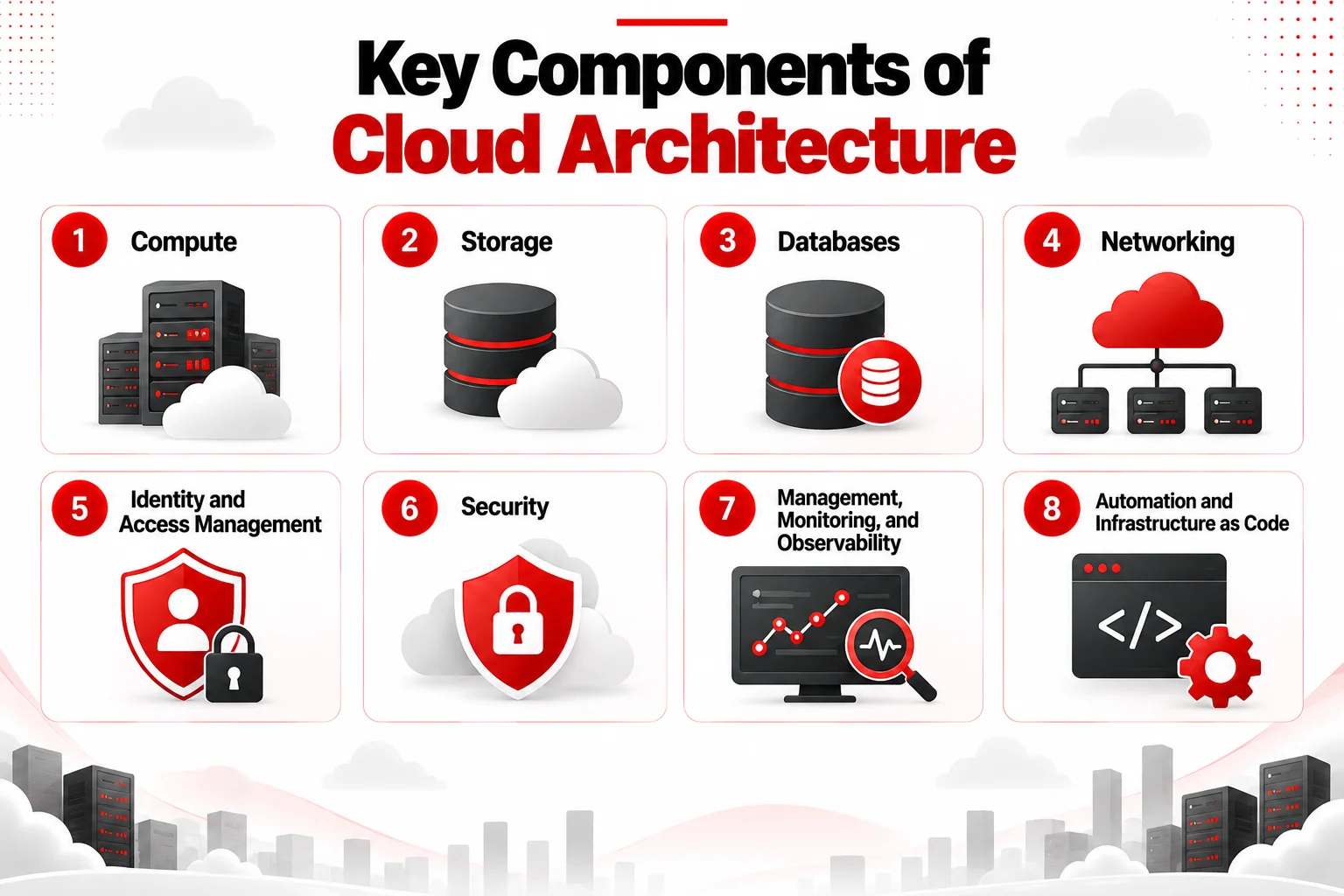
A cloud architecture can contain hundreds of individual services, but most environments are built around several fundamental layers.
1. Compute
Compute resources provide the processing power needed to run applications and handle workloads. Depending on what they are building, organizations can choose from several compute options, including:
- Virtual machines
- Containers
- Kubernetes clusters
- Serverless functions
- Managed application platforms
The right choice depends on factors such as workload behavior, scalability, portability, operational overhead, and cost.
2. Storage
Cloud storage holds files, backups, application assets, logs, media, archives, and other data. Architects usually choose among object, block, and file storage depending on how the information will be accessed.
A backup archive, for example, has very different performance requirements from the storage attached to a transactional application.
3. Databases
Databases are at the heart of most modern applications, storing and organizing the information those applications need to work. Depending on the type of data and how it’s used, businesses may rely on relational databases, NoSQL databases, in-memory databases, graph databases, or data warehouses.
Backup, replication, security, and disaster recovery requirements all play an important role in deciding which database technology is the right fit.
4. Networking
Networking connects users, applications, cloud services, data centers, and other environments. Important elements can include:
- Virtual networks
- Subnets
- Routing
- DNS
- Load balancers
- VPNs
- Firewalls
- Private connectivity
- Content delivery networks
Good network architecture also limits unnecessary exposure. For example, a database generally shouldn’t be directly accessible from the public internet simply because the application using it needs internet access.
5. Identity and Access Management
IAM determines who can access cloud resources and what they’re allowed to do once they have access. It isn’t limited to employees or administrators. IAM also manages access for applications, APIs, devices, workloads, and automated processes that interact with cloud resources.
A good IAM setup gives users and systems only the permissions they actually need to perform their tasks. This approach, known as the principle of least privilege, helps reduce unnecessary access and lowers the risk of security issues.
6. Security
Security should be built into cloud architecture from the beginning, not treated as something to add after applications and services are already running. Protecting a cloud environment involves multiple layers. Depending on the organization and its workloads, these can include:
- Encryption
- IAM controls
- Network segmentation
- Secrets and key management
- Vulnerability management
- Logging and monitoring
- Web application protection
- Threat detection
- Incident response
- Data protection
AWS, for example, identifies identity and access management, detection, infrastructure protection, data protection, incident response, and application security among its core cloud-security best-practice areas.
7. Management, Monitoring, and Observability
Once a cloud environment is running, teams need a clear view of what’s happening across their applications and infrastructure. Different types of data provide different insights. Metrics can indicate that CPU usage is rising. Logs might reveal why an application failed. Traces can show where latency occurred across distributed services.
Together, monitoring, logging, tracing, alerting, and auditing allow teams to understand the health, performance, and security of cloud workloads.
8. Automation and Infrastructure as Code
Manually configuring dozens or hundreds of cloud resources quickly becomes difficult to control. Infrastructure as Code (IaC) allows teams to define infrastructure using machine-readable configuration. This makes deployments more repeatable and easier to review, version, automate, and reproduce.
Automation can also support provisioning, configuration management, scaling, testing, backup, deployment, and incident response.
What is the Role of a Cloud Architect?
A Cloud Architect designs the overall structure of cloud environments and translates business and technical requirements into workable cloud solutions. Their job is to decide how applications, infrastructure, networking, security, and cloud services should work together. Much of the role involves making practical trade-offs.
For example, improving availability may require additional resources and increase costs, while choosing managed services can reduce maintenance but may affect portability. A Cloud Architect helps teams weigh these options and choose an approach that fits their requirements.
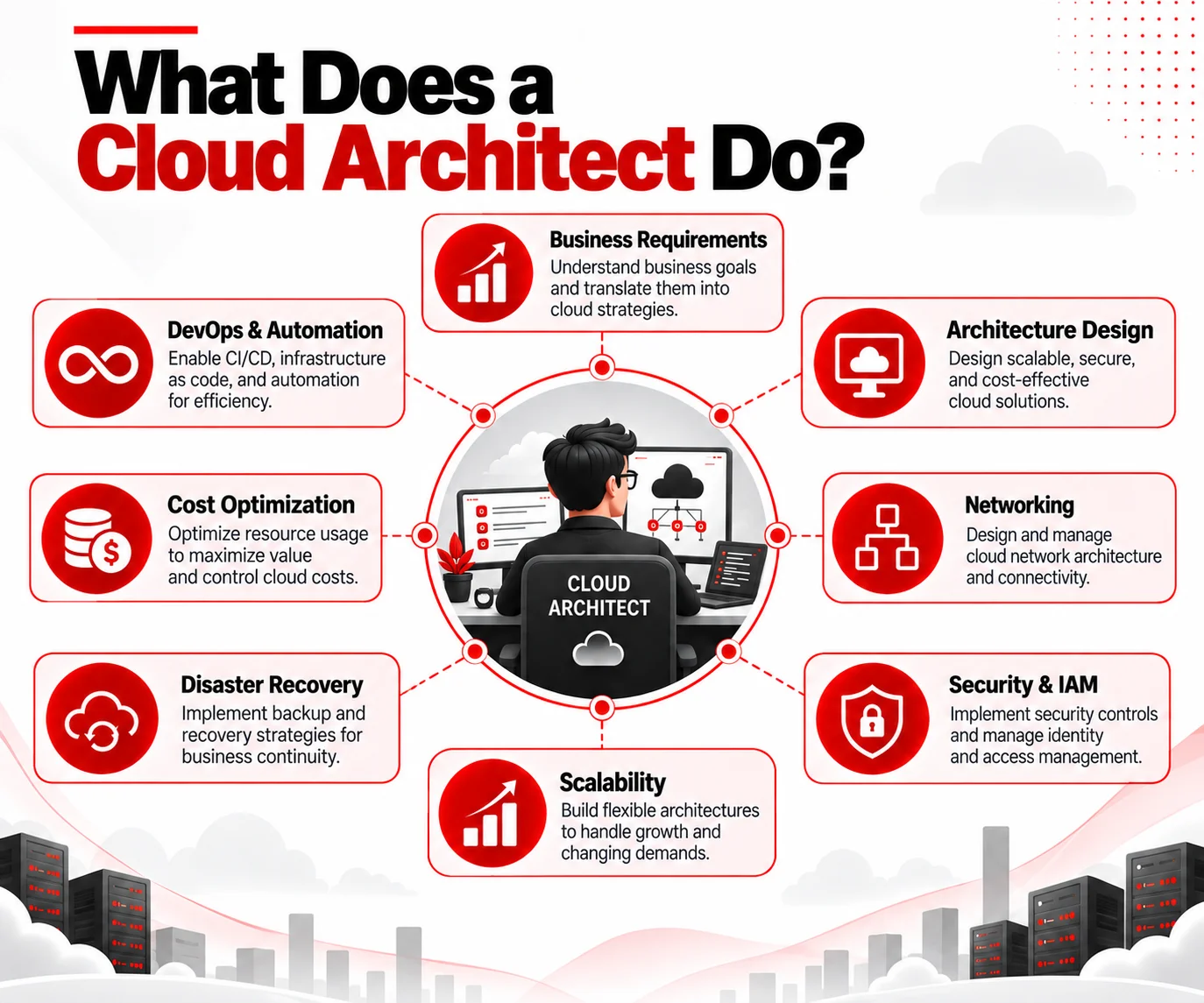
A successful Cloud Architect needs a mix of technical knowledge, problem-solving, security awareness, communication skills, and business understanding.
Explore more: Roles and Responsibilities of a Cloud Architect
Key Benefits of Cloud Architecture
A well-designed cloud architecture provides several key benefits.
1. Scalability
Cloud architectures can be designed to increase or decrease resources according to demand. Instead of permanently provisioning infrastructure for the busiest possible day, an application may scale horizontally as traffic changes.
2. Improved Reliability
Failures are unavoidable. Good architecture reduces their impact by using redundancy, automated recovery, and other measures that help applications remain available.
3. Better Security
Security can be built into the environment from the start through IAM, encryption, network controls, monitoring, secrets management, and secure configurations.
4. Cost Optimization
Cloud architecture helps businesses avoid unnecessary spending by choosing the right resources, scaling them efficiently, and monitoring usage and costs.
5. Faster Deployment
Automation, reusable designs, managed services, and Infrastructure as Code (IaC) make it faster to create environments and deploy applications.
6. Flexibility
Organizations can choose cloud services based on their performance, security, cost, and operational needs, giving them more flexibility as requirements change.
Cloud Architecture Best Practices
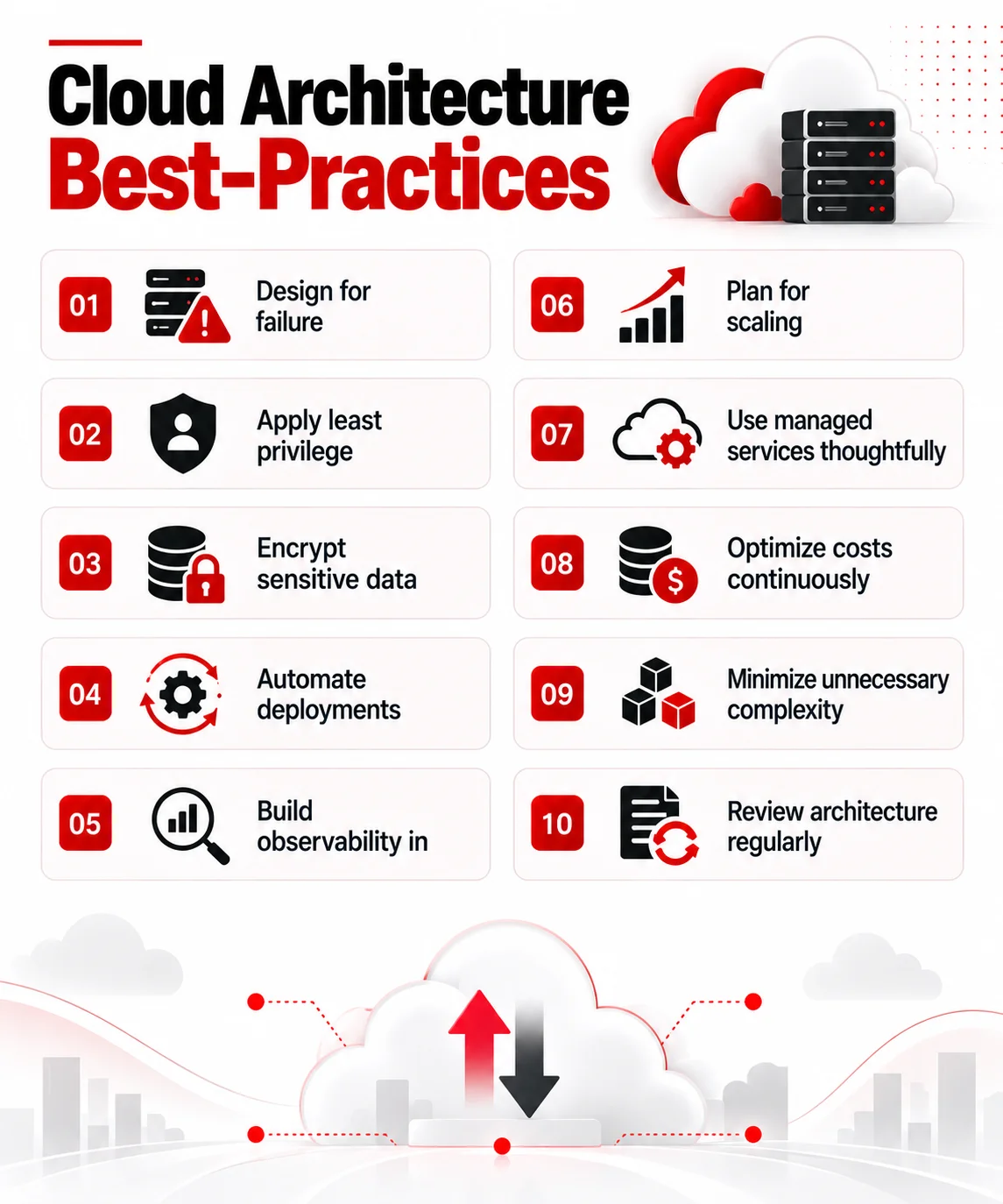
A strong architecture isn’t defined by how many cloud services it uses. In fact, unnecessary complexity often makes systems harder to operate. Major cloud architecture frameworks consistently focus on qualities such as reliability, security, performance, operations, and cost. AWS also explicitly includes sustainability in its current Well-Architected Framework.
Explore: What Are the Biggest Cloud Architecture Security Gaps in 2026?
Conclusion
Cloud architecture sits behind almost every successful cloud deployment. The individual technologies matter, but architecture is about the relationships between them: how an application receives traffic, where its data goes, who can access it, what happens during a failure, how it scales, how teams monitor it, and what it costs to operate.
That is why learning cloud architecture means going beyond memorizing individual services.
Start with the fundamentals of compute, networking, storage, databases, IAM, and security. Then learn architecture patterns, automation, resilience, observability, cost optimization, and disaster recovery. Most importantly, practice designing systems around real requirements.
Build Your Cloud Architecture Skills with InfosecTrain
Understanding cloud architecture can open the door to roles in cloud engineering, cloud security, DevOps, solutions architecture, and cloud architecture. InfosecTrain’s cloud training programs help learners build practical skills in cloud platforms, security, networking, identity, governance, and architecture.
Depending on your learning goals, you can explore:
- CompTIA Cloud+ Certification Training to build vendor-neutral skills in cloud deployment, operations, security, troubleshooting, and management.
- CCSP Cloud Security Certification Training to strengthen your knowledge of cloud security architecture, data protection, compliance, and risk management.
- AWS Solutions Architect – Associate (SAA-C03) Training to develop skills in designing secure, scalable, reliable, and cost-effective AWS solutions.
- AWS Cloud Practitioner Training to build a strong foundation in AWS Cloud concepts, services, security, and pricing.
Explore InfosecTrain’s cloud computing and cloud security training programs and start building the skills to design secure, scalable, and resilient cloud solutions.

TRAINING CALENDAR of Upcoming Batches For CISSP Training
| Start Date | End Date | Start - End Time | Batch Type | Training Mode | Batch Status | |
|---|---|---|---|---|---|---|
| 29-Sep-2026 | 20-Oct-2026 | 07:00 - 12:00 IST | Weekday | Online | [ Close ] | |
| 17-Oct-2026 | 29-Nov-2026 | 10:00 - 14:00 IST | Weekend | Online | [ Open ] | |
| 26-Oct-2026 | 01-Dec-2026 | 20:00 - 22:00 IST | Weekday | Online | [ Open ] | |
| 14-Nov-2026 | 20-Dec-2026 | 19:00 - 23:00 IST | Weekend | Online | [ Open ] | |
| 12-Dec-2026 | 24-Jan-2027 | 10:00 - 14:00 IST | Weekend | Online | [ Open ] | |
| 09-Jan-2027 | 14-Feb-2027 | 19:00 - 23:00 IST | Weekend | Online | [ Open ] | |
| 13-Feb-2027 | 21-Mar-2027 | 09:00 - 13:00 IST | Weekend | Online | [ Open ] | |
| 13-Mar-2027 | 18-Apr-2027 | 19:00 - 23:00 IST | Weekend | Online | [ Open ] |
Frequently Asked Questions
What is the difference between cloud architecture and cloud infrastructure?
Cloud infrastructure refers to resources such as servers, storage, and networks. Cloud architecture defines how those resources are designed, connected, and managed.
Is cloud architecture the same as cloud computing?
No. Cloud computing delivers IT resources and services over the cloud, while cloud architecture defines how those services work together within a solution.
What is a cloud architecture diagram?
A cloud architecture diagram is a visual representation of cloud resources, services, connections, data flows, and security boundaries within a system.
What is serverless cloud architecture?
Serverless architecture allows developers to run applications or functions using managed cloud services without directly managing the underlying servers.
What is cloud-native architecture?
Cloud-native architecture uses approaches such as microservices, containers, APIs, automation, and managed cloud services to build applications designed specifically for cloud environments.
How is cloud architecture different from traditional IT architecture?
Traditional IT often relies on fixed, organization-managed infrastructure. Cloud architecture emphasizes on-demand resources, automation, elasticity, managed services, and programmable infrastructure.
What is scalability in cloud architecture?
Scalability is the ability of a cloud system to increase or decrease resources as workload demand changes.
What is high availability in cloud architecture?
High availability means designing applications to remain accessible despite failures by using redundancy, failover, and resilient infrastructure.
How does disaster recovery fit into cloud architecture?
Disaster recovery defines how applications and data are backed up, restored, or moved to alternative resources after a major disruption.
What is the shared responsibility model in cloud architecture?
The shared responsibility model divides security responsibilities between the cloud provider and the customer, with responsibilities varying by service type.
Can cloud architecture reduce IT costs?
It can. Techniques such as autoscaling, right-sizing, managed services, and usage monitoring can reduce unnecessary spending when implemented effectively.
Which cloud platforms should a Cloud Architect learn?
Cloud Architects commonly build skills in major platforms such as AWS, Microsoft Azure, and Google Cloud, depending on their organization's or target role's requirements.