DPDPA Data Mapping: How to Identify and Map Personal Data Your Business Processes
Think about a routine customer transaction. Someone visits your website, fills out a form, provides a phone number, makes a payment, receives an invoice, contacts support a week later, and eventually appears in your marketing database. To the customer, that may feel like one interaction with one company.
Inside the business, their information may have passed through the website, CRM, payment platform, analytics tools, email system, customer-support software, cloud storage, spreadsheets, backups, and third-party service providers.
That gap between where businesses think personal data exists and where it actually exists is exactly why data mapping matters.
Under the Digital Personal Data Protection Act, 2023, and DPDPA Rules, 2025, businesses need a clear understanding of the personal data they process, why they use it, where it goes, and how long it is retained. Simply put, you can not manage or protect personal data if you don’t know where it is. Data mapping provides that visibility and creates a practical foundation for DPDPA compliance.
What Is Data Mapping Under DPDPA?
Data mapping is the process of identifying and documenting how personal data moves through an organization. It is simply understanding what personal data your business collects, why it needs it, where it goes, who can access it, and how long it stays there.
It tracks the complete data journey: Collection → Processing → Storage → Access → Sharing → Retention → Deletion
For example, a job applicant’s resume may move from a careers portal to an HR system, be accessed by recruiters, and be shared with a background-verification provider. A good data map captures this entire journey, giving businesses the visibility needed to make better privacy and DPDPA compliance decisions.
Why Does Data Mapping Matter for DPDPA Compliance?
The DPDP Act places responsibility on the Data Fiduciary for processing performed by it or on its behalf by a Data Processor. It also requires appropriate technical and organizational measures and reasonable security safeguards for protecting personal data. The Act also gives Data Principals rights over their personal data, including the ability to request information about what data is being processed, how it is being used, and which parties have received it.
It can support several areas of DPDPA readiness:
1. Creating Accurate Privacy Notices
Privacy notices should reflect how personal data is actually handled, not how teams assume it is handled. Data mapping shows what is collected, why it is used, where it goes, and whether third parties process it, helping businesses create more accurate notices.
2. Managing Consent and Processing Purposes
Every piece of personal data should have a clear purpose. Data mapping connects the data collected with the reason for processing it. If the only answer to “Why do we collect this?” is “We’ve always collected it,” it may be time to reconsider whether that data is really needed.
3. Responding to Data Principal Requests
If an individual asks about personal data being processed, the organization needs a way to locate relevant information across systems. A current data map can significantly narrow that search.
4. Managing Data Processors
Personal data often moves beyond your internal systems to cloud providers, SaaS tools, payroll services, CRM platforms, and other Data Processors. Data mapping shows which third parties handle personal data and why, making these dependencies easier to manage.
5. Supporting Data Retention and Erasure
Keeping personal data forever creates unnecessary privacy and security risks. A data map shows where data is stored and how long it is kept, helping businesses apply retention and erasure requirements more effectively.
6. Improving Breach Response
During a breach, teams need quick answers: What data was affected? Whose data was involved? Where else does it exist? An up-to-date data map provides this visibility and helps teams respond faster and more effectively.
What Personal Data Should You Look For?
One common data-mapping mistake is searching only for obvious identifiers such as names and phone numbers. Personal data can appear in many forms and business contexts. Start by looking for categories such as:
| Data Category | Examples |
| Identity information | Name, date of birth, photograph |
| Contact information | Email address, mobile number, residential address |
| Account information | User ID, customer ID, account details |
| Financial information | Billing information, transaction records |
| Employment information | Resume, employee ID, attendance, performance information |
| Technical information | Device identifiers, IP-related information, logs |
| Location-related information | Location information collected by applications or services |
| Customer interaction data | Support tickets, call records, complaints, feedback |
| Online activity | Website interactions, account activity |
| Documents | Applications, uploaded IDs, contracts, forms |
| Derived information | Profiles, scores, preferences, classifications |
How to Perform DPDPA Data Mapping Step by Step
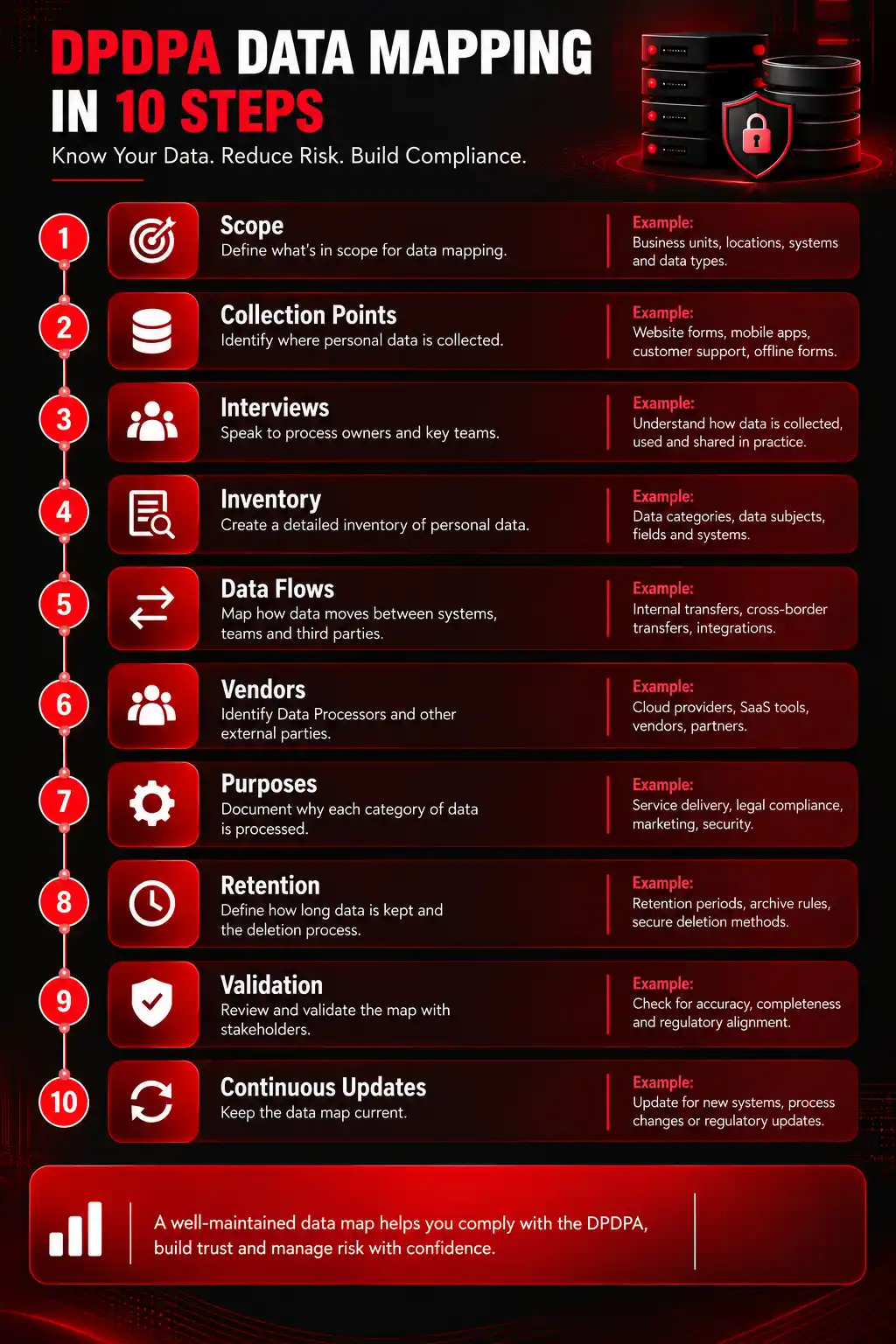
Step 1: Define the Scope
Decide what you want to map first. For a smaller organization, an enterprise-wide exercise may be manageable. For a large company, starting with individual processes is usually easier.
Good starting points include:
- Employee lifecycle
- Customer onboarding
- Recruitment
- Marketing
- E-commerce transactions
- Customer support
- Mobile applications
- Vendor management
Define which business units, systems, legal entities, and third parties fall within the exercise. Otherwise, the mapping project can expand endlessly.
Step 2: Identify Where Personal Data Enters the Business
Find where personal data enters the organization. Common collection points include website forms, mobile applications, registration pages, sales calls, emails, physical documents later digitized, APIs, customer-support interactions, recruitment portals, employee onboarding systems, CCTV or other digital systems where applicable, and information received from business partners.
Don’t forget indirect collection. Not every piece of information comes directly from the individual.
Step 3: Interview the People Who Actually Use the Data
This is one of the most valuable parts of the exercise. Speak with the people who actually handle the data. Ask what they collect, where they store it, who they share it with, and what happens when it is no longer needed.
Step 4: Build a Personal Data Inventory
Now document what you have found. At minimum, a practical inventory should capture:
| Field | What to Record |
| Business process | Recruitment, payroll, marketing, etc. |
| Data Principal category | Customer, employee, applicant, vendor contact |
| Personal data | Categories or specific fields collected |
| Source | Website, app, employee, partner, system |
| Purpose | Why the information is processed |
| System/location | Where it is stored |
| Internal access | Teams or roles that use it |
| Data Processor/vendor | External parties processing it |
| Sharing | Other relevant recipients |
| Retention | How long it remains |
| Security | Key safeguards or controls |
| Deletion | How information is erased |
| Owner | Person/team accountable for the process |
Avoid making the inventory so complicated that business teams stop maintaining it. A smaller inventory that stays current is usually more valuable than an enormous workbook last updated 18 months ago.
Step 5: Map the Data Flow
Visualize how information moves across the business.
Customer → Website → CRM → Billing System → Cloud Storage → Vendor
This helps uncover hidden transfers and duplicate copies.
Step 6: Identify Third-Party Processing
Create a list of every external organization or service that handles personal data as part of the mapped process, including cloud, SaaS, payroll, analytics, payment, recruitment, and support providers.
Then compare the vendor inventory against contracts and procurement records. If marketing lists a platform that procurement has never heard of, you may have found a governance gap.
Step 7: Map Purpose to Personal Data
For every category of information, document the purpose.
For example:
Email address → Account communication
Mobile number → OTP authentication
Delivery address → Order fulfillment
Resume → Recruitment assessment
This exercise often exposes unnecessary collection. If nobody can provide a convincing reason for collecting a particular field, ask whether the organization should collect it at all.
Step 8: Map Retention and Deletion Information
Next, find out what happens at the end of the lifecycle. Record how long data is kept and what happens afterward, including deletion, archiving, anonymization, or retention in backups.
Step 9: Validate the Map
Never assume the first version is correct. Ask process owners, IT, security, privacy teams, and relevant vendors to verify the information against actual systems and processes.
Step 10: Assign Ownership and Keep It Alive
Assign ownership and update the map whenever systems, vendors, products, integrations, or processing activities change.
Common DPDPA Data Mapping Mistakes
1. Treating It as an IT-Only Task
IT knows the systems, but business teams know why and how the data is actually used. Effective mapping needs input from both.
2. Mapping Systems, Not Data Activities
A list of CRMs, cloud platforms, and databases isn’t enough. You also need to understand what happens to personal data inside those systems.
3. Overlooking Unstructured Data
Personal data often hides in emails, spreadsheets, PDFs, shared folders, downloads, and archived files. Don’t limit your search to databases.
4. Ignoring Third-Party Vendors
If a vendor processes personal data for your business, include it in the map. Data leaving your systems doesn’t mean it leaves your responsibility.
5. Treating Data Mapping as a One-Time Exercise
Data flows change as new tools, vendors, and processes are introduced. Review and update your data map regularly to keep it useful.
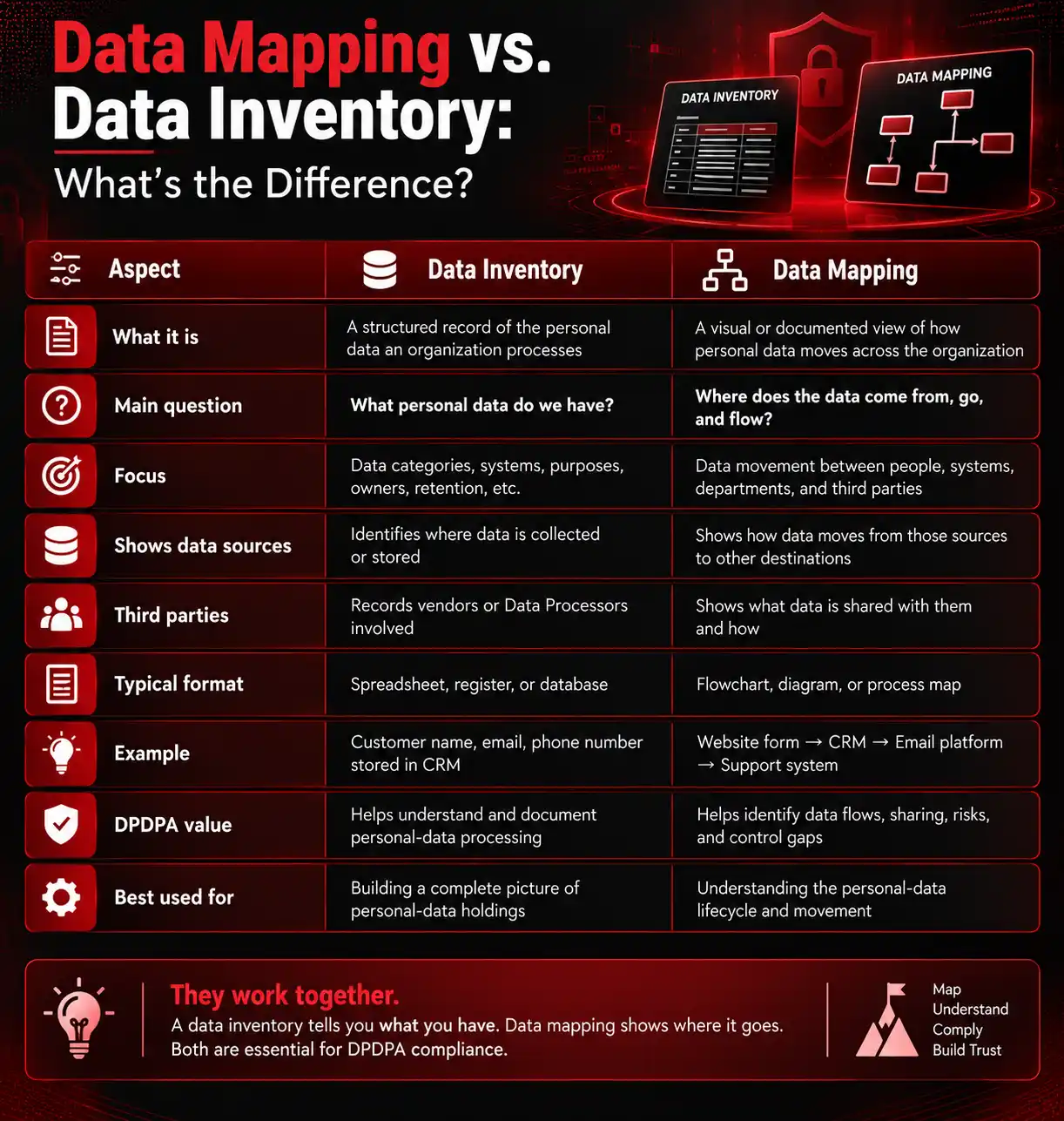
Data Mapping vs. Data Inventory
The terms are often used interchangeably, but there is a useful distinction.
A data inventory records the personal data your organization has and relevant details about its processing.
A data map shows how that information moves between people, processes, systems, and external parties.
How Data Mapping Strengthens Cybersecurity
You can’t protect data if you don’t know where it is. A clear data map gives security teams visibility into where personal data lives, who can access it, and where it is shared. It can also uncover forgotten data stores, unnecessary copies, excessive access, unapproved SaaS tools, risky third-party connections, and poor deletion practices.
It also improves incident triage. If a compromised system appears on the data map, responders can quickly understand the categories of personal data associated with it and the downstream systems or processors that may need investigation.
Conclusion
Data protection starts with knowing where your personal data is and how it is being used. In reality, data can quickly spread across systems, spreadsheets, teams, vendors, and older applications, making it difficult to track.
That’s where data mapping helps. It gives businesses a clear picture of how personal data moves from collection to deletion. For organizations working toward DPDPA readiness, this visibility makes it easier to manage consent, security, retention, Data Processors, Data Principal rights, and incident response.
A good data map isn’t just a compliance document. It’s a practical way to understand your data and protect it better.
Master DPDPA 2023 & GDPR with InfosecTrain
Knowing where personal data lives is only the beginning. Privacy professionals also need to understand why data is processed, how privacy risks are identified, how Data Principal rights are handled, and how compliance requirements translate into everyday business practices.
This is where InfosecTrain’s DPO Hands-on Training can help. The training is designed to build practical DPO capabilities around data protection, privacy governance, compliance, risk management, and real-world privacy responsibilities.
If you work in privacy, GRC, cybersecurity, legal, audit, or compliance, developing hands-on DPO skills can help you move from simply understanding regulations to applying privacy requirements in real business environments.

TRAINING CALENDAR of Upcoming Batches For DPO Training
| Start Date | End Date | Start - End Time | Batch Type | Training Mode | Batch Status | |
|---|---|---|---|---|---|---|
| 12-Oct-2026 | 27-Oct-2026 | 20:00 - 22:00 IST | Weekday | Online | [ Open ] | |
| 03-Dec-2026 | 18-Dec-2026 | 20:00 - 22:00 IST | Weekday | Online | [ Open ] | |
| 08-Feb-2027 | 23-Feb-2027 | 20:00 - 22:00 IST | Weekday | Online | [ Open ] |
Frequently Asked Questions
Does data mapping improve cybersecurity?
Yes. It helps security teams identify where personal data resides and apply appropriate protection measures.
Why is data mapping important under DPDPA?
It helps businesses understand their personal data flows and manage privacy obligations more effectively.
Is data mapping mandatory under the DPDP Act?
The Act does not specifically mandate a document called a data map, but mapping can support several compliance obligations.
What should a DPDPA data map include?
It should cover data types, sources, purposes, systems, access, third parties, retention, and deletion.
How does data mapping help during a data breach?
It helps teams quickly identify affected data, systems, individuals, and third-party processors.
Who should participate in data mapping?
Privacy, legal, IT, security, HR, marketing, finance, procurement, and relevant business teams should participate.
How do you start DPDPA data mapping?
Start by identifying where personal data enters the business, why it is collected, and where it moves afterward.
How often should a data map be updated?
Update it regularly and whenever systems, vendors, data collection, or processing activities change.
Should third-party vendors be included in data mapping?
Yes. Include vendors and Data Processors that receive or process personal data on your behalf.
What are common data mapping challenges?
Shadow IT, spreadsheets, unstructured data, unknown copies, outdated systems, and undocumented vendors are common challenges.
Can data mapping be automated?
Partly. Tools can discover and classify data, but human input is still needed to understand its purpose and business context.
How does data mapping support Data Principal rights?
It helps businesses locate relevant personal data and understand how and where it is being processed.